What Makes a Bad AI Video Prompt—and How to Fix It
Learn why AI video prompts fail when they are too vague, overloaded, or badly timed, then use a practical director's checklist to fix them.
When it comes to AI video generation, there is a massive debate: Should your prompts be short or long? Some argue that a short prompt is best because it leaves room for the AI's "imagination." Others say you should max out the word limit with as much detail as possible.
What if I told you that it’s neither? A perfect balance has to be struck, and the "one size fits all" method simply does not work universally. Let's break down why.
The Danger of the "Too Short" Prompt
When I say short, I mean a single sentence or less.
Take this for example: "The cat is walking while the moon rises."
This is way too short, even for a 4-second generation, the shortest clip Seedance 2.0 produces. It gives the AI too much freedom to do whatever it wants. Without direction, the model will often do the bare minimum, resulting in a video that looks low quality, stiff, or random.

The Power of the "Just Right" Detailed Prompt
So, what happens if we extend it? Let’s give the AI clear directions on the camera movement, the lighting, the audio, and the pacing, bringing the prompt to around 2,000 characters.
Here is the prompt we used for the second video:
Visuals: Scene 1: A wide, sweeping cinematic shot of a silhouetted black cat with luminous emerald-green eyes walking slowly along the weathered wooden edge of a high rooftop. The sky behind it is a deep, velvety indigo gradient, transitioning from twilight to night. In the far distance, the jagged silhouette of a vast city skyline glimmers with thousands of tiny, distant electric lights. The camera moves with a slow, ultra-smooth horizontal tracking motion, perfectly matching the cat's steady, rhythmic, and incredibly graceful feline gait. Soft wisps of evening fog drift lazily through the lower third of the frame, adding depth and a mysterious atmosphere to the urban landscape. Scene 2: A sudden, dramatic cut to a tight, extreme close-up of the cat's paws softly pressing down on the damp, textured wood. Tiny droplets of evening dew glisten under the subtle ambient light. The camera angle is low, right at ground level, emphasizing the silent, calculated weight of each step. As the cat lifts one paw, a gentle lens flare catches a stray light beam. The focus is incredibly sharp, capturing the individual fine hairs around the cat's claws. Scene 3: The camera slowly tilts upward and pulls back into a breathtaking vertical composition. From behind the distant, shadowed mountains on the horizon, a colossal, hyper-detailed full moon begins its slow ascent. The intense, ethereal moonlight breaks through the scattered clouds, casting long, dramatic, and sharply defined shadows from the cat across the rooftop. The fur on the cat’s back catches the silver lunar light, creating a bright, glowing rim-light effect. Scene 4: Cut to a tight close-up of the cat's face. It pauses its walk, turning its head slowly toward the camera. Its brilliant green eyes reflect the perfect, round shape of the rising moon like twin mirrors. Its long white whiskers twitch subtly in the cool night breeze. Scene 5: A spectacular, high-angle crane shot that slowly moves upward and away from the roof. The cat resumes its steady walk, moving toward the very corner of the building, completely framed within the massive, glowing circle of the fully risen moon. The scale contrast is immense, making the cat look like a tiny, mythical guardian of the night.
Audio & Dialogue:The soundscape begins with a deeply atmospheric, low-frequency ambient synth drone that evokes a sense of cosmic scale and quiet mystery. Underneath the drone, the subtle, realistic sounds of the night are present. As the moon begins to rise in Scene 3, a beautiful, minimalist orchestral score enters. A single, hauntingly elegant cello melody plays a slow, ascending minor progression. When the cat blinks in Scene 4, the music softens, leaving only a pure, resonant piano chord that lingers in the air.
See how much better that flows? It is incredibly cinematic. Now, if you don't want a cinematic look, that is fine! You can adjust the details to fit a casual vlog style, an anime style, etc. The point is that you are in control.
The Overload Problem: Too Much Detail + Timestamps
Now, let's talk about the other extreme. Another major issue arises when you try to force timestamps alongside massive walls of descriptive text.
If you cram too much action, complex dialogue, and micro-managing timestamps into a single prompt, you cause an "information overload." The model simply cannot process that much shifting data within a strict 15-second generation cap on Seedance 2.0.
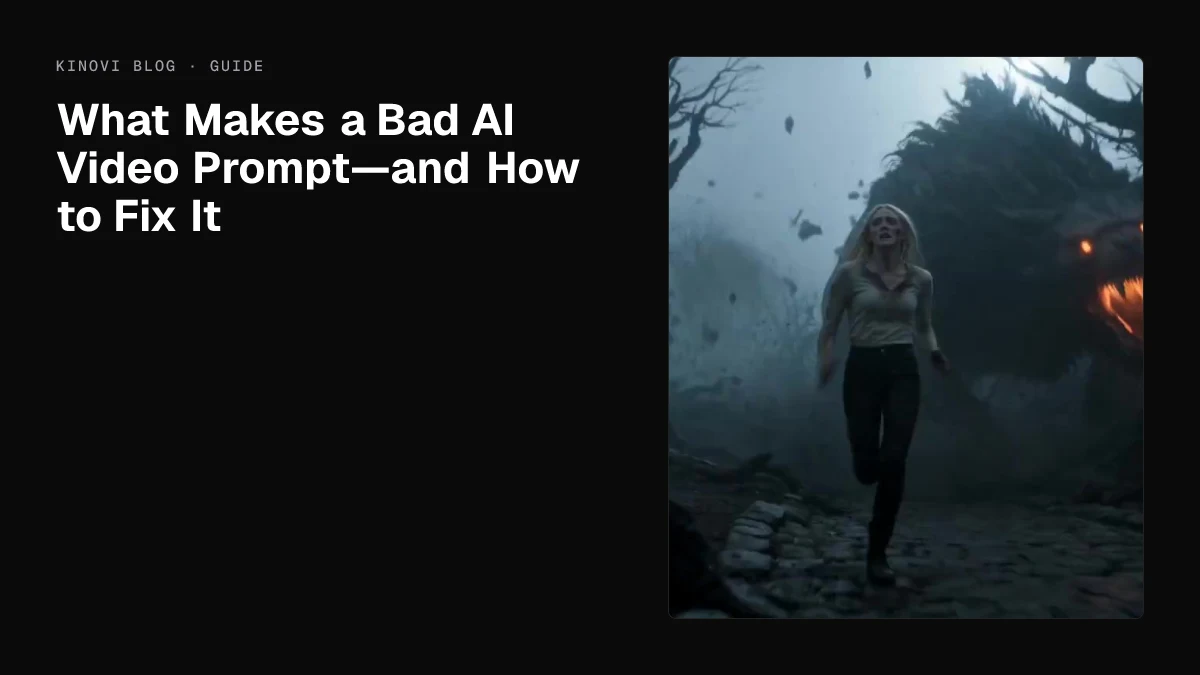
Let's look at this extremely dense prompt featuring a woman running from a giant demon dog, broken into strict 5-second intervals:
The blonde woman is a fragile, desperate figure, sprinting wildly over sharp, broken cobblestones and twisted roots, fleeing through a desolate, decaying, fog-drenched gothic landscape. She is being hunted relentlessly by an unfathomably vicious 10-foot demon dog, a hulking, unstoppable mass of scarred, obsidian-black muscle, bristling fur, and infernal energy. The horrifying scale is constantly emphasized by the beast’s massive, boulder-sized paws that shatter the frozen ground and splinter ancient fallen trees with terrifying ease. Its jagged, molten-glowing jaws are large enough to snap a carriage in half, towering menacingly over her delicate, exhausted human frame as it gains ground.
The blonde woman is the primary focus for human desperation, her face caked in mud, blood, and sweat. Reference @Audio1 for her breathless, terrified voice, intercut with the deafening, bone-rattling guttural roars of the abyssal hound.
00:00-00:05 - The blonde woman sprints frantically into frame. Fast-paced, kinetic handheld tracking shot, staying incredibly tight on her desperate movements as she weaves through a dead, jagged forest. Behind her, out of the thick, oppressive mist, the 10-foot demon dog explodes through the dense treeline, instantly turning massive, centuries-old oaks into flying splinters. The beast snarls, its breathing sounding like a roaring furnace, thick, viscous saliva slinging from its monstrous, razor-filled maw. The ground violently shakes with every thundering, galloping impact of the creature, kicking up massive chunks of dark earth and debris in its wake.
00:05-00:10 - Cut to a tight, high-speed frontal tracking shot of the blonde woman’s face, isolating her in the frame. Pure, unadulterated terror is etched into every muscle of her features; her chest heaves violently, her blonde hair matted to her skin with sweat and freezing rain. She risks a panicked, agonizing glance over her shoulder, witnessing the molten-eyed monstrosity lunging dangerously close, the extreme heat of its breath visibly distorting the freezing air just inches behind her. Her voice cracks with absolute desperation, breathless, weeping, and shattered, as she screams out: "No! Please, God, somebody help me! Get back! Leave me alone!" Her tone is completely stripped of hope, raw, horrified, and driven purely by primal survival instinct.
00:10-00:15 - Most of the camera shots suddenly drop to extremely low, ground-level Dutch angles, focusing entirely on the sheer, unstoppable momentum and devastating power of the demon dog’s thundering, muscular legs. The beast’s gargantuan, heavily clawed paws rip deep, violent trenches into the muddy earth with every terrifying stride. A suffocating sense of nightmare-inducing dread dominates the atmosphere as the monster ruthlessly bounds over shattered stone ruins and decaying terrain. The final shots should capture the immense, inescapable weight and velocity of the creature's final bounding leap toward the camera, its colossal, horrific shadow completely swallowing the stumbling blonde woman in utter darkness.
Keep consistent size references: the demon dog's shoulder height is a towering 10 feet, its massive, hulking bulk easily dwarfing the blonde woman. The dog's crushing paws are the size of large boulders, and its jaws are wide enough to easily engulf a human torso.
Ridley Scott and Guillermo del Toro inspired cinematography. High-contrast chiaroscuro lighting, deep, suffocating shadows, and cold, desaturated colors. 6500K color temperature for the piercing, eerie moonlight slicing through the canopy, sharply juxtaposed by the aggressive 2000K hellish, fiery glow radiating from the hound's eyes and throat. Heavy, rolling ground fog, cinematic survival-horror realism, visceral kinetic camera shake, and a constant, pulse-pounding feeling of inescapable terror from every angle. Big-budget dark fantasy monster-movie tone with grim, hyper-realistic detail.
Audio & Dialogue:
The blonde woman's breathless, terrified voice, intercut with the deafening, bone-rattling guttural roars of the abyssal hound. The beast snarls, its breathing sounding like a roaring furnace, thick, viscous saliva slinging from its monstrous, razor-filled maw. The blonde woman's voice cracks with absolute desperation, breathless, weeping, and shattered, as she screams out: "No! Please, God, somebody help me! Get back! Leave me alone!" Her tone is completely stripped of hope, raw, horrified, and driven purely by primal survival instinct.
The Result: As you can see in the generation, when the AI is overloaded, hallucinations happen. Sometimes the physics break, the scale gets warped, or dialogue gets skipped entirely (though it luckily didn't happen in this specific demo).
I am not telling you that you can never use timestamps. You can! However, when you treat timestamps like their own individual scenes within a single prompt, you vastly increase the chance of visual hallucinations and audio errors.
The Character Cap Trap & The 10-Second Rule
Many creators see the maximum character limit for prompts and think, "I need to use every single word to get my money's worth." Actually, maxing out your character cap is highly discouraged. More words do not automatically equal a better video; in fact, feeding the AI a massive wall of text is the fastest way to cause errors. When you overload the prompt, the model has to desperately juggle too many instructions at once, leading to ignored commands, warped physics, and visual hallucinations.
This issue becomes severely magnified based on your generation length.
The 10-Second Threshold:
While Seedance 2.0 gives you the ability to generate up to 15 seconds (Seedance 2.5 goes up to 30), pushing past the 10-second mark inherently increases the tendency for errors.
-
Generations under 10 seconds are tight, controlled, and highly accurate to your prompt. It can handle heavy action scenes much better this way.
-
Generations over 10 seconds require the AI to sustain complex physics, lighting, and character consistency for a much longer period. I recommend using over 10 seconds if the scene is basic. Reminder, only a recommendation, you could still make 15 seconds work, but a higher chance of errors will occur.
If you combine a maxed-out, over-detailed prompt with a 15-second generation request, you are almost guaranteeing a high risk that the video will break down, lose temporal consistency, or ignore your dialogue entirely by the end of the clip.
The Takeaway: Keep your prompts focused on the essential details of the immediate scene, and if you want heavy, complex action, keep the generation under 10 seconds!
The Director's Solution
My best advice for handling complex, multi-shot scenes? Make each timestamp its own individual video generation, and then stitch them together or use video reference to extend the video with the simple prompt of "Continue film after @Video1 . (Then add your own details here) "
For reusable production patterns, see 24 Seedance 2.5 prompt examples.
A final prompt check
Before submitting, confirm that the prompt has one clear subject, one primary action, a readable camera instruction, a realistic duration, explicit preservation rules for references, and a usable final frame. Split a complex multi-shot idea into separate tasks rather than forcing every scene into one generation.
Sources checked
Last checked: September 24, 2026.
Related articles
More to try
Related models
ByteDance · video model
Seedance 2.0
Next-generation AI video model by ByteDance. Combines Fast and Pro modes for high-quality video generation.
$0.0707/s
Alibaba · video model
HappyHorse 1.0
HappyHorse 1.0 is Alibaba's high-quality video generation model on Kinovi, supporting text-to-video, image-to-video, reference-image video, and video editing modes.
$0.0801/s
OpenAI · image model
GPT Image 2
Advanced AI image generation and editing by OpenAI. GPT Image 2 excels at photorealism, text rendering, complex compositions, and precise instruction following.
$0.0100/image