Kie API Alternative (2026): Pricing vs Kinovi & Migration Guide
A model-by-model look at the Kie API and Kinovi, with per-second video and per-image unit prices, reference-video billing rules, monthly cost scenarios, and a migration path that keeps your existing jobs running.
In this guide It starts with when Kinovi is worth trying and when you should stay on Kie. Then it explains how the Kie API bills, which conditions you have to align when you compare, and a model-by-model alignment of video and image prices for the overlapping models already checked. For reference videos it spells out how each model counts billed seconds, and Seedance 2.5 full jobs are calculated as 5 seconds of output plus 5 seconds of reference. Monthly costs include only specs whose rules are clear, estimated at published prices. After that come a migration example, refunds and rate limits, and the cases where you do not need to migrate.
Start with the conclusion
If your main volume is on Seedance 2.5, 2.5 Flash, or Seedance 2.0 standard / Fast, Kinovi’s current tables are lower when you calculate at the same resolution, duration, and reference-video rules, and that product line is worth trying. For Seedance 2.0 Mini, MiniMax H3, and high volumes of Nano Banana 2 stills at 2K and 4K, Kie is cheaper at the same specs. You do not have to treat the more expensive side as the default just because you are “looking for an alternative.”
Neither side is lower across the whole catalog. At the current tables on each model page: Seedance 2.5, 2.5 Flash, and 2.0 standard / Fast are lower on Kinovi at the same specs; 2.0 Mini, MiniMax H3, Nano Banana 2 at 2K/4K, and Wan 3.0 and Wan 3.0 Prime are lower on Kie at the same specs. HappyHorse 1.0 is lower on Kinovi at the same specs. Seedream 5.5’s plain text-to-image current tables are the same on both sides, but image-to-image, layer decompose, and edit jobs cannot use the text-to-image per-image price as the full job. Seedream 5.0 Pro plain text-to-image is lower on Kie per image. Nano Banana Pro is lower on Kinovi at 1K and 2K, and the same at 4K. Kling 4.0 is lower on Kinovi at the current 720p and 1080p tables; Kie also has 4K and HDR tiers, plus Kling 4.0 Flash, which was confirmed only in the Kie catalog this time. Grok Imagine Video 1.5 is a preview page quote on both sides; at the same resolution, with no reference and with audio, the page figures are lower on Kie, but that is not a verified amount actually paid, and it is not written into the price-focus summary above. The “from” price on the Kie pricing page is usually the cheapest tier for that model (often a lower resolution, with a reference video), and cannot be used to budget a 720p no-reference job.
Credits do not expire on either side. Failed jobs are not charged on Kie, and on Kinovi the hold is refunded, so this is not a reason unique to one side. The request pattern is also close: submit a job, then query the result. Whether to migrate should turn on the models you actually use, the unit prices, and the billed seconds—not on which interface looks more “up to date.”
| Dimension | Kie | Kinovi |
|---|---|---|
| Price focus (at current tables) | Seedance 2.0 Mini, MiniMax H3, Nano Banana 2 at 2K/4K, Wan 3.0 and Wan 3.0 Prime, and Seedream 5.0 Pro plain text-to-image are lower at the same specs | Seedance 2.5, 2.5 Flash, 2.0 standard / Fast, and HappyHorse 1.0 are lower at the same specs; Nano Banana Pro is lower at 1K/2K; Kling 4.0 is lower at 720p/1080p |
| Credits | 1 credit = $0.005; they do not expire; no subscription; failed jobs are not charged; large top-ups may include a bonus, so comparisons use published prices | USD figures on the model pages are authoritative; they do not expire; failed jobs refund the hold |
| Request pattern | POST /api/v1/jobs/createTask, then GET .../recordInfo; put parameters in input | Same route names; put parameters in inputs; the model IDs differ |
| Rate limits | Default: at most 20 new submits every 10 seconds | By account concurrency tier; new accounts get 3 slots |
| File retention | Outputs are kept for 14 days; uploads are deleted after 24 hours | Follow the official docs as of that day |
What the Kie API actually is
Kie is a platform for calling video, image, music, and chat models from multiple vendors through one API. Switching models is usually a change to the model parameter. The marketplace and pricing overview are at kie.ai/market and kie.ai/pricing.
Billing is prepaid credits, pay-as-you-go, with no subscription. The official conversion is stated plainly: 1 credit = $0.005, so 200 credits equal 1 US dollar. Large top-ups sometimes include bonus credits; the pricing page states, for example, a 10% bonus on the $1,250 tier. Bonuses make the effective unit price lower than the published price, but not every account can be calculated at that discount, so the tables below all use published prices. Credits do not expire; failed jobs are not charged. New accounts can receive 80 free credits, or about $0.40 at that conversion.
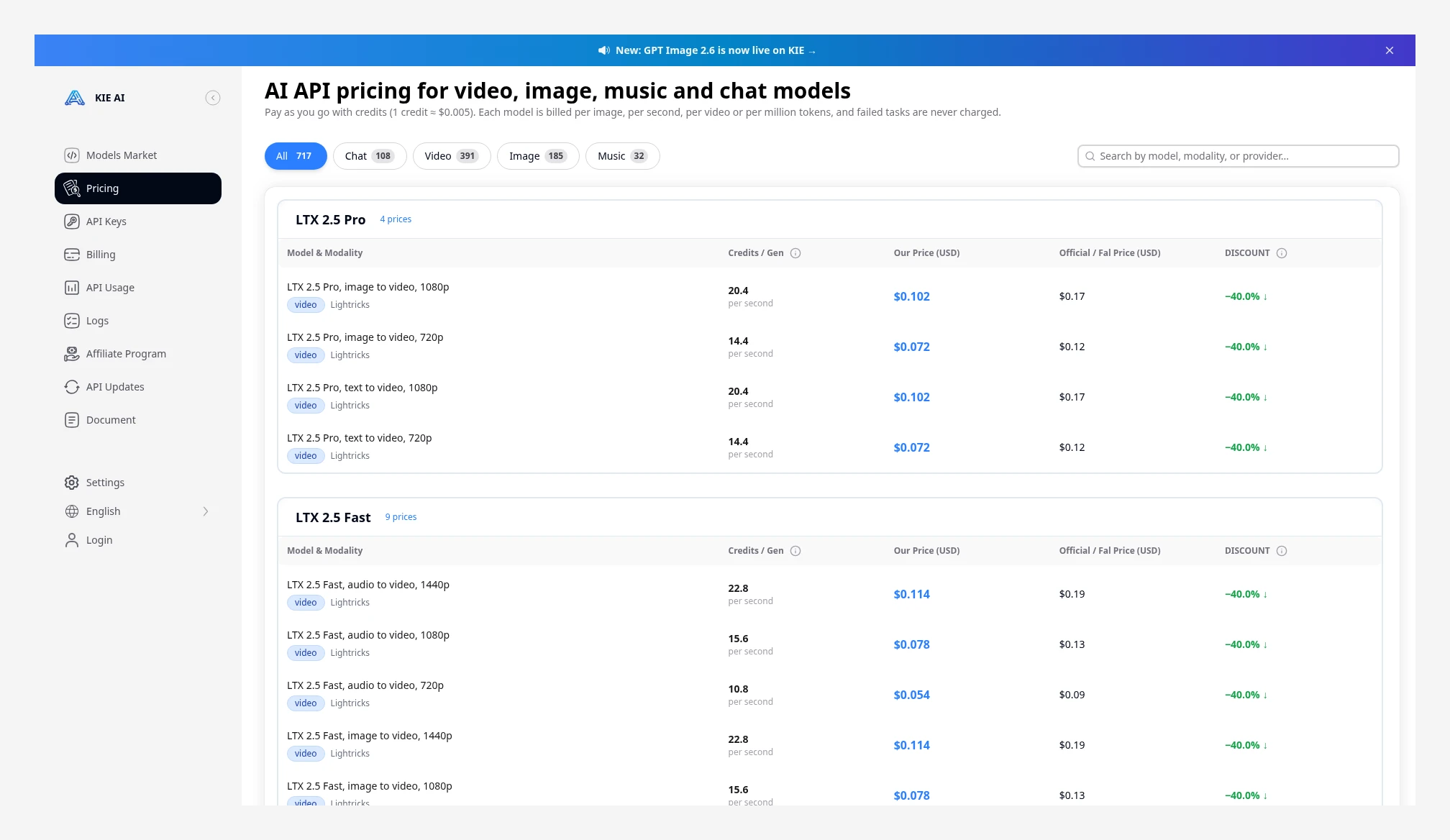 The Kie pricing page states that 1 credit = $0.005 and that failed jobs are not charged. Source: https://kie.ai/pricing
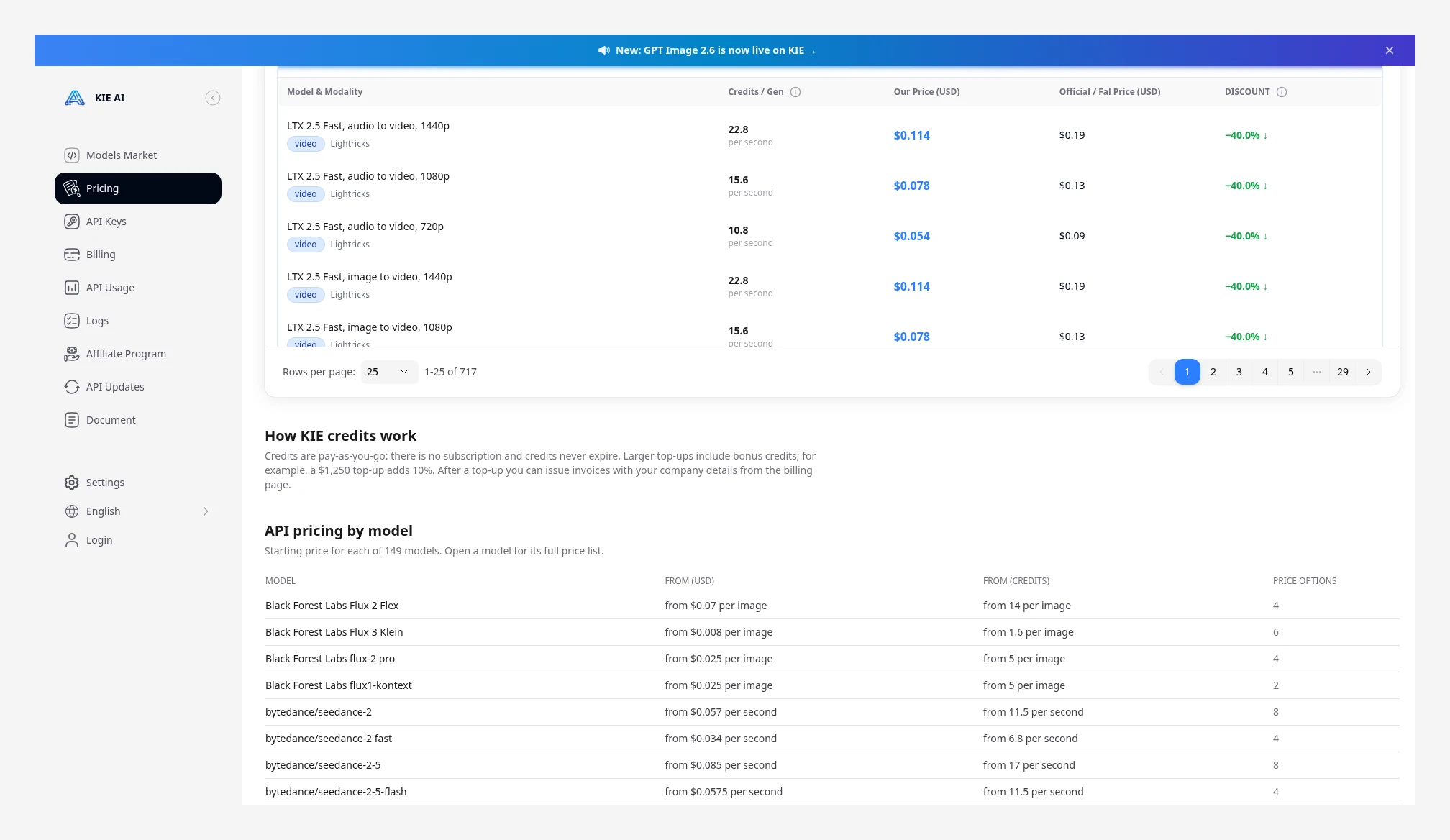 The same page states that credits are pay-as-you-go, with no subscription, and do not expire; large top-ups may include a bonus. Starting prices below are each model’s lowest tier, for example Seedance 2.5 from $0.085/s. Source: https://kie.ai/pricing
Image, video, and music jobs are asynchronous. You first call POST https://api.kie.ai/api/v1/jobs/createTask; success only means the job was created, and the data.taskId in the response is what you use for later queries. Then poll GET https://api.kie.ai/api/v1/jobs/recordInfo?taskId=, or pass callBackUrl. Job states include waiting, queuing, generating, success, and fail. Chat models return synchronously. Auth is Authorization: Bearer <API_KEY> at creation time. The key lives at kie.ai/api-key. Many /api/v1/* endpoints still return HTTP 200 even on failure, so you need to read the code.
You can check the balance at GET https://api.kie.ai/api/v1/chat/credit. Uploading a file itself is free. The upload host in the official docs is https://kieai.redpandaai.co, which is not the same domain as api.kie.ai is not the same domain; uploaded files are deleted after 24 hours. Generated media is kept for 14 days, and logs for 2 months. The default rate limit is at most 20 new jobs every 10 seconds; over that you get a 429, and rejected requests do not enter the queue. The docs also note that this limit usually still allows 100 or more jobs to be running at once, so do not conflate “submit rate” with “jobs currently running.”
Why teams look for a Kie API alternative
The usual starting point is not “Kie does not work,” but that the public price for the same production line is different at another provider. On a high-volume model such as Seedance 2.5, a unit-price gap of a few hundredths of a dollar becomes visible once you multiply by a few hundred jobs a month. Conversely, H3 or Nano Banana 2 may also be cheaper on Kie, so the point of a comparison is to look at your own mix, not to assume you must switch platforms.
Next are the billing details. Kie’s pricing overview often uses “from $X/s” as an index, and that figure is often the lowest tier, not the 720p no-reference unit price in your budget. When a reference video is involved, models also count billed seconds differently: some add the reference duration, and some only switch to another unit-price tier. If you look at the unit price and ignore billed seconds, the bill will not match.
Then come usage constraints. Outputs are kept for 14 days; if the business needs them longer, you have to store them yourself. Rate limits are calculated on the rate of new submits, which is a different policy from platforms that assign concurrency slots by account. These can all be reasons to compare, but credits that do not expire and failed jobs that are not charged are also offered by Kinovi, and need not be treated as decisive differences for leaving Kie.
Align these points before you compare
Align the job conditions before you compare prices, or the numbers will not mean much. The four items below are where it is easiest to go wrong.
- Use the same version, the same resolution, and the same duration, and match the input type and add-ons too. Flash, Mini, Prime, Max, and Turbo are all separate models and cannot be mixed into one row with the standard tier. If text-to-video, image-to-video, reference-video, edit, and extend are different entry points, calculate each under its own rule; do not take an image-to-video price and use it for a text-to-video budget. Billing units have to match too: some are per second, some per image, per request, or per token, and different units cannot be compared as unit prices directly. Whether audio is included by default, and add-ons such as HDR or extra reference images, all have to be counted into the same job. Do not take a 480p starting price and use it for a 720p budget.
- When a reference video is involved, first see how this side counts billed seconds, then multiply by the unit price. Some platforms add reference duration and output duration together, then multiply by the reference-tier unit price; others only switch to another unit-price tier and still bill on the output duration you chose. Kling also has its own rule: when total input duration does not exceed output, it bills twice the output duration. So with a reference, what you look at is “reference-tier unit price × the billed seconds that platform specifies,” not the no-reference unit price times output duration. When the two sides count billed seconds differently, compare only the full job, or only the same no-reference job. Do not treat “input plus output” and “output only” as the same condition.
- Compare in US dollars, not by credit counts. Kie uses 1 credit = $0.005 conversion, and model pages usually list both credits and US dollars. Kinovi takes the USD column on each model-page table as authoritative. The two credit systems are not worth the same amount, so “10 credits versus 10 credits” is meaningless. At a few tiers, credits × 0.005 can differ from the page’s USD figure by a rounding increment; when you compare, use the USD figure published on the page.
- The main tables use published prices only. Large top-up bonuses (for example a 10% bonus on one Kie tier) make the amount actually paid lower, but not every account can be calculated at that discount, so they are not folded into a “definitely cheaper” conclusion. The figures in the tables are the current tables on the model pages, used to align cost under the same conditions.
Model-by-model pricing
The tables below include specs that can be matched on both sides’ official model pages, and whose billing rules are clear. Unit prices are taken from that page’s current table. Percentages are always Kinovi vs Kie: (Kinovi − Kie) ÷ Kie. “Lower” means Kinovi is cheaper at that tier; “higher” means Kinovi is more expensive. The USD figures in the tables link through to the corresponding model pages. If image-to-video and text-to-video tables are the same for a given model, the body keeps only one representative figure; edit, reference, or one-sided entry points get their own figures when the rules differ. Items whose billing units or sub-models do not line up are shown as official quotes side by side, not as a percentage in the same row. These figures are page list prices, not bills from paid test runs.
Video models at a glance (no reference, per second)
Unit: USD / second. With no reference, both sides bill on output duration, so this table can compare unit prices directly.
Kie’s Kling 4.0 table also has 4K, separate no-reference and with-reference tiers, and an HDR surcharge; Kinovi’s current table on that page lists 720p and 1080p text-to-video unit prices, so the 4K tier is not compared for now. Flash, Fast, and Mini are listed only at the resolutions actually written on each page; higher tiers that are not listed are not forced into alignment. For no-reference image-to-video, if the official rule is also output duration only, at the same unit price as text-to-video, you can read this table directly; with a reference video, or for edit and extend, use each side’s billed-seconds formula, in the sections that follow.
Image models at a glance
Unit: USD / image.
| Model | Specs | Kie (USD/image) | Kinovi (USD/image) | Kinovi vs Kie |
|---|---|---|---|---|
| Nano Banana 2 | 2K | $0.0600 | $0.0707 | 17.8% higher |
| Nano Banana 2 | 4K | $0.0900 | $0.1178 | 30.9% higher |
| Nano Banana Pro | 1K | $0.0900 | $0.0670 | 25.6% lower |
| Nano Banana Pro | 2K | $0.0900 | $0.0670 | 25.6% lower |
| Nano Banana Pro | 4K | $0.1200 | $0.1200 | Same |
| Seedream 5.5 | 1K / 1.5K | $0.0180 | $0.0180 | Same |
| Seedream 5.5 | 2K | $0.0315 | $0.0315 | Same |
| Seedream 5.0 Pro | 1K | $0.0350 | $0.0527 | 50.6% higher |
| Seedream 5.0 Pro | 2K | $0.0700 | $0.0904 | 29.1% higher |
Kie’s Nano Banana 2 also has a 1K $0.04; Kinovi’s page currently lists only 2K and 4K, so 1K is not compared for now. Which side is lower is not the same for Nano Banana 2 and Pro: if stills are mainly Nano Banana 2, Kie is cheaper; if they are mainly Pro at 1K/2K, Kinovi is cheaper. These two Seedream 5.5 rows are plain text-to-image per image only, and the two sides are the same; image-to-image, layer decompose, and edit have additional billing, so you cannot treat $0.0180 / $0.0315 as the full job, as discussed later. The Seedream 5.0 Pro row is also plain text-to-image per image; when Kie runs image-to-image, the first input image is free, and each one after that is $0.0025, and the Kinovi page states that reference images add no surcharge, so jobs with references have to be calculated separately. GPT Image 2 and 2.5 differ in tiers or billing units and are not written into this “flat per-image” summary table; see the later section.
Seedance: keep the unit price and billed seconds separate
The Seedance 2.5 rules are the same on both sides. With no reference video, billing is “no-reference unit price × output duration”; with a reference video, a lower reference unit price is used, but billed seconds become reference duration + output duration. Reference images and reference audio do not add billed seconds. Kie’s docs also state that when duration is set to -1, billing follows the duration actually generated.
Kinovi’s 2.5 table also spells out when the charge is taken: at submit time it first holds credits for the output duration, and after success it adds the reference-video duration (up to 30 seconds) at the reference-tier unit price, so the final charge can be higher than the estimate at submit time. The 5 seconds plus 5 seconds below is the complete billing after success, not the estimate at the moment of submit.
So the 720p reference-tier unit price looks lower (Kie $0.190 /s, Kinovi $0.1612 /s), but 5 seconds of output plus a 5-second reference has to be multiplied as 10 seconds times the reference-tier unit price. The full job will cost more than “just 5 seconds, with no reference.”
| Scenario | Formula | Kie | Kinovi | Kinovi vs Kie |
|---|---|---|---|---|
| 5 seconds at 720p, no reference | 5 × the no-reference unit price | $1.5750 | $1.3585 | 13.7% lower |
| 5 seconds at 480p, no reference | 5 × the no-reference unit price | $0.7000 | $0.5985 | 14.5% lower |
| 5 seconds at 1080p, no reference | 5 × the no-reference unit price | $3.9500 | $3.3020 | 16.4% lower |
| 5 seconds at 4K, no reference | 5 × the no-reference unit price | $6.2750 | $5.4820 | 12.6% lower |
| 5 seconds of output + a 5-second reference, 720p | 10 × the reference-tier unit price | $1.9000 | $1.6120 | 15.2% lower |
| 5 seconds of output + a 5-second reference, 1080p | 10 × the reference-tier unit price | $4.7500 | $3.9470 | 16.9% lower |
Kie’s 2.5 reference-tier unit prices are: 480p $0.085, 720p $0.190, 1080p $0.475, 4K $0.775. Kinovi’s counterparts are $0.0737, $0.1612, $0.3947, and $0.6720. The Seedance 2.5 “from $0.085/s” on the pricing page refers to the 480p with-reference-video tier, not the 720p no-reference price. The page also notes that prices are currently in beta and may change later; high-value top-up bonuses are not folded into the table above.
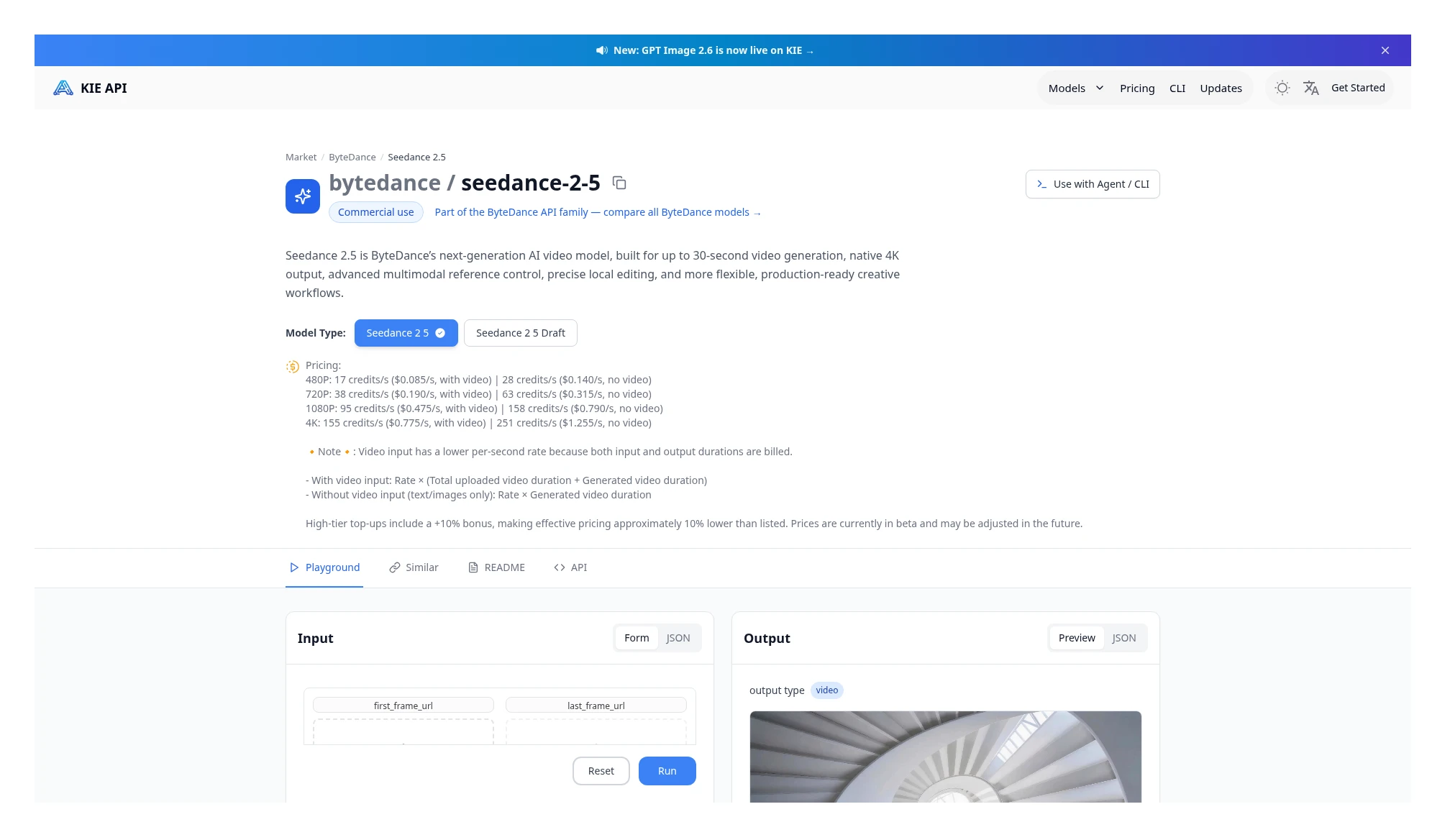 Kie Seedance 2.5 price card: no-reference $0.140 / $0.315 / $0.790 / $1.255, with reference $0.085 / $0.190 / $0.475 / $0.775; with a reference, billing is input plus output. Source: https://kie.ai/seedance-2-5
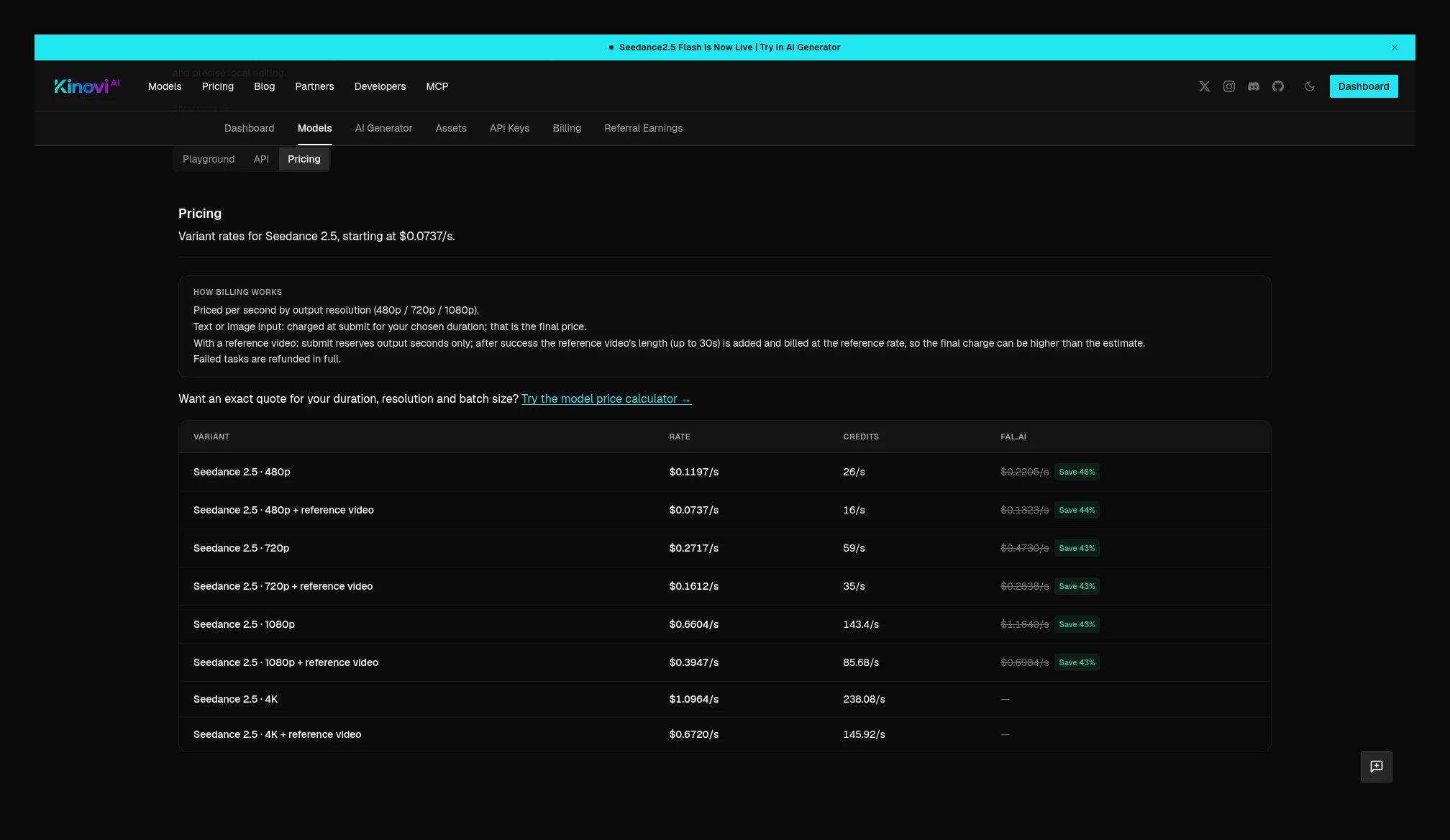 Kinovi Seedance 2.5’s eight unit-price tiers, plus the note that with a reference video billing is input plus output. Source: https://kinovi.ai/models/seedance2-5#pricing
Seedance 2.0 needs extra care. Kie’s standard tier (you have to select Seedance 2 on the page, and not stay on Fast) has no-reference unit prices of 480p $0.095, 720p $0.205, 1080p $0.51, and 4K $1.04; with-reference unit prices are $0.0575, $0.125, $0.31, and $0.64. With a reference, billing is still unit price × (input + output).
Kinovi’s 2.0 standard no-reference prices are $0.0707 / $0.1884 / $0.4239 / $0.9420, and with-reference prices are $0.0895 / $0.2261 / $0.5087 / $1.1305. That page’s FAQ states: with a reference video, it only switches to the reference-tier unit price, still billed on the output duration you chose, and does not add the reference seconds. So for the same 5 seconds of output plus a 5-second reference, the two sides count billed seconds differently, and you cannot compare them with the same “multiply by 10 seconds.”
Under each side’s official rule, the 720p estimate for this job is: Kie 10 × $0.125 = $1.250, Kinovi 5 × $0.2261 = $1.1305. At 480p it is Kie 10 × $0.0575 = $0.575, Kinovi 5 × $0.0895 = $0.4475. This is a full-job estimate for the same task under different billed-seconds methods, not a unit-price comparison at the same number of seconds, so it is not written into the “same-formula” percentage table above.
No-reference 2.0 unit prices can be compared at the same number of seconds; see the summary table. The no-reference prices already checked for Kie Fast are 480p $0.059/s and 720p $0.124/s, and with reference $0.034 / $0.075; Mini no-reference is $0.019 / $0.041, and with reference $0.012 / $0.025. Until a definitive comparison is finished on the corresponding Kinovi pages in this round, Fast / Mini are not written in as cheaper or more expensive.
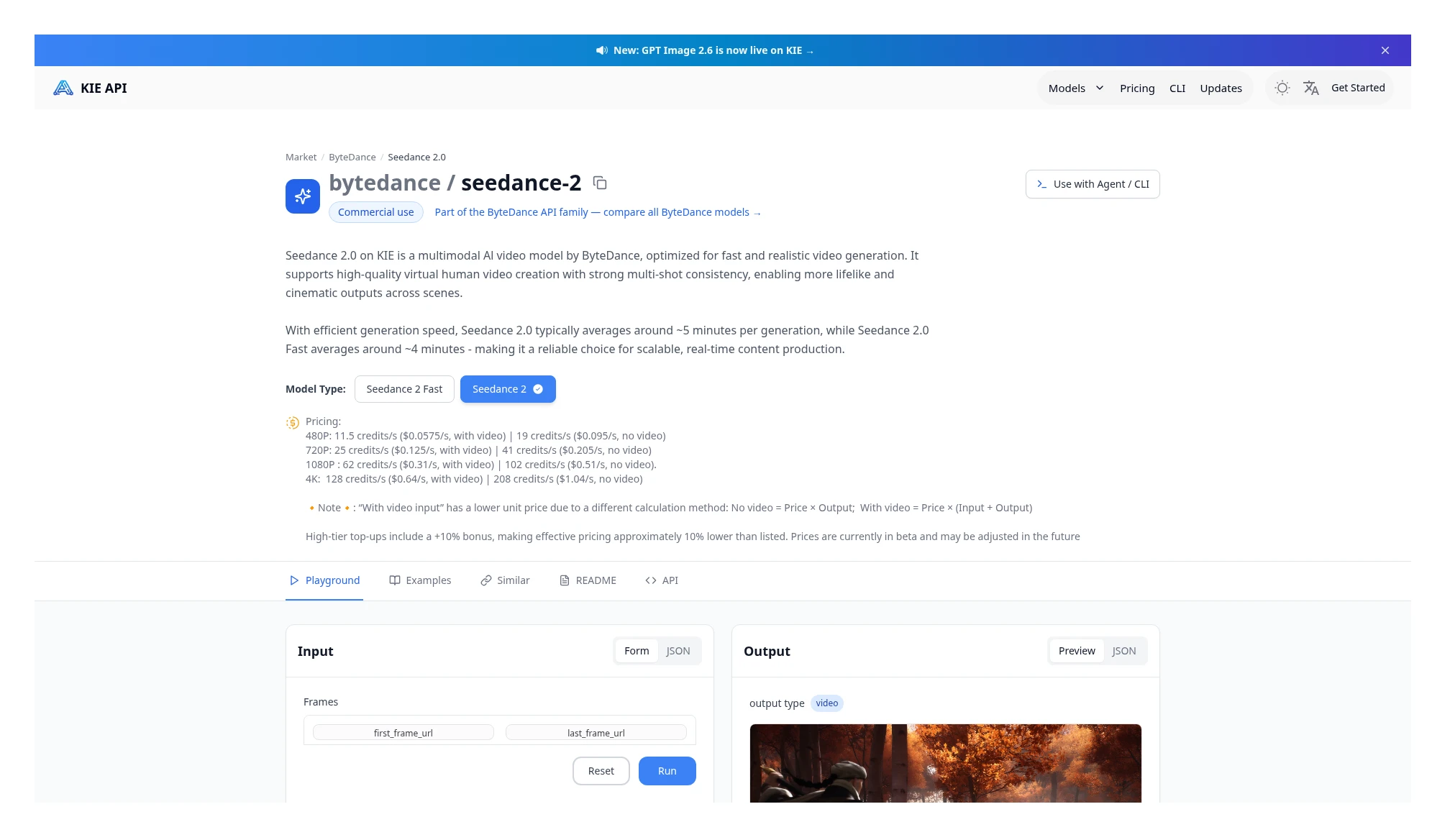 Kie Seedance 2.0 standard price card (Seedance 2 selected on the page): no-reference $0.095 / $0.205 / $0.51 / $1.04, with reference $0.0575 / $0.125 / $0.31 / $0.64; with a reference, billing is input plus output. Source: https://kie.ai/seedance-2-0?model=bytedance%2Fseedance-2
Seedance 2.5 Flash, and 2.0 Fast / Mini
Seedance 2.5 Flash counts billed seconds the same way as 2.5: no reference on output duration, and with a reference, (reference duration + output duration) times the reference-tier unit price. No-reference 480p is $0.0925 vs $0.0671, 27.5% lower; at 720p it is $0.2050 vs $0.1506, 26.5% lower. A 5-second 720p job with no reference: Kie $1.025, Kinovi $0.753. For 5 seconds of output plus a 5-second reference at 720p: Kie 10 × $0.1275 = $1.275, Kinovi 10 × $0.0917 = $0.917, 28.1% lower. Both sides list only 480p and 720p.
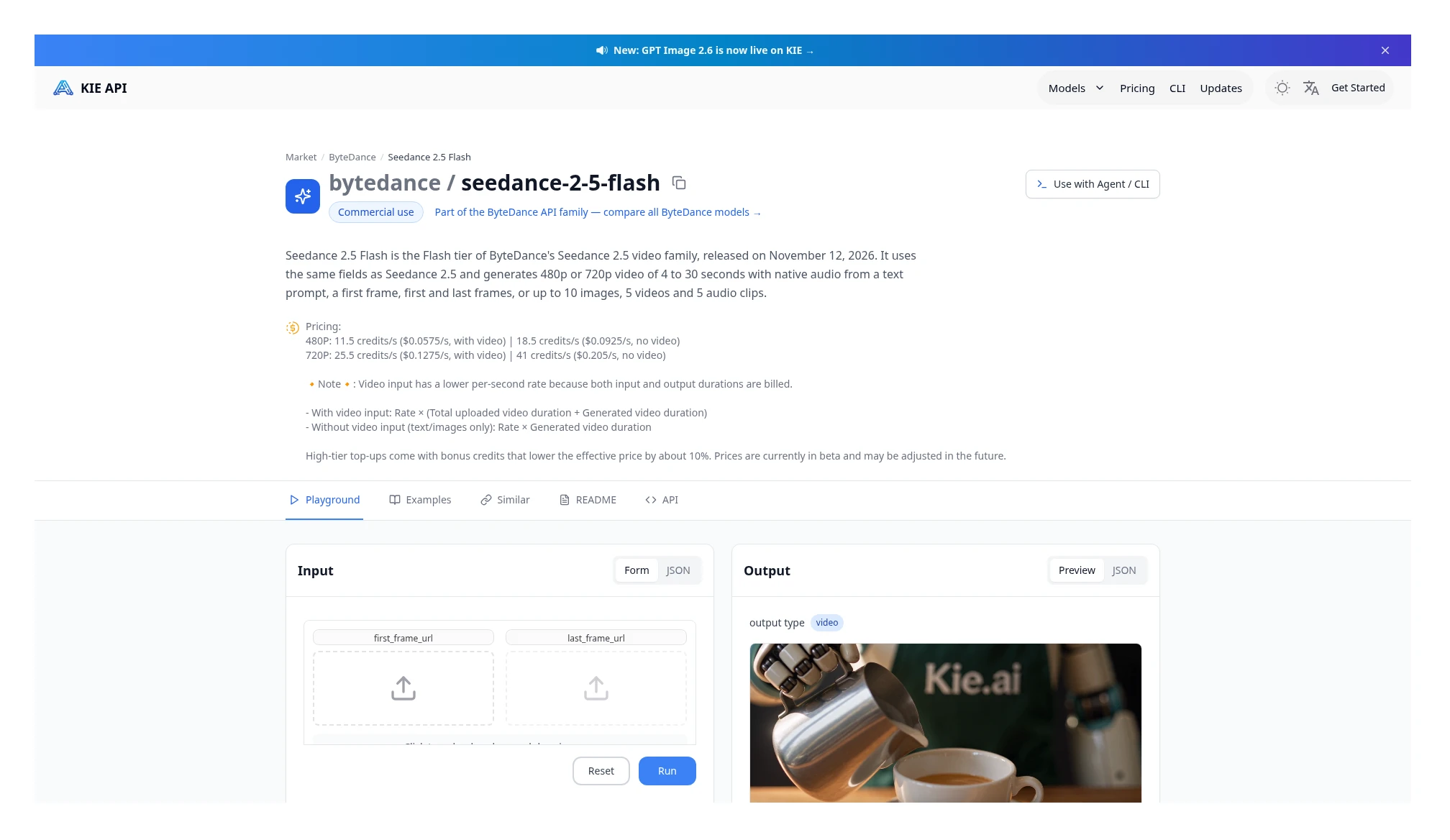 Kie Seedance 2.5 Flash: no-reference 480p $0.0925/s, 720p $0.205/s; with video, 480p $0.0575/s, 720p $0.1275/s. With no video, billing is on output seconds; with video, input plus output seconds. Source: https://kie.ai/seedance-2-5-flash
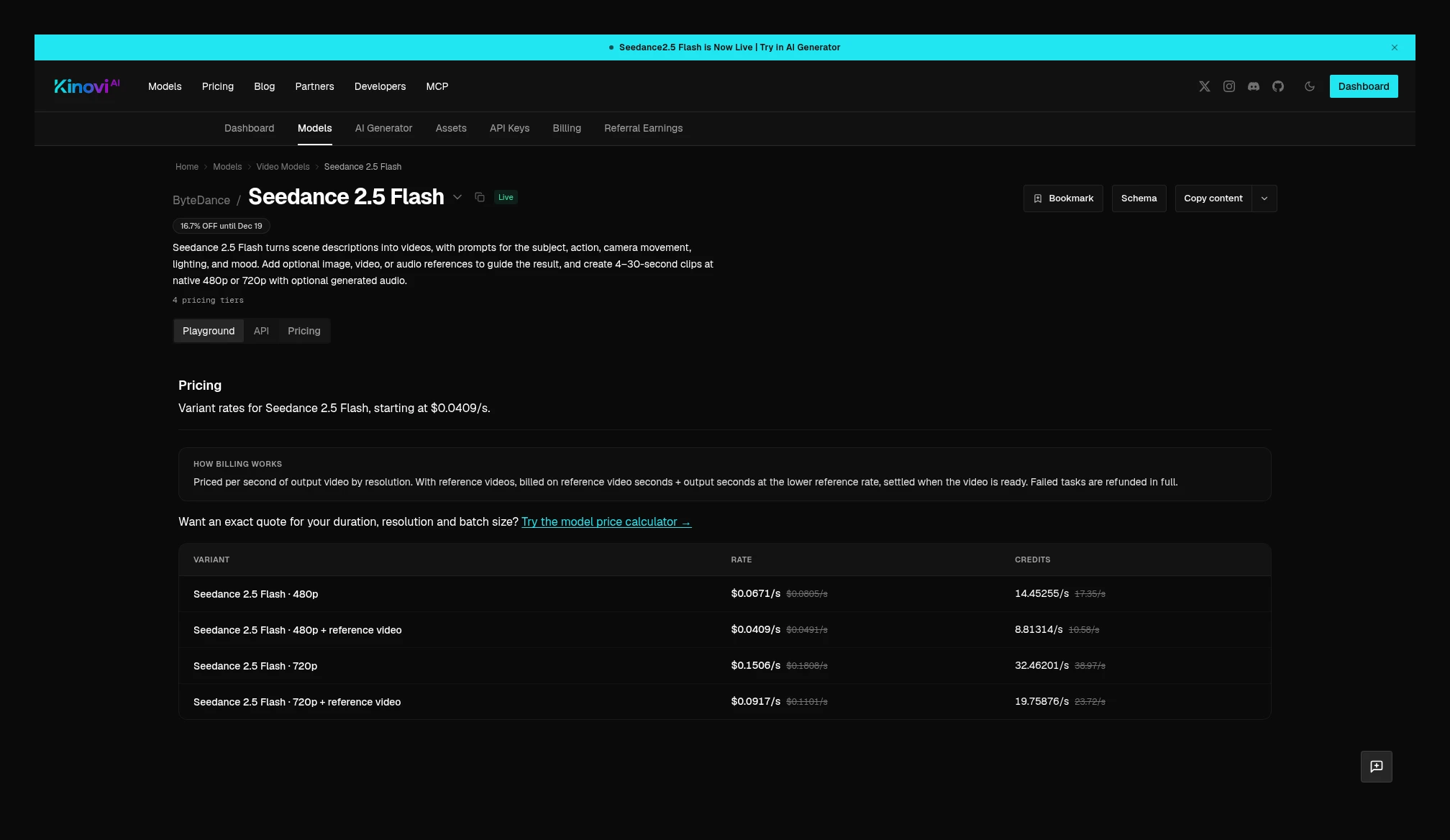 Kinovi Seedance 2.5 Flash current price table: 480p $0.0671/s, 720p $0.1506/s; reference tier 480p $0.0409/s, 720p $0.0917/s. With a reference, billing is reference plus output seconds, times the lower reference-tier unit price. Source: https://kinovi.ai/models/seedance2-5-flash#pricing
Seedance 2.0 Fast and Mini has to be read the same way as 2.0 standard: keep the with-reference and no-reference formulas separate. On Kie, these two tiers still use input plus output when there is a reference; Kinovi’s Fast and Mini switches to the reference-tier unit price and still bills on the chosen output duration. So the percentages below are for no-reference jobs only.
| Specs | Kie | Kinovi | Kinovi vs Kie | Full 5-second no-reference job |
|---|---|---|---|---|
| Fast 480p, no reference | $0.0590 | $0.0495 | 16.1% lower | $0.295 vs $0.2475 |
| Fast 720p, no reference | $0.1240 | $0.0989 | 20.2% lower | $0.620 vs $0.4945 |
| Mini 480p, no reference | $0.0190 | $0.0212 | 11.6% higher | $0.095 vs $0.106 |
| Mini 720p, no reference | $0.0410 | $0.0565 | 37.8% higher | $0.205 vs $0.2825 |
For the same 5 seconds of output plus a 5-second reference at 720p, under each side’s rule: Fast is Kie 10 × $0.075 = $0.750, Kinovi 5 × $0.1201 = $0.6005; for Mini it is Kie 10 × $0.025 = $0.250, Kinovi 5 × $0.0678 = $0.339. This is a full-job comparison, not a unit-price comparison under the same number of billed seconds.
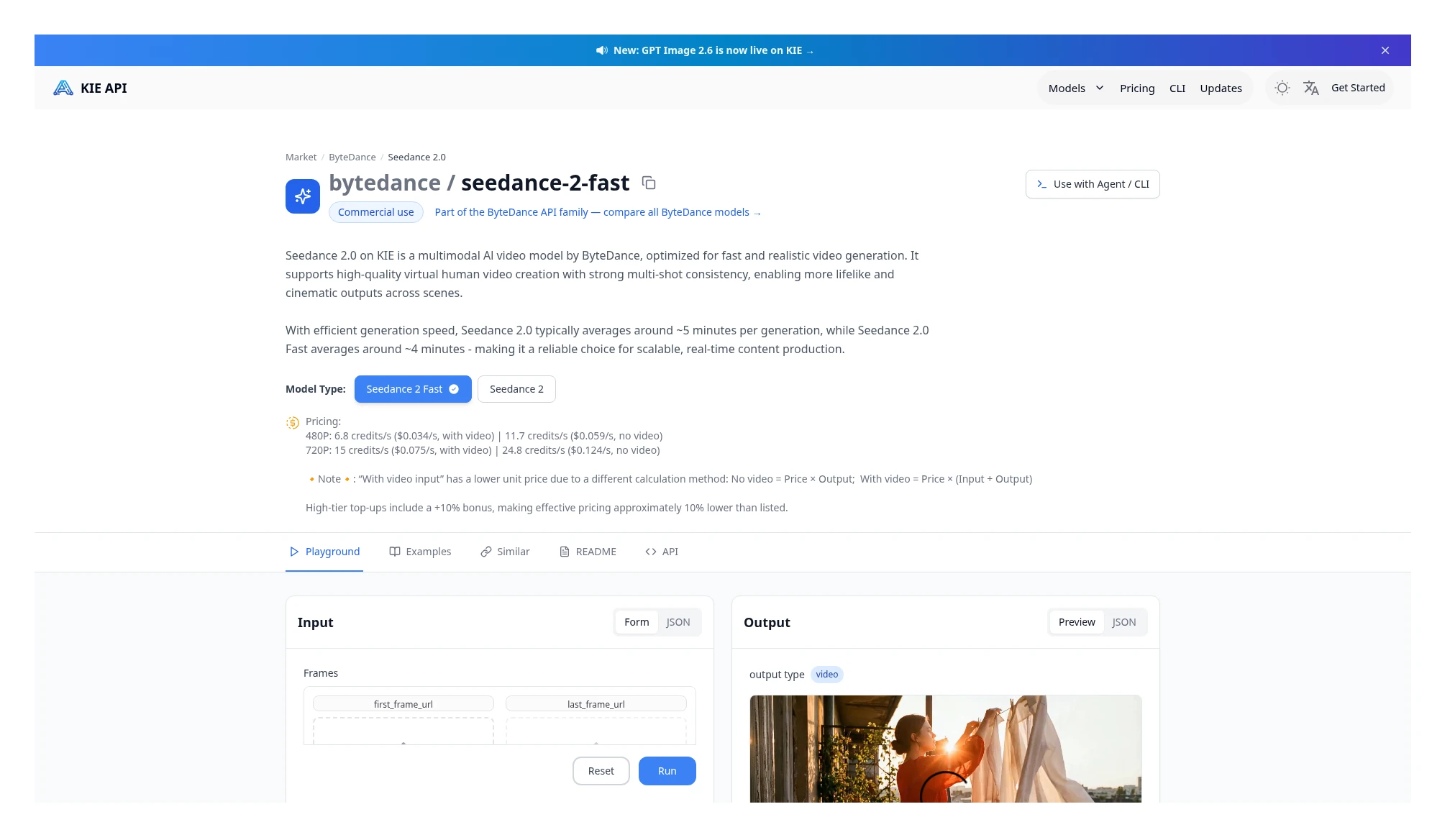 Kie Seedance 2.0 Fast (the page is already on seedance-2-fast): no-reference 480p $0.059/s, 720p $0.124/s; with video, 480p $0.034/s, 720p $0.075/s. With video, billing is input plus output seconds. Source: https://kie.ai/seedance-2-0?model=bytedance%2Fseedance-2-fast
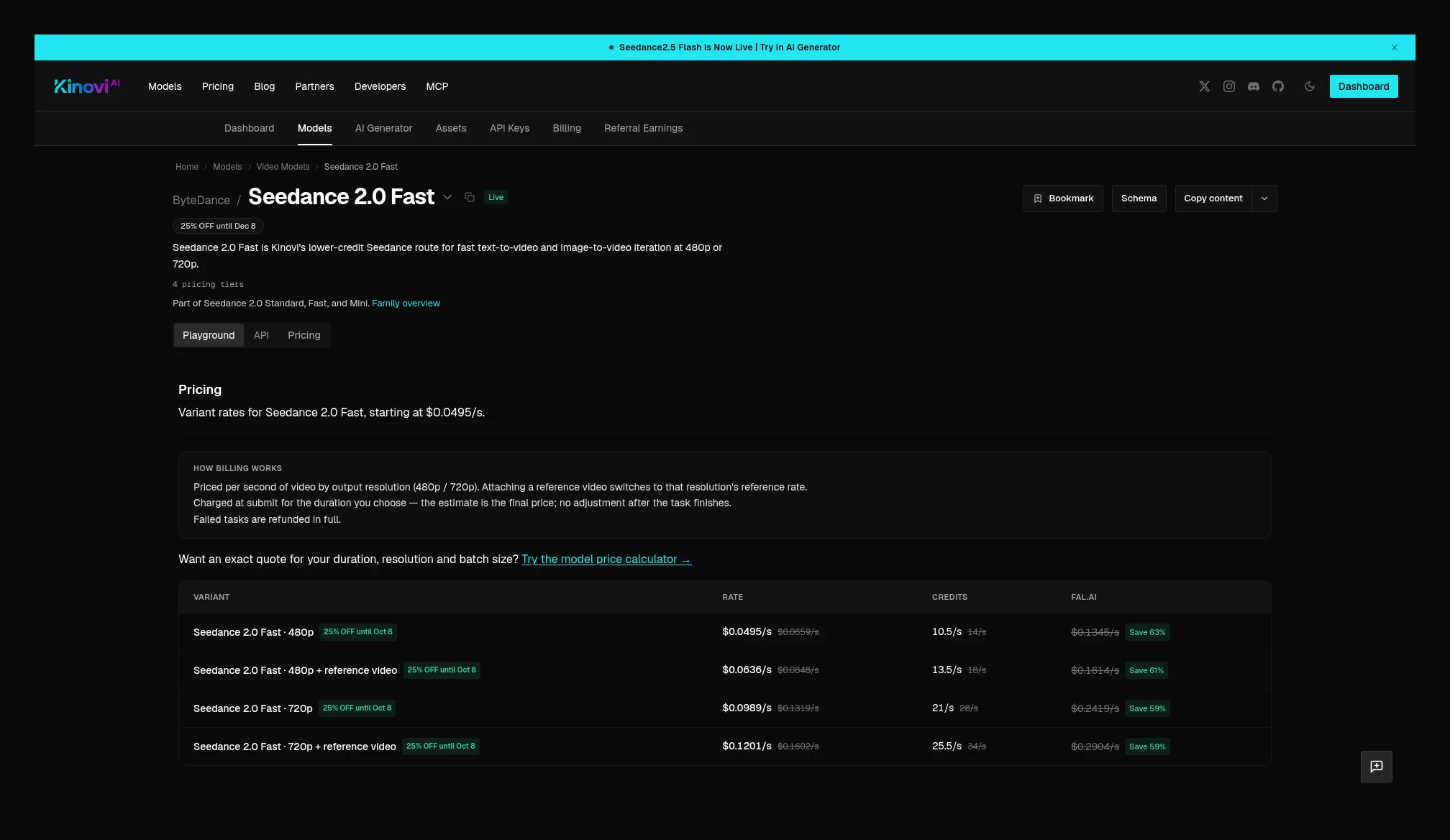 Kinovi Seedance 2.0 Fast current price table: 480p $0.0495/s, 720p $0.0989/s; reference tier 480p $0.0636/s, 720p $0.1201/s. With a reference, it switches to the reference-tier unit price and still bills on the chosen output duration. Source: https://kinovi.ai/models/seedance2-fast#pricing
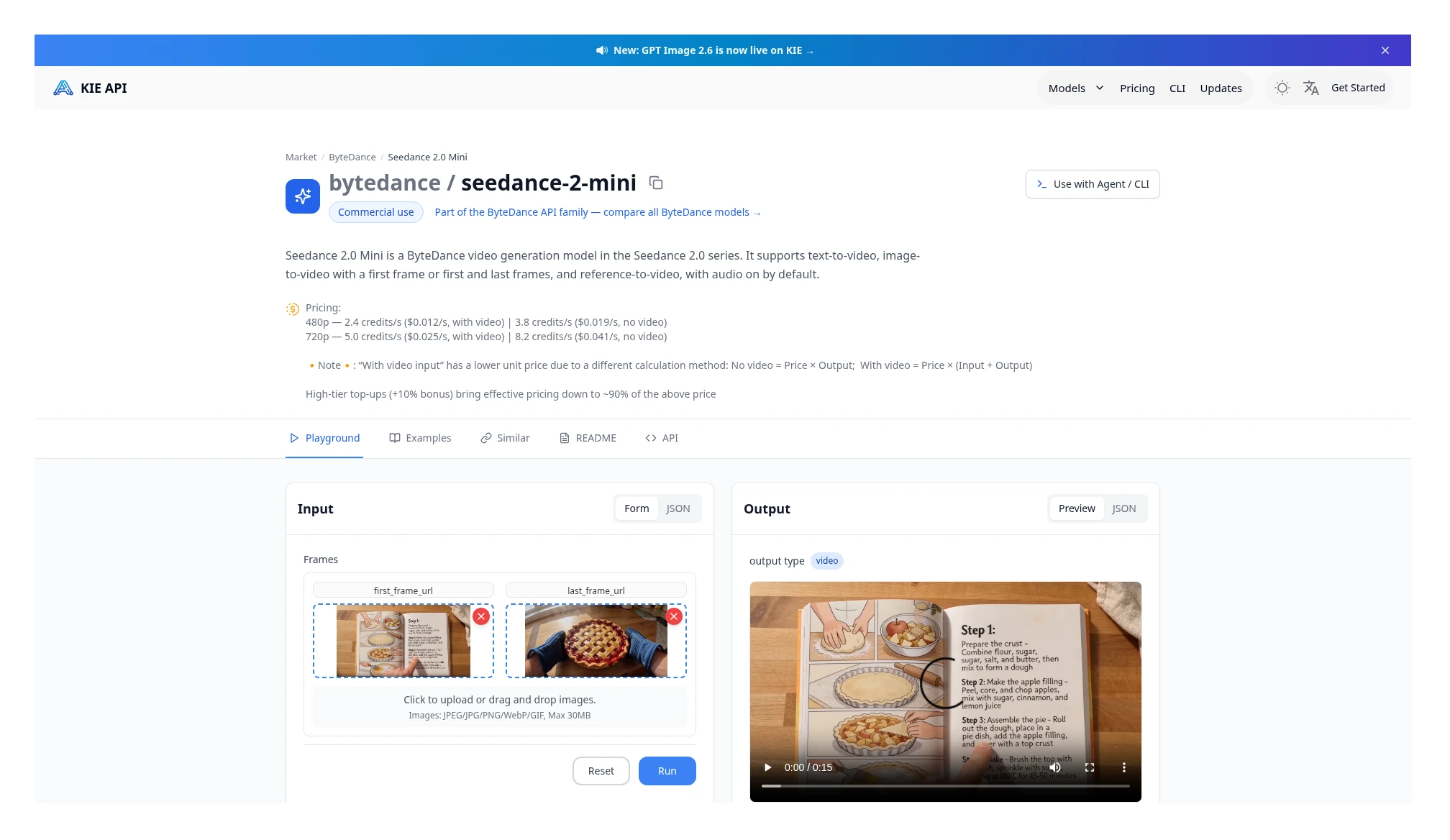 Kie Seedance 2.0 Mini: no-reference 480p $0.019/s, 720p $0.041/s; with video, 480p $0.012/s, 720p $0.025/s. With video, billing is input plus output seconds. Source: https://kie.ai/seedance-2-0-mini
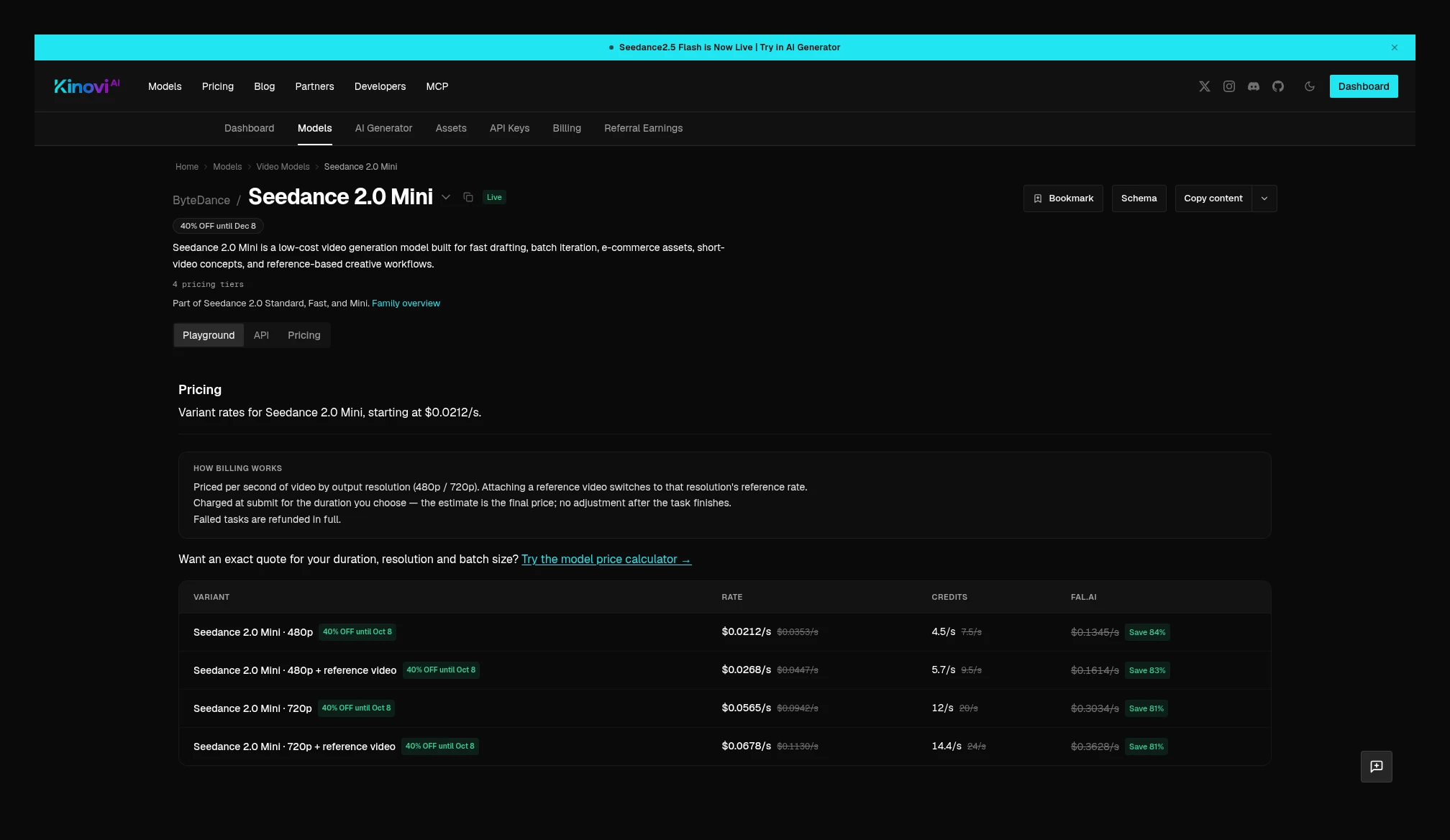 Kinovi Seedance 2.0 Mini current price table: 480p $0.0212/s, 720p $0.0565/s; reference tier 480p $0.0268/s, 720p $0.0678/s. With a reference, it switches to the reference-tier unit price and still bills on the chosen output duration. Source: https://kinovi.ai/models/seedance2-mini#pricing
How Seedance edit and extend are billed
Kinovi puts edit and extend on separate model pages, with formulas that differ from generating from scratch.
Seedance 2.5 Video Edit price table uses the reference tier: 480p $0.0737/s, 720p $0.1612/s, 1080p $0.3947/s, 4K $0.6720/s. The billing note is: at the chosen resolution’s reference-tier unit price, the source duration is counted twice (input plus output), with the source capped at 30 seconds, that is cost = 2 × source seconds × the reference-tier unit price. At submit time it first holds about 15 seconds or the duration you set, and after success it settles against the actual source. For example, editing a 10-second 720p clip: 20 × $0.1612 = $3.224. Output length and frame follow the source clip.
Seedance 2.5 Video Extend reference-tier unit price is the same as on the edit page. After success, billing is (source seconds, up to 30 seconds) + newly generated seconds times the same reference-tier unit price. At submit time it often holds only the extend duration you chose; after completion it adds the source duration, so the final bill will be higher than the estimate at submit time. For example, extending a 10-second source by 5 seconds at 720p: 15 × $0.1612 = $2.418.
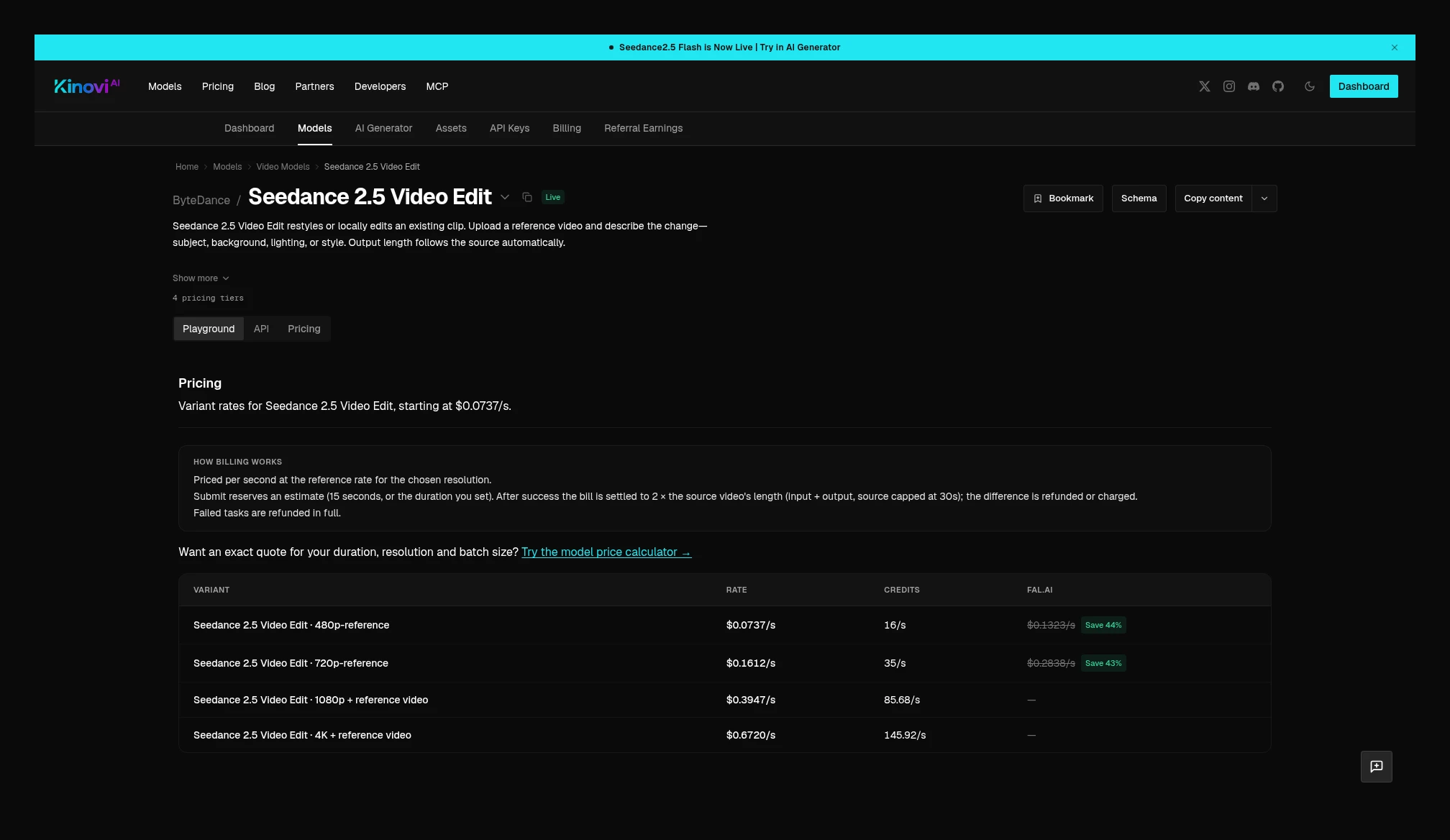 Kinovi Seedance 2.5 Video Edit: reference tier 480p $0.0737/s, 720p $0.1612/s, 1080p $0.3947/s, 4K $0.6720/s; the charge is settled as 2 × source duration × the reference-tier unit price. Source: https://kinovi.ai/models/seedance2-5-edit#pricing
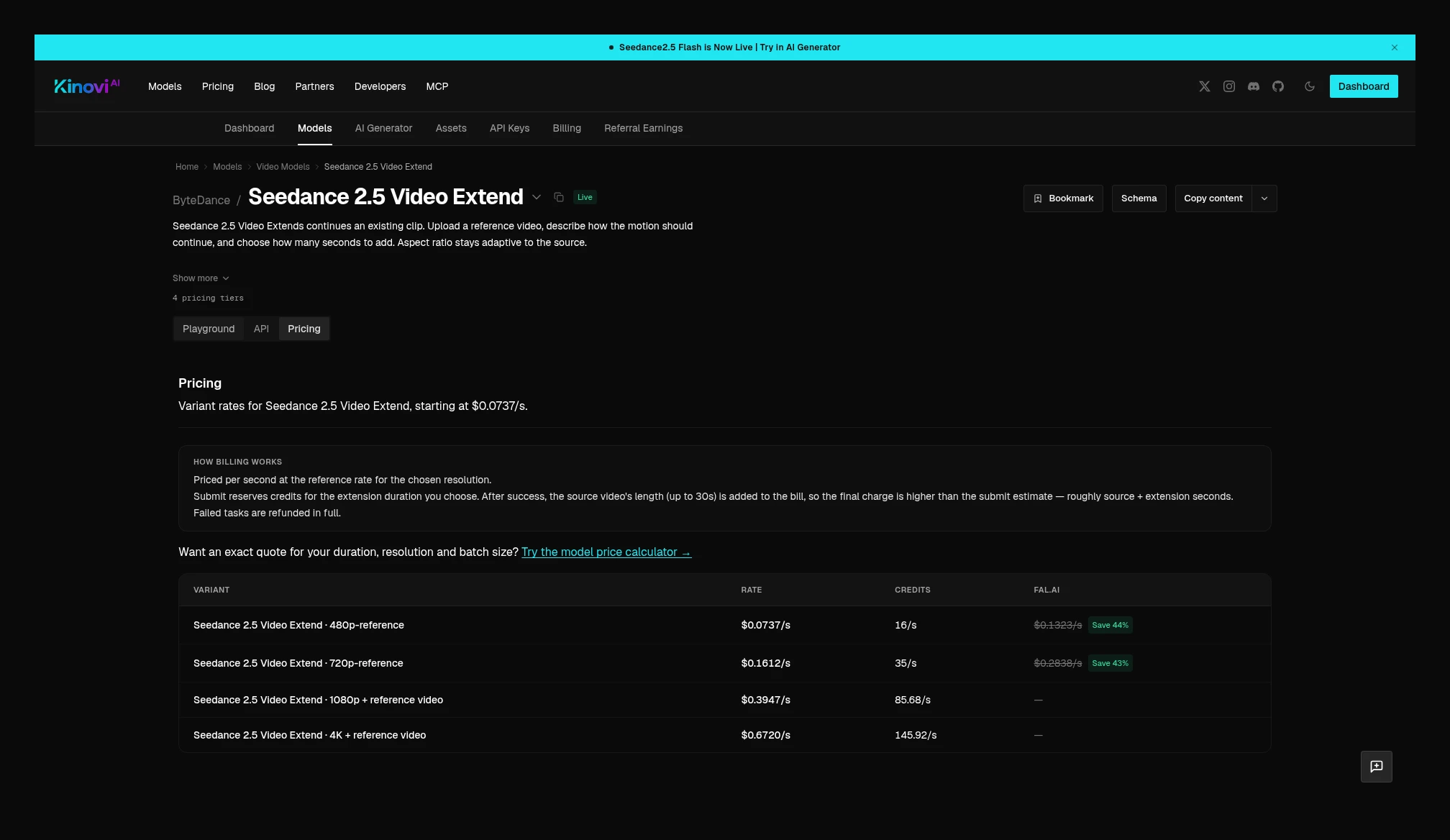 Kinovi Seedance 2.5 Video Extend: reference-tier unit prices are the same as on the edit page; after success, billing is (source up to 30 seconds + newly generated duration) × the reference-tier unit price. Source: https://kinovi.ai/models/seedance2-5-extend#pricing
Flash edit page follows the same kind of rule, using the Flash reference-tier unit prices: 480p $0.0409/s, 720p $0.0917/s. For example, editing a 10-second 720p Flash clip: 20 × $0.0917 = $1.834. Flash extend uses the same prices; extending a 10-second source by 5 seconds at 720p: 15 × $0.0917 = $1.3755.
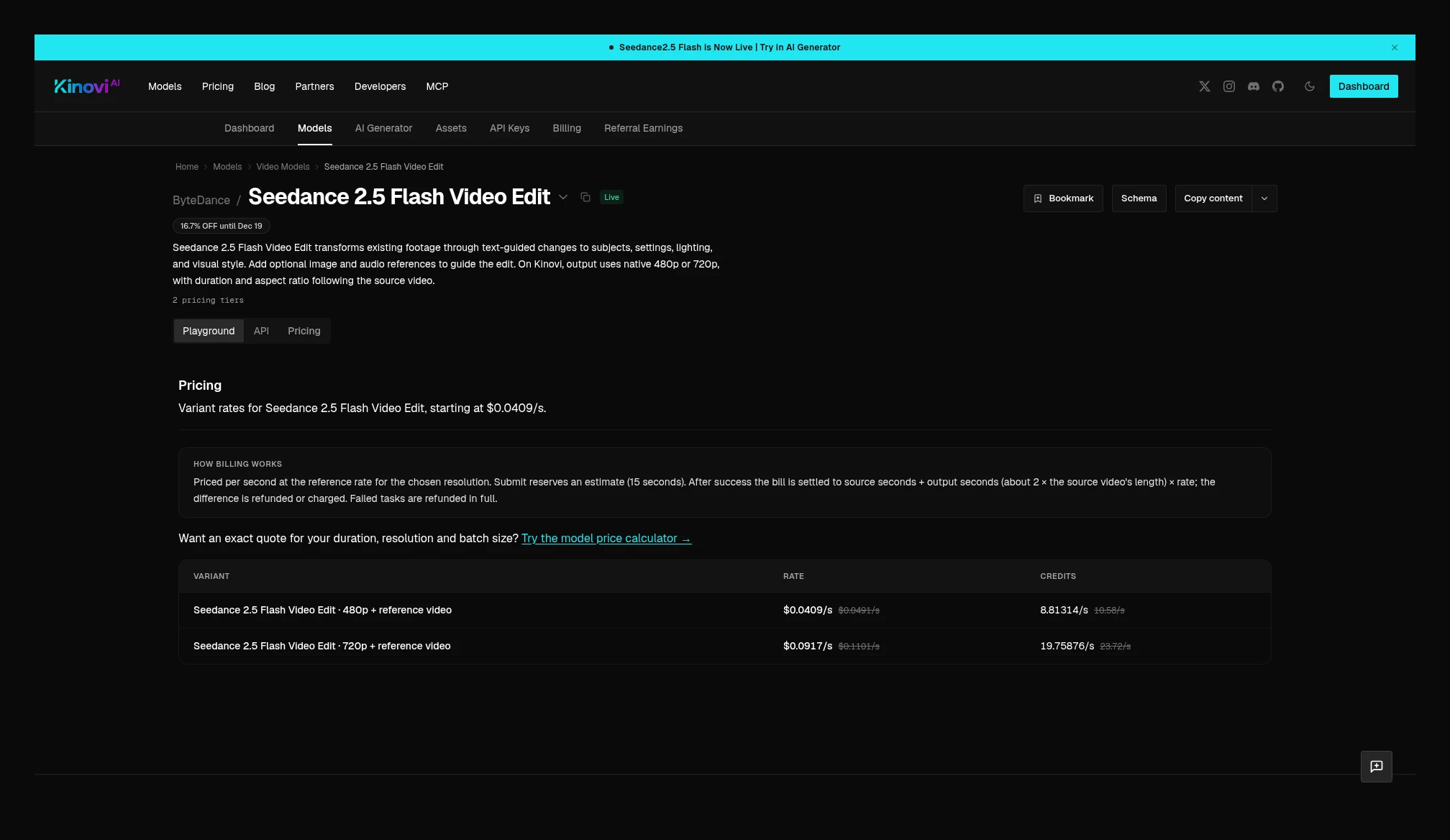 Kinovi Seedance 2.5 Flash Video Edit: reference tier 480p $0.0409/s, 720p $0.0917/s; likewise settled at about 2 × source duration. The Flash extend page uses the same prices, billed as source plus newly generated duration. Source: https://kinovi.ai/models/seedance2-5-flash-edit#pricing
Kie’s 2.5 and Flash pages have no separate edit / extend price cards, but the parameters include omni_reference_task_type, with the options auto, reference, edit, and extend. Edit and extend require a reference video and the aspect ratio set to adaptive; Flash edit also requires duration=-1. Because there is no standalone unit price, this is not aligned as a percentage under the same formula as Kinovi’s edit page, and no separate Kie edit price is invented.
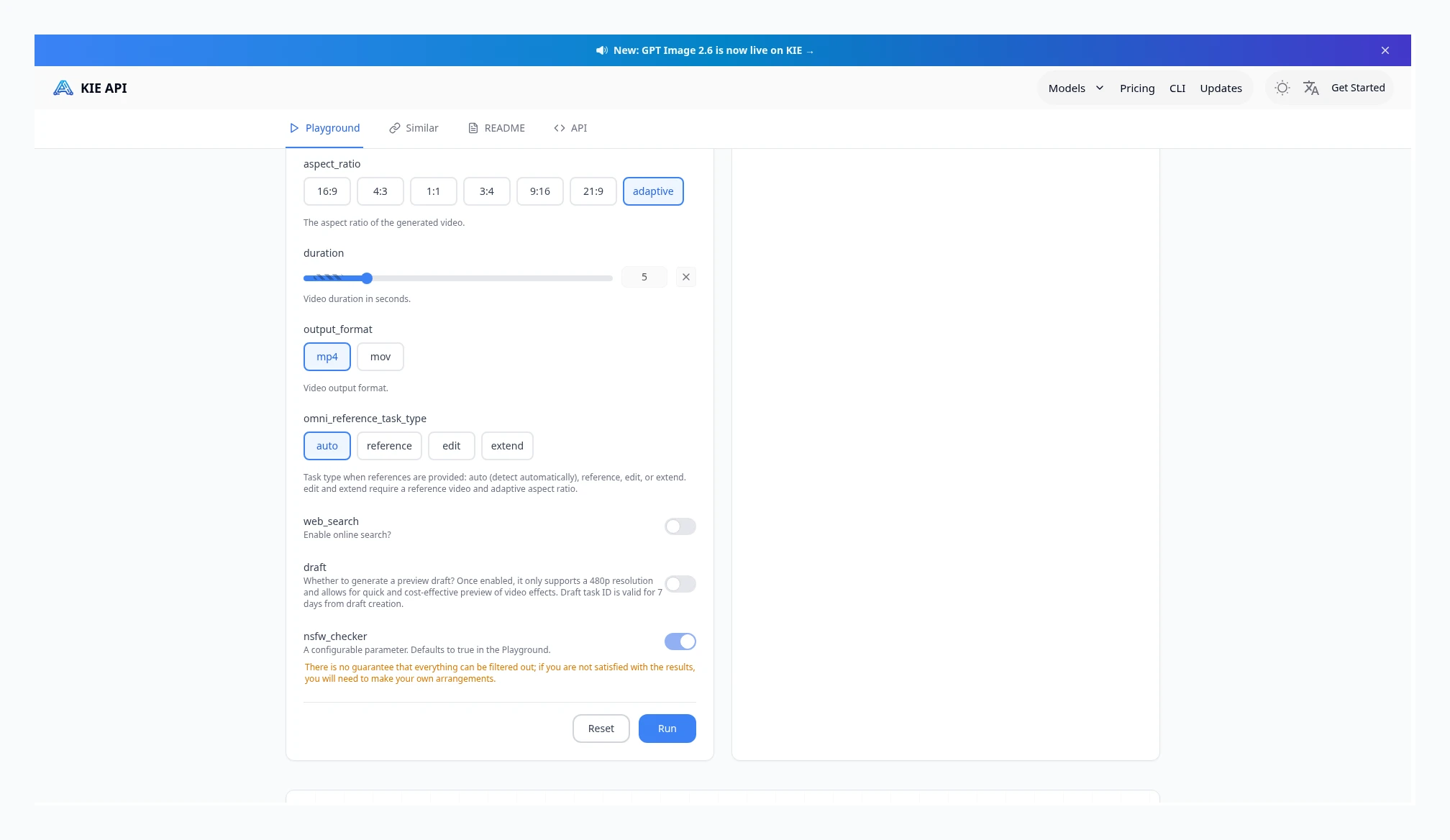 Kie Seedance 2.5’s omni_reference_task_type can be auto, reference, edit, or extend; edit and extend require a reference video and an adaptive aspect ratio. The page has no separate edit price card. Source: https://kie.ai/seedance-2-5
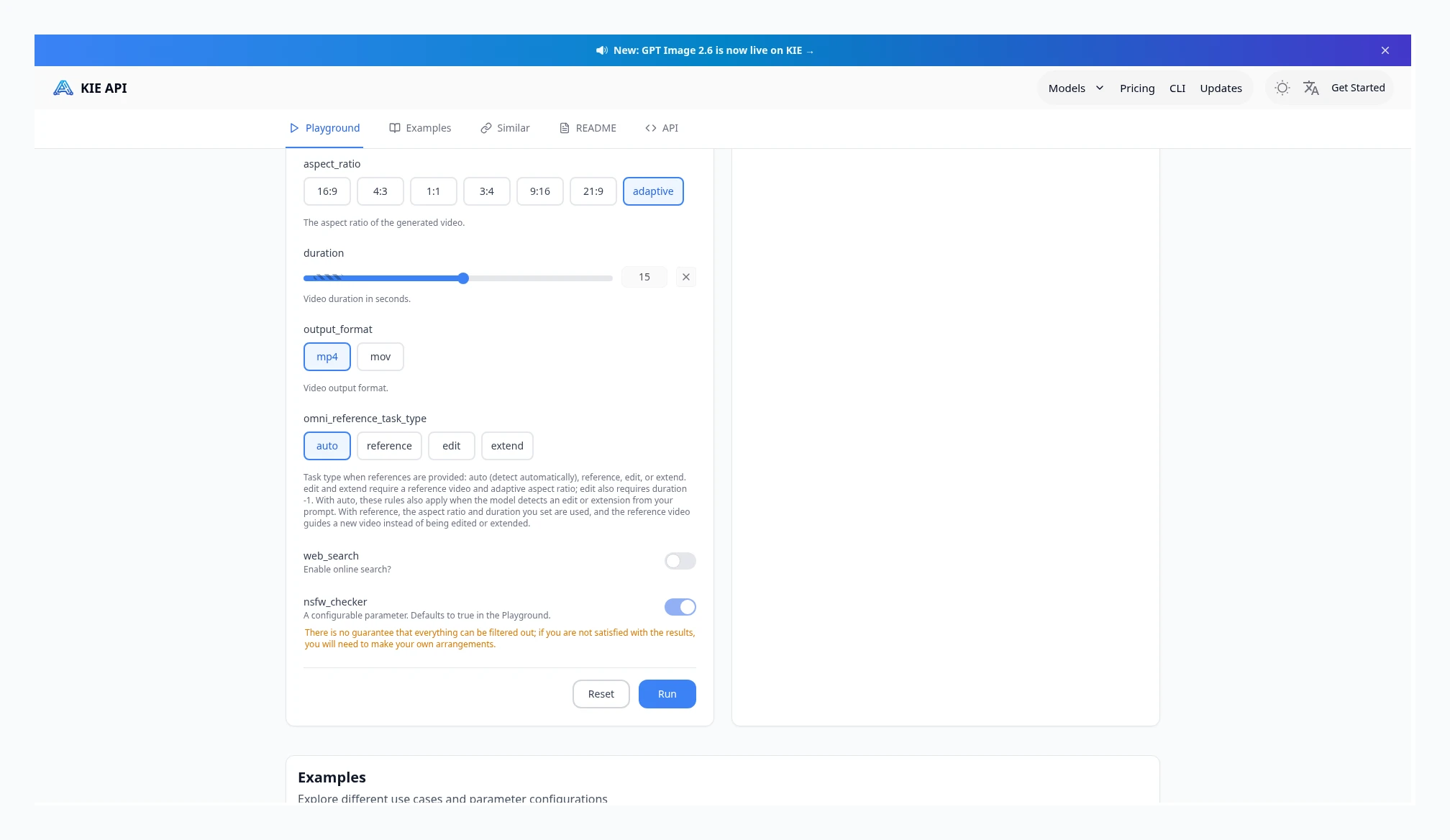 Kie Seedance 2.5 Flash also offers edit / extend options; the page states that edit also requires duration=-1, and there is likewise no separate price card. Source: https://kie.ai/seedance-2-5-flash
Takeaway: For Seedance 2.5 and 2.5 Flash on both sides: after a reference video is added, the unit price is lower, but billed seconds become reference duration plus output duration, so the full job can cost more than one without a reference. Do not apply this formula to Kinovi’s Seedance 2.0, Fast, or Mini—there, a reference only switches the unit-price tier, and billing is still on output duration; on Kie, these three tiers still bill input plus output. Kinovi’s edit is “2 × source duration,” and extend is “source + newly generated duration,” both at the reference-tier unit price. Kie offers edit / extend parameters on these two tiers, but has no separate price card, so you cannot take the no-reference unit price for generating from scratch and use it against Kinovi’s full edit job.
Kling 4.0
Kie’s Kling 4.0 no-reference unit price is 720p $0.1425/s, 1080p $0.2125/s, 4K $0.495/s. With a reference video the unit price is lower ($0.085 / $0.1275 / $0.295), and the billing rule is not exactly the same as Seedance: when total reference-video duration is less than or equal to output, billing is output duration × 2; when the reference is longer, it is input plus output. For example, 10 seconds of output plus a 5-second reference is billed as 20 seconds; if the reference is 15 seconds, it is billed as 25 seconds. 1080p and 4K can also add optional HDR, with surcharges of $0.0425/s and $0.07/s respectively, multiplied by output duration only; the reference duration does not add an HDR charge.
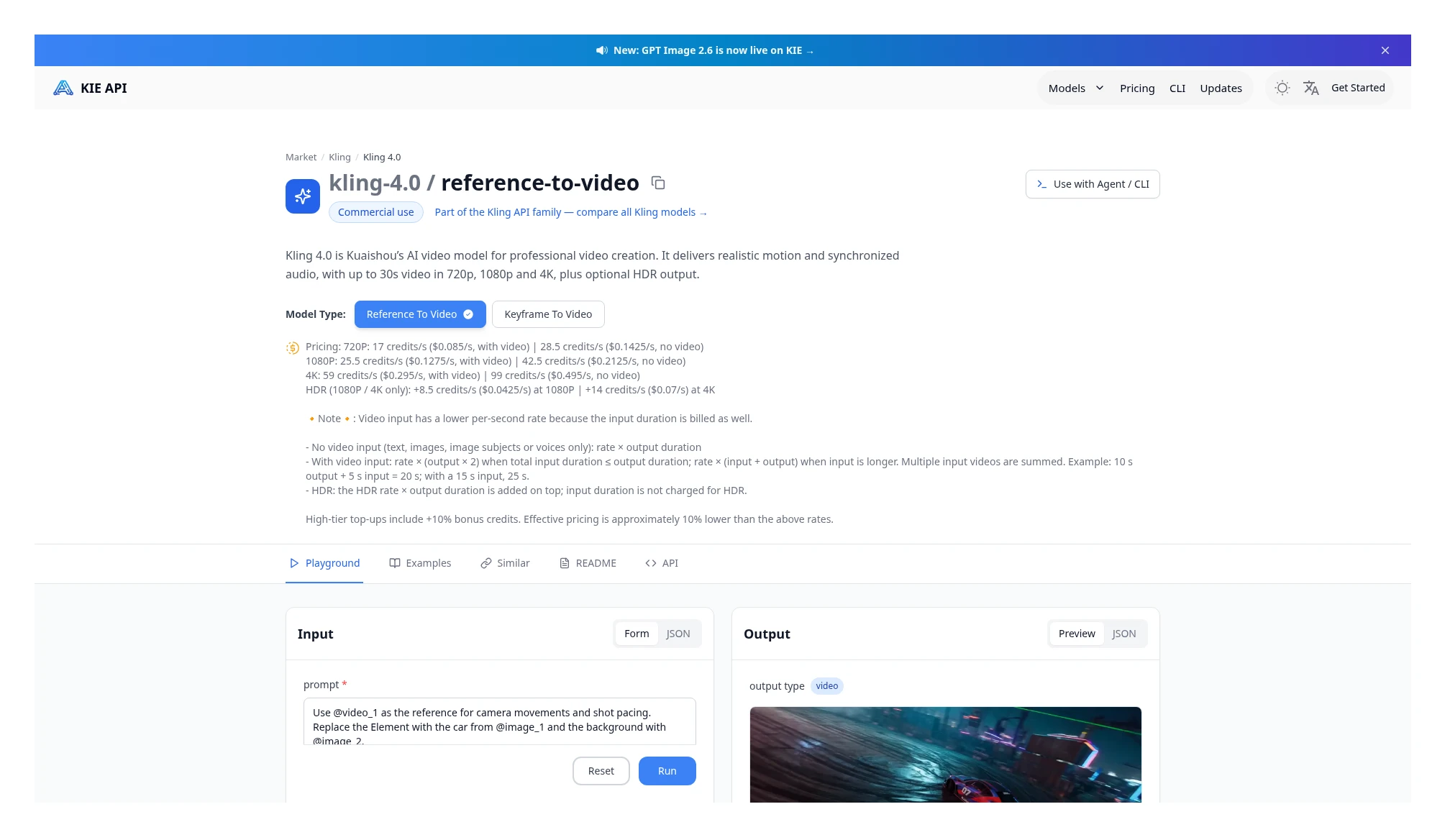 Kie Kling 4.0 price card: no-reference $0.1425 / $0.2125 / $0.495, with reference $0.085 / $0.1275 / $0.295; HDR adds $0.0425 / $0.07 at 1080p and 4K, multiplied by output duration only. Source: https://kie.ai/kling-4-0
Kinovi’s Kling 4.0 text-to-video current table is 720p $0.1260/s, 1080p $0.1890/s, billed on output duration. At these current quotes, with no reference, Kinovi is 11.6% lower than Kie at 720p, and 11.1% lower at 1080p. Image-to-video page current table is the same as text-to-video, also billed on output duration; no-reference image-to-video can be compared with text-to-video in the same unit-price row. That Kinovi text-to-video page does not list 4K, so this table does not include a 4K comparison.
With a reference, the two sides use different formulas, so compare the full job. Reference-video page states: multiply “reference-video seconds + output seconds” by the lower billable-second unit price, 720p $0.0756/s, 1080p $0.1134/s. Kie, by contrast, bills output × 2 times the with-reference unit price when total input duration does not exceed output; when input is longer, it bills input plus output. For example, 5 seconds of output plus a 5-second reference at 720p: Kie uses 10 seconds × $0.085 = $0.850; Kinovi uses 10 seconds × $0.0756 = $0.756. If the reference is 15 seconds and the output is 10 seconds, Kie bills 25 seconds, and Kinovi also bills 25 seconds, but the unit prices differ. The HDR surcharge is written only on Kie, and is multiplied by output duration only.
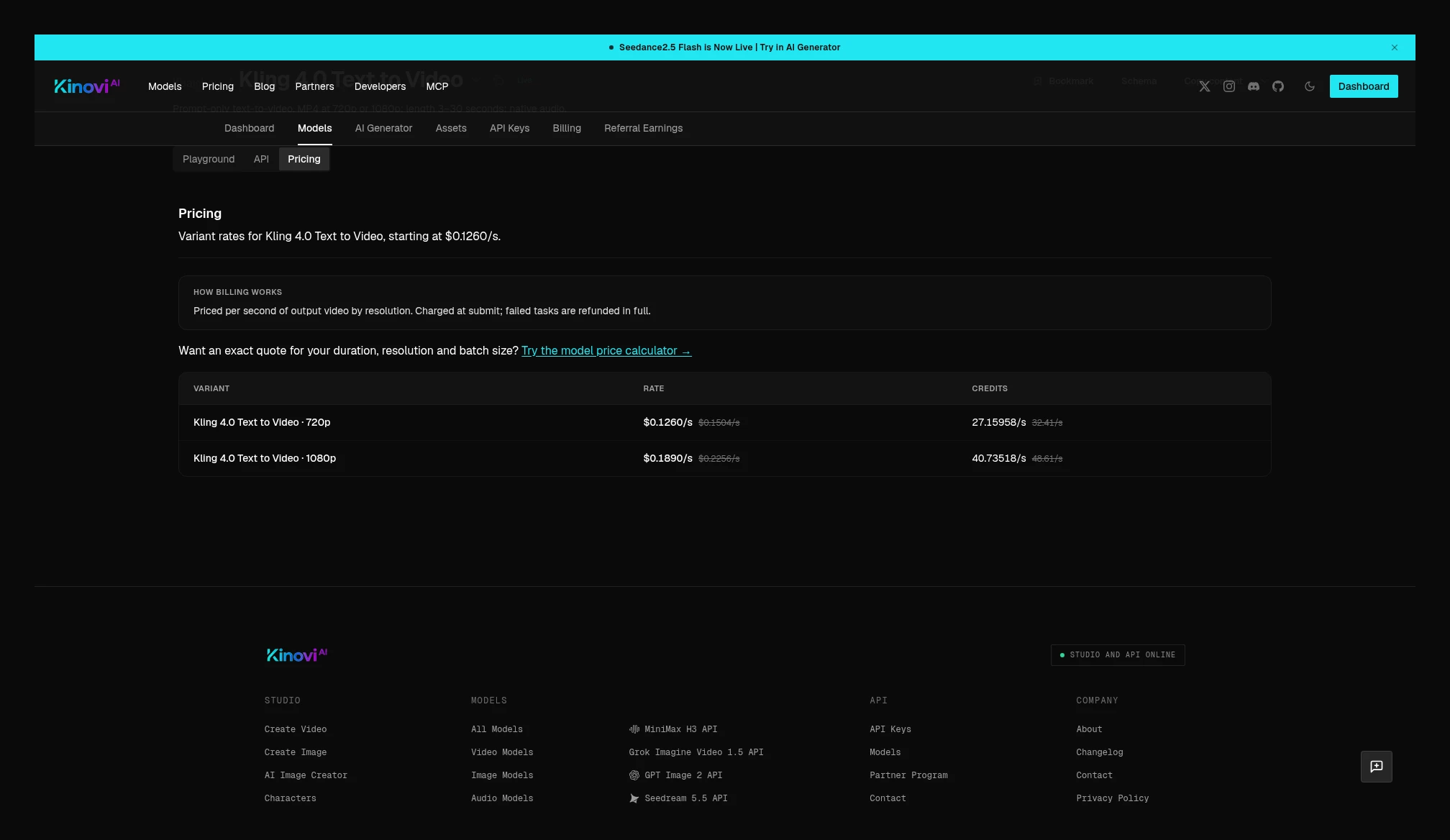 Kinovi Kling 4.0 text-to-video current price table: 720p $0.1260/s, 1080p $0.1890/s. Source: https://kinovi.ai/models/kling-4-0-text-to-video#pricing
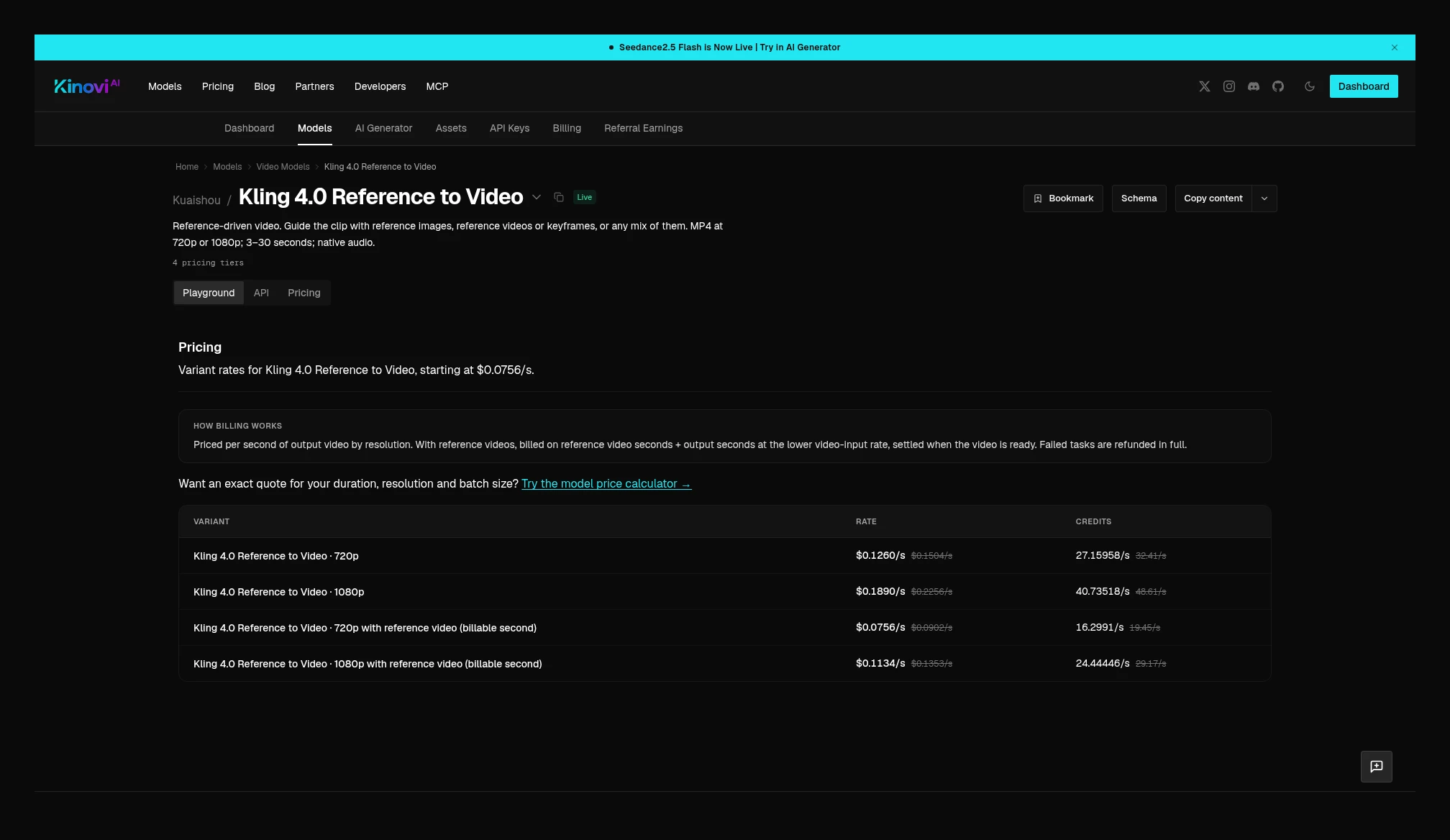 Kinovi Kling 4.0 Reference to Video: with no reference video, 720p $0.1260/s, 1080p $0.1890/s; with a reference video, billing is reference seconds plus output seconds, times the lower billable unit price of 720p $0.0756/s, 1080p $0.1134/s. Source: https://kinovi.ai/models/kling-4-0-reference-to-video#pricing
Kling 4.0 Flash (confirmed in the Kie catalog only, this time)
Kie’s Kling 4.0 Flash is split into two entry points; both output 720p, for 3–20 seconds. Flash Keyframe To Video bills on output duration, at $0.085/s. Flash Reference To Video is also $0.085/s when there is no video input; with video input the unit price drops to $0.0565/s, and the billed-seconds rule is the same as Kling 4.0: when total input duration does not exceed output, it is output duration × 2; when input is longer, it is input plus output. For example, 10 seconds of output plus a 5-second reference is billed as 20 seconds; a 15-second reference is billed as 25 seconds.
No same-named Flash page was seen in Kinovi’s public catalog this time, so only Kie’s official quotes are recorded, with no side-by-side percentages.
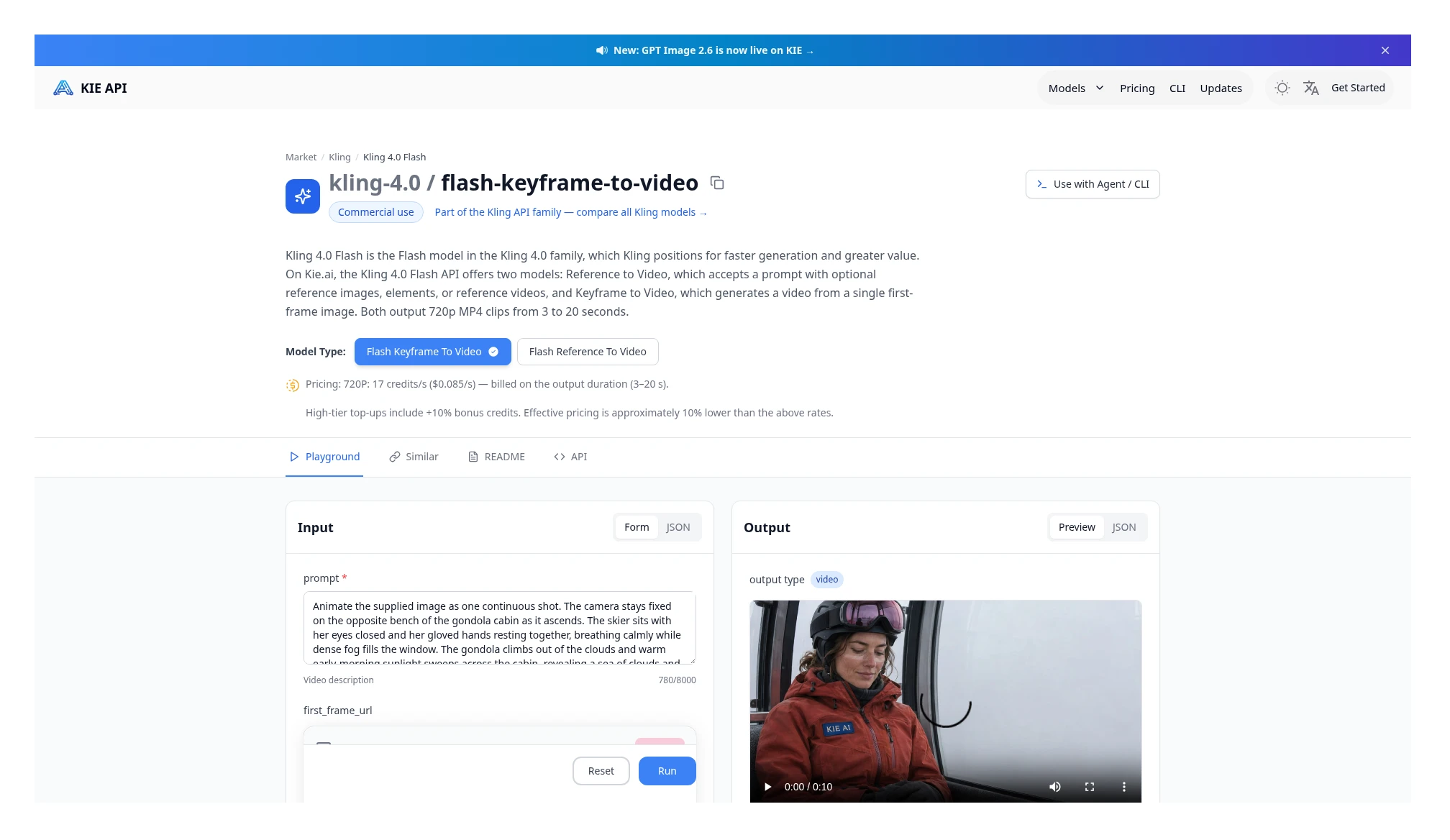 Kie Kling 4.0 Flash Keyframe To Video: 720p $0.085/s, billed on output duration, for 3–20 seconds. Source: https://kie.ai/kling-4-0-flash
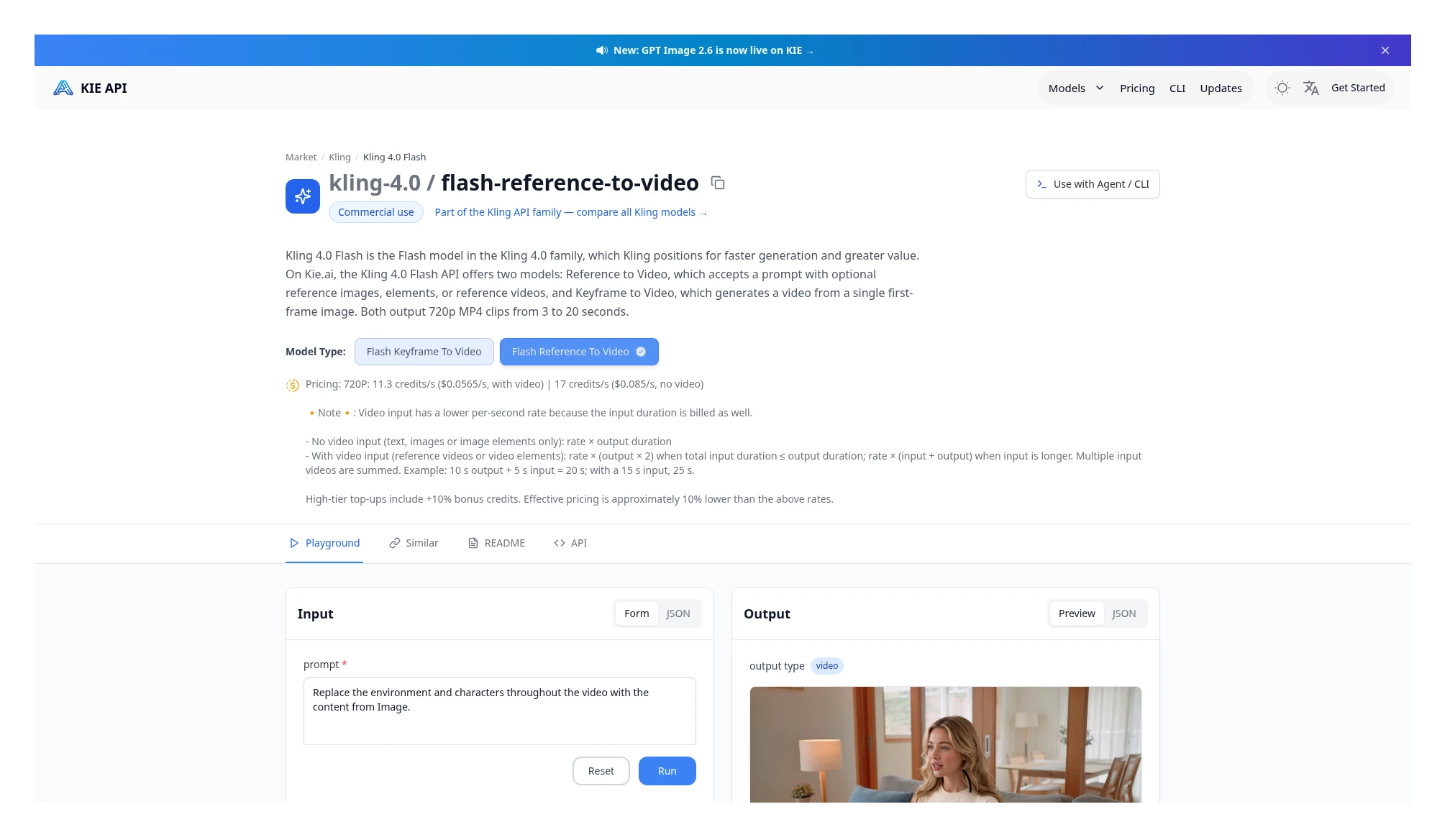 Kie Kling 4.0 Flash Reference To Video: 720p $0.0565/s with video input, $0.085/s with no video input; the billed-seconds rule is the same as Kling 4.0. Source: https://kie.ai/kling-4-0-flash
Wan 3.0 and Wan 3.0 Prime
Kie’s Wan 3.0 unit prices are 480p $0.04/s, 720p $0.08/s, 1080p $0.16/s. The billing rule is (input-video duration + output duration) × the same unit price, with no separate, cheaper reference-tier unit price. When there is no input video, input duration is 0, so you only multiply by output.
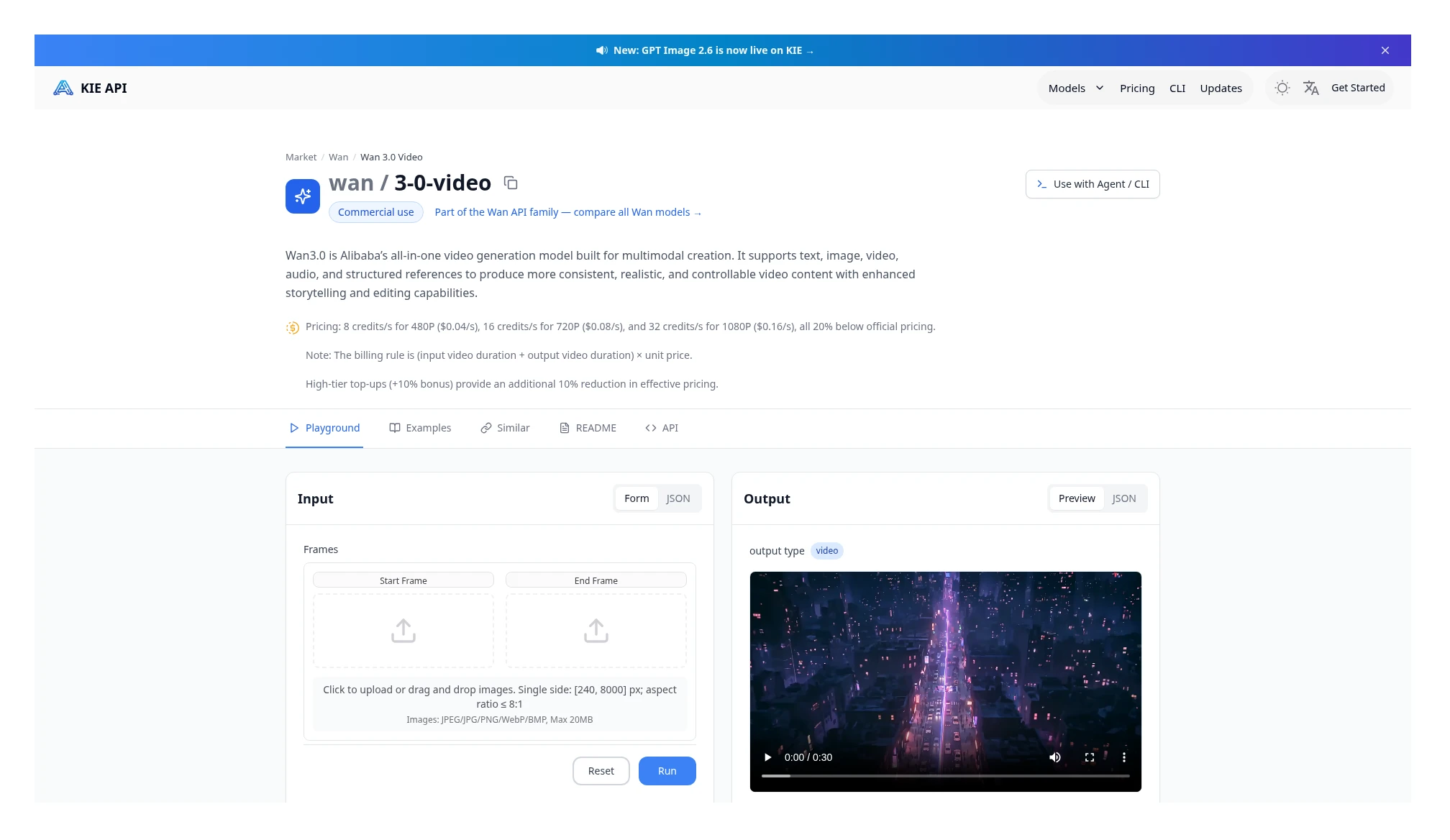 Kie Wan 3.0 price card: $0.04 / $0.08 / $0.16, billed as (input-video duration + output duration) × the same unit price. Source: https://kie.ai/wan3.0-video
Kinovi’s Wan 3.0 text-to-video current table is $0.0442 / $0.0884 / $0.1767, billed on output duration. At these current quotes, with no reference at 720p, Kinovi is 10.5% higher than Kie, or $0.442 versus $0.400 for 5 seconds.
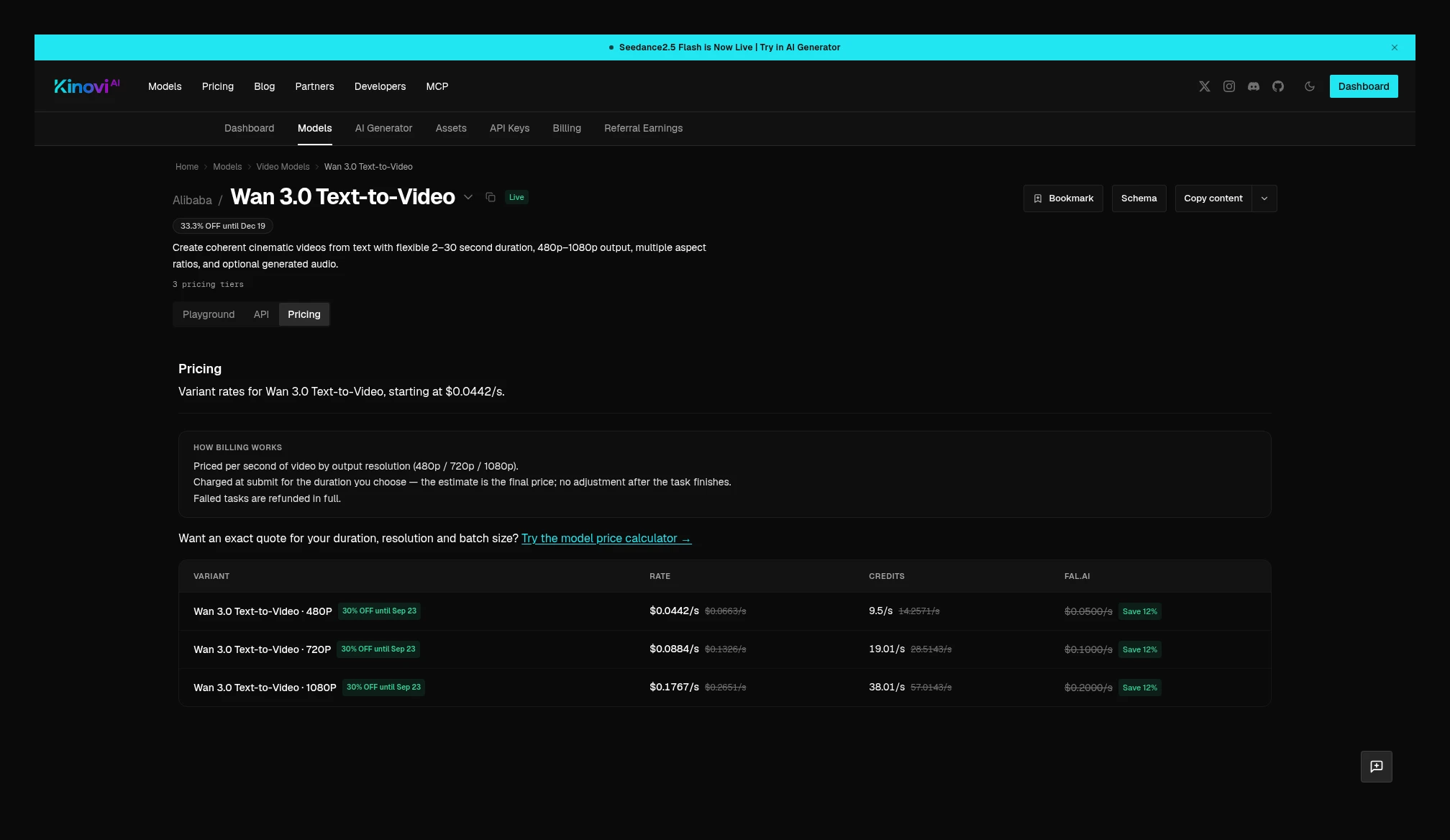 Kinovi Wan 3.0 text-to-video current price table: 480p $0.0442/s, 720p $0.0884/s, 1080p $0.1767/s. Source: https://kinovi.ai/models/wan3-text-to-video#pricing
Wan 3.0 Prime is the faster tier and must not be mixed into the same row as the standard tier. Kie’s Wan 3.0 Prime current table is 480p $0.0612/s, 720p $0.126/s, 1080p $0.252/s, with no 4K. Billing is likewise (input-video duration + output duration) × the same unit price; with no input video, only output is counted. The maximum is 30 seconds. The page lists 480p as 12.2 credits/s, or $0.0612/s; at 1 credit = $0.005, 12.2 × $0.005 = $0.061, which differs from the page’s USD figure by $0.0002. The table below uses the USD price published on the page.
Kinovi’s Wan 3.0 Prime text-to-video current table is 480p $0.0658/s, 720p $0.1354/s, 1080p $0.2709/s, credits are deducted at submit time for the chosen output duration, and refunded on failure.
Both sides are compared only on the same no-reference text-to-video job. Do not multiply Kie’s with-reference “input + output” and Kinovi’s text-to-video “output only” as if they were the same number of seconds.
| Specs | Kie (USD/s) | Kinovi (USD/s) | Kinovi vs Kie | 5-second no-reference text-to-video |
|---|---|---|---|---|
| 480p | $0.0612 | $0.0658 | 7.5% higher | $0.306 vs $0.329 |
| 720p | $0.1260 | $0.1354 | 7.5% higher | $0.630 vs $0.677 |
| 1080p | $0.2520 | $0.2709 | 7.5% higher | $1.260 vs $1.3545 |
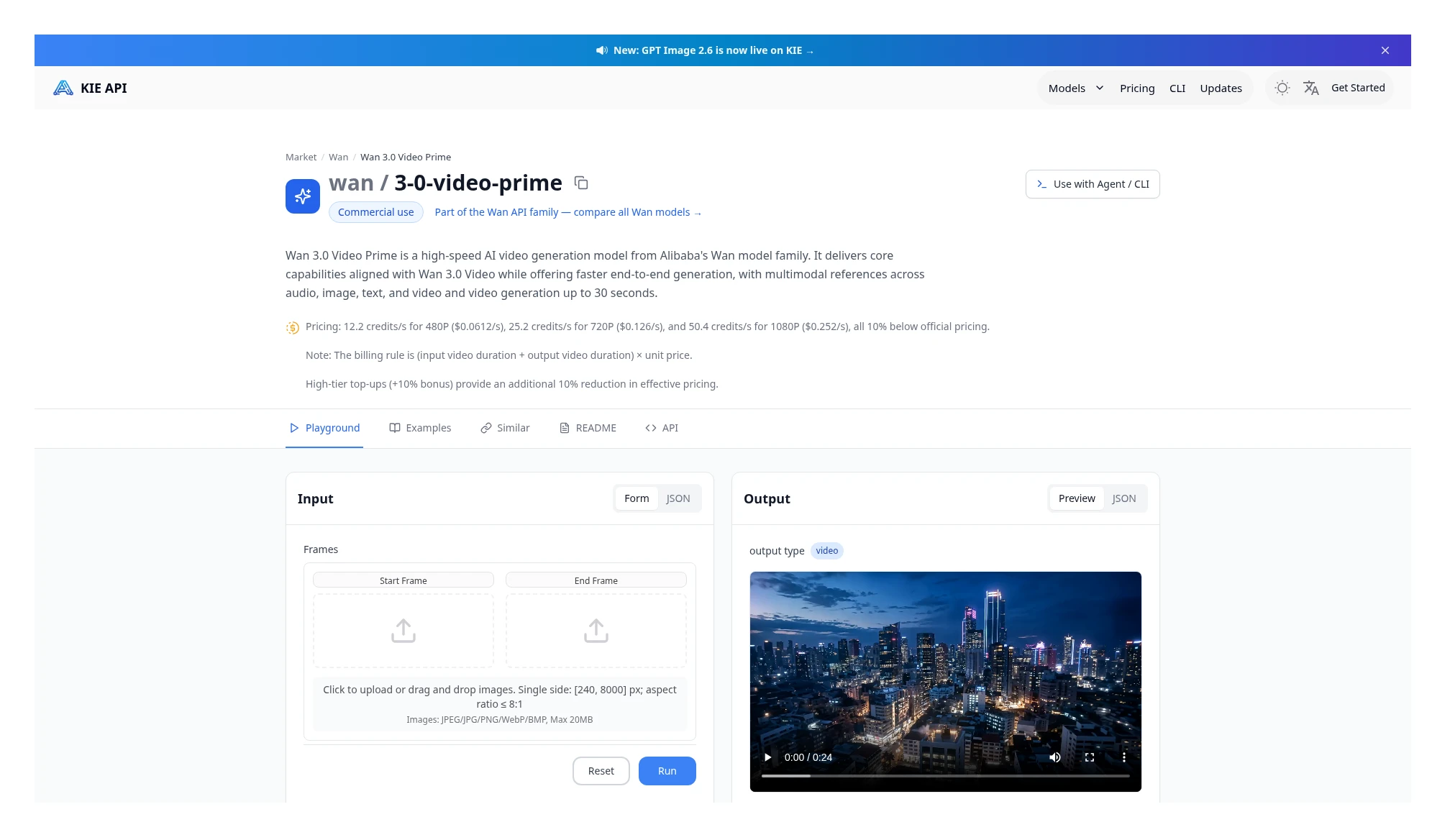 Kie Wan 3.0 Prime price card: 480p $0.0612/s, 720p $0.126/s, 1080p $0.252/s, billed as (input-video duration + output duration) × the same unit price. Source: https://kie.ai/wan3.0-video-prime
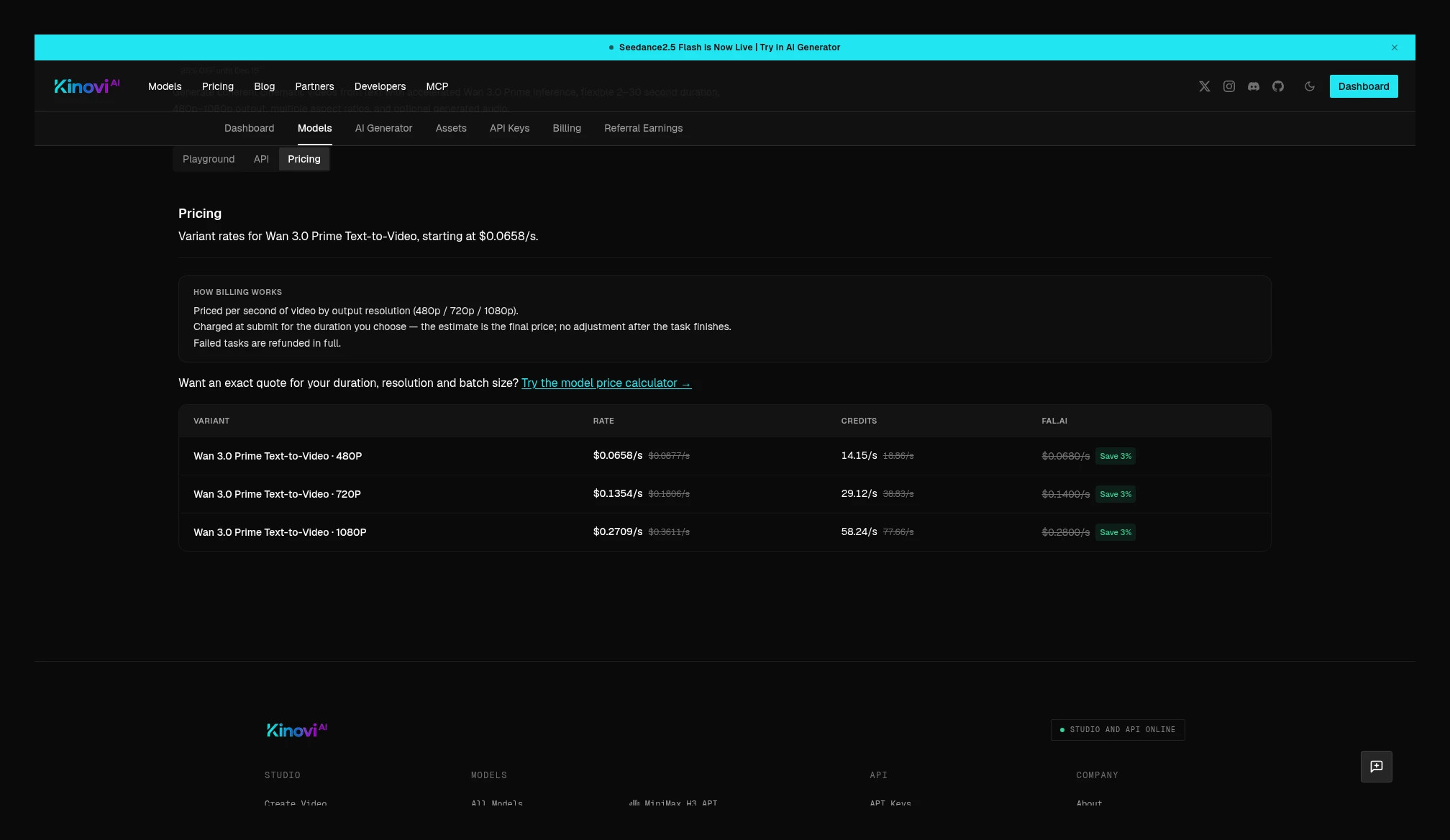 Kinovi Wan 3.0 Prime text-to-video current price table: 480p $0.0658/s, 720p $0.1354/s, 1080p $0.2709/s, billed on output duration. Source: https://kinovi.ai/models/wan3-prime-text-to-video#pricing
Kinovi splits Wan 3.0 and Prime into three entry points: text-to-video, image-to-video, and reference. The current image-to-video tables are the same as text-to-video, and the official notes say billing is on output duration with no surcharge for reference images, so no-reference image-to-video can be aligned with the no-reference unit prices in the summary table: Wan 3.0 image-to-video, Prime image-to-video.
Reference-video jobs cannot be lined up that way. Kinovi’s Wan 3.0 reference page current table is the same as text-to-video (480p $0.0442/s, 720p $0.0884/s, 1080p $0.1767/s), billed on output duration; when videoUrls are present, reference-video total duration plus output duration must not exceed 30 seconds. Kie’s Wan 3.0 with a reference is (input + output) × the same unit price. For the same 5 seconds of output plus a 5-second reference at 720p: Kie 10 × $0.080 = $0.80, Kinovi 5 × $0.0884 = $0.442. Prime reference page is the same: the table matches Prime text-to-video, also bills on output only, and has the same 30-second cap. For 5 seconds of output plus a 5-second reference at 720p: Kie 10 × $0.126 = $1.260, Kinovi 5 × $0.1354 = $0.677. These are full jobs under two different rules, and cannot be written as a “unit-price comparison at the same number of seconds.”
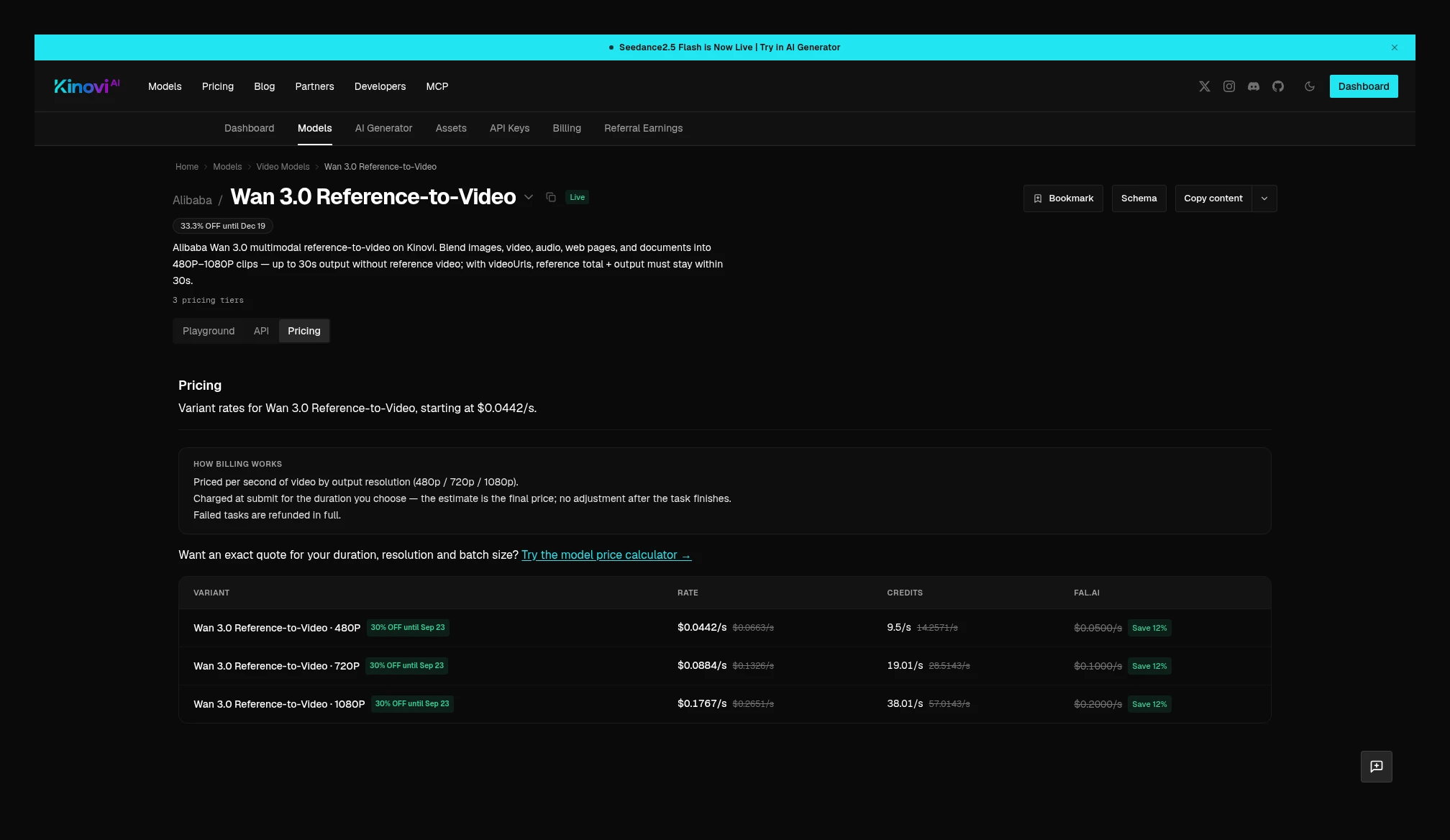 Kinovi Wan 3.0 Reference-to-Video current table is the same as text-to-video: 480p $0.0442/s, 720p $0.0884/s, 1080p $0.1767/s, billed on output duration. Source: https://kinovi.ai/models/wan3-ref-to-video#pricing
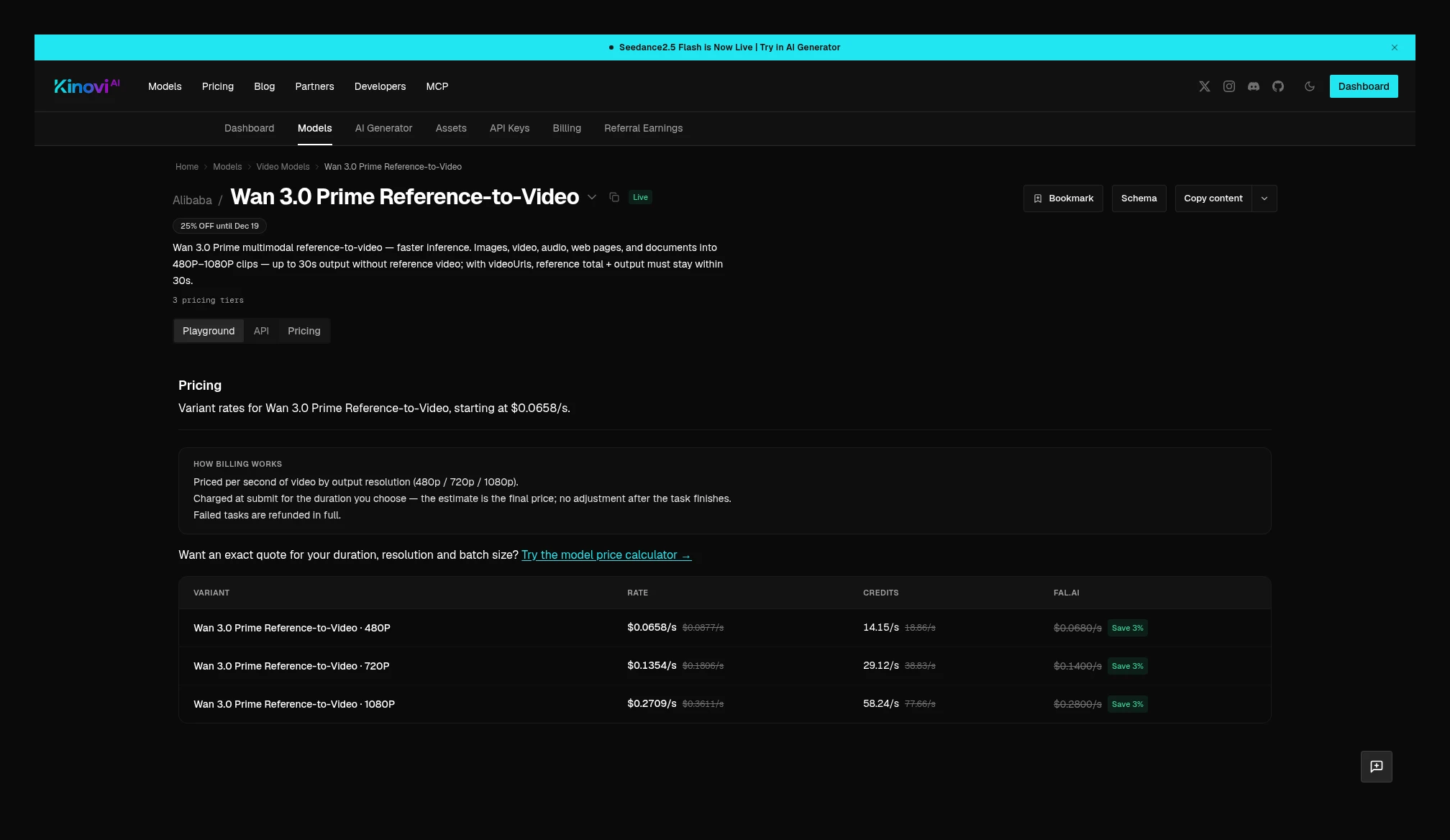 Kinovi Wan 3.0 Prime Reference-to-Video current table is the same as text-to-video: 480p $0.0658/s, 720p $0.1354/s, 1080p $0.2709/s, billed on output duration. Source: https://kinovi.ai/models/wan3-prime-ref-to-video#pricing
MiniMax H3: at the same specs, Kie is lower
Standard H3 is one of the overlapping video models with the most visible gap this time. The Kie price card states: 768p $0.04/s (8 credits/s), and 2K $0.065/s (13 credits/s). Kinovi is $0.0677/s and $0.1083/s. A 5-second 768p text-to-video job: Kie $0.20, Kinovi $0.3385, 69.3% higher on Kinovi relative to Kie. A 5-second 2K job: Kie $0.325, Kinovi $0.5415, 66.6% higher.
Kie also states: total cost = unit price × (generation duration + input-video duration) + extra image fees; the first 5 input images are free, and each one after that is 4 credits ($0.02); reference audio has no surcharge. High-value top-up bonuses would change the effective unit price again; the table above still uses published prices.
Kinovi’s H3 image-to-video page current unit prices are the same as text-to-video (768p $0.0677/s, 2K $0.1083/s). Reference-video page states: output is billed by duration and resolution, the input reference video is billed separately per second (currently the same price as output), the first 5 input images are free, and each one after that is $0.0271, and reference audio has no surcharge; at submit time it first holds credits for the output duration, then settles actual usage after completion. With a reference, both sides can be written as “output seconds × unit price + reference-video seconds × unit price + image fees beyond 5 images,” but the image add-on fees differ ($0.02 vs $0.0271).
The video page in Kie’s public catalog is standard H3, with no separate Max / Turbo entry point, so the official quotes below are recorded on the Kinovi side only. They are not mixed into the same row as standard H3, and no Kie Max price is invented.
H3 Max text-to-video is currently 480p $0.0447/s, 768p $0.0677/s, billed on output seconds, for 5–15 seconds. Max image-to-video price table is the same as text-to-video. Max reference page output unit prices are the same, but the input video is billed separately at 480p $0.0501/s, 768p $0.1313/s; from input image 2 onward, each image is $0.0677, and audio is free. This is not the same rule as the standard H3 reference page (“first 5 images free, input video at the same price as output”).
H3 Max Turbo text-to-video and image-to-video share the same prices: 480p $0.0230/s, 768p $0.0352/s, billed on output seconds. Turbo Talking Avatar is a separate entry point: one portrait plus one audio track, 480p $0.0447/s, 768p $0.0677/s, for 2–15 seconds, billed on output seconds.
If H3 is a large share of your bill, at today’s tables it is cheaper to stay on Kie. Do not use the “Kinovi is lower” line from Seedance to summarize H3.
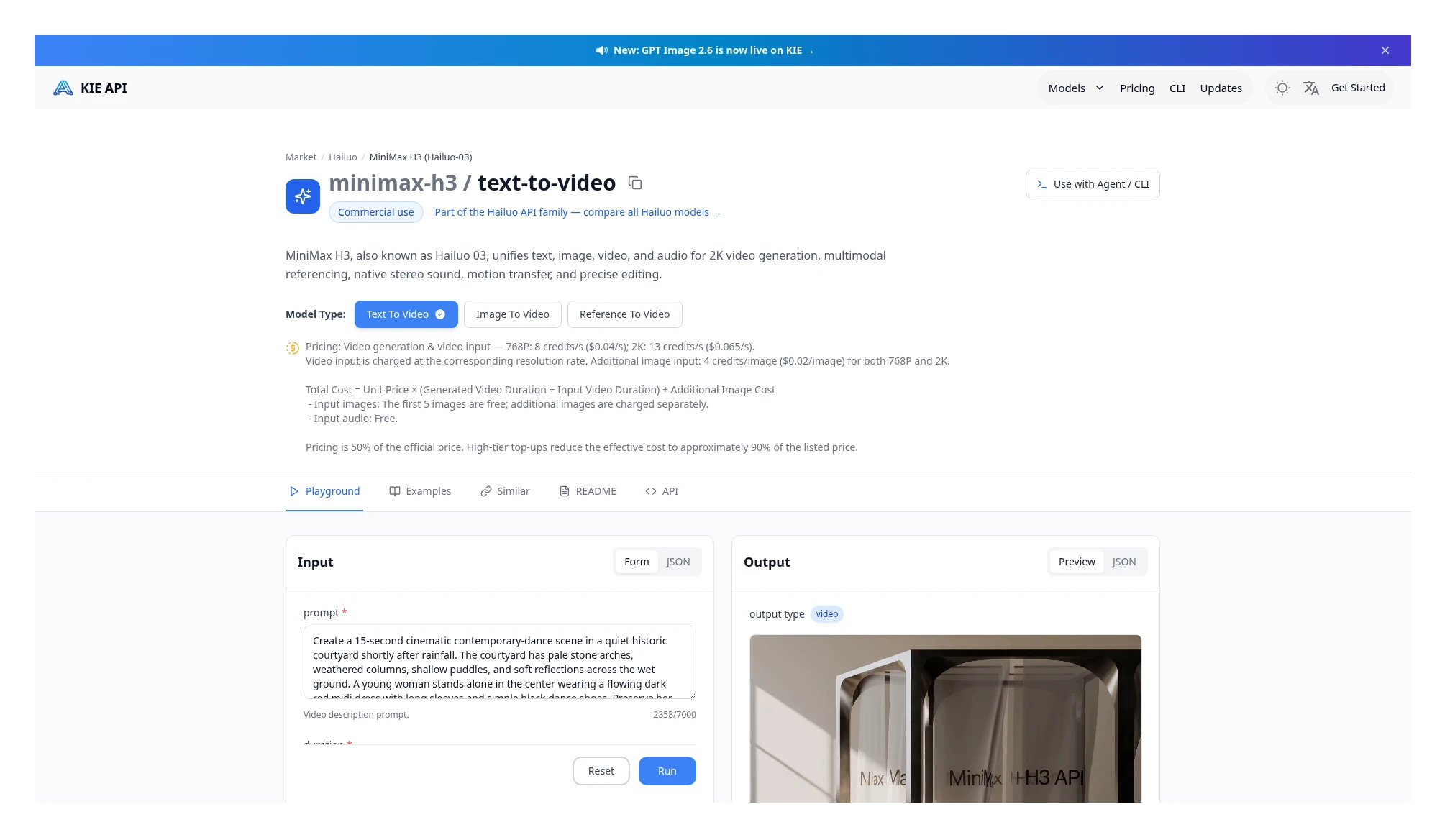 Kie MiniMax H3 price card: 768p $0.04/s, 2K $0.065/s; the input video is added to the output duration at the same unit price. Source: https://kie.ai/minimax-h3
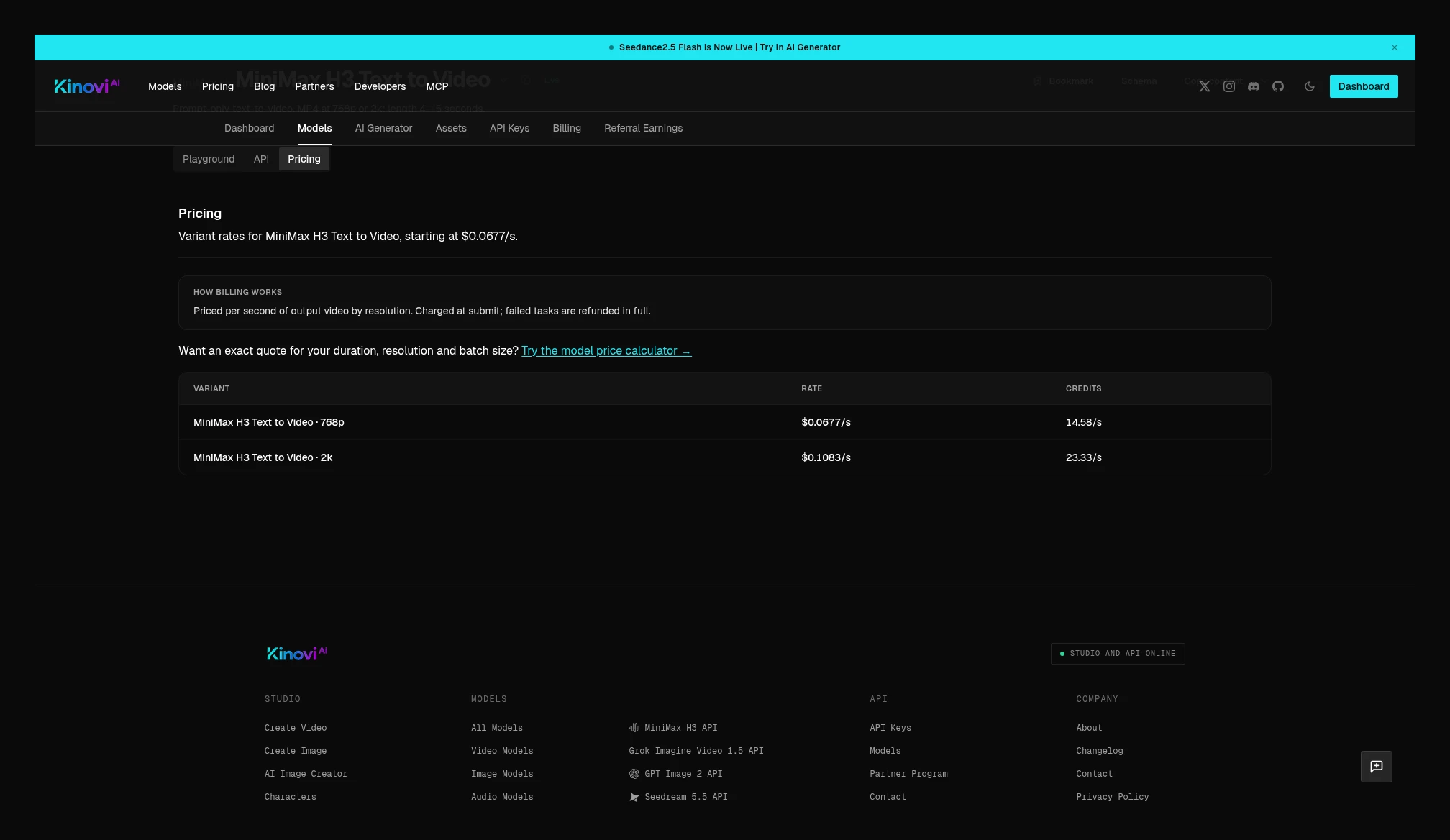 Kinovi MiniMax H3 text-to-video price table: 768p $0.0677/s, 2K $0.1083/s. Source: https://kinovi.ai/models/minimax-h3-text-to-video#pricing
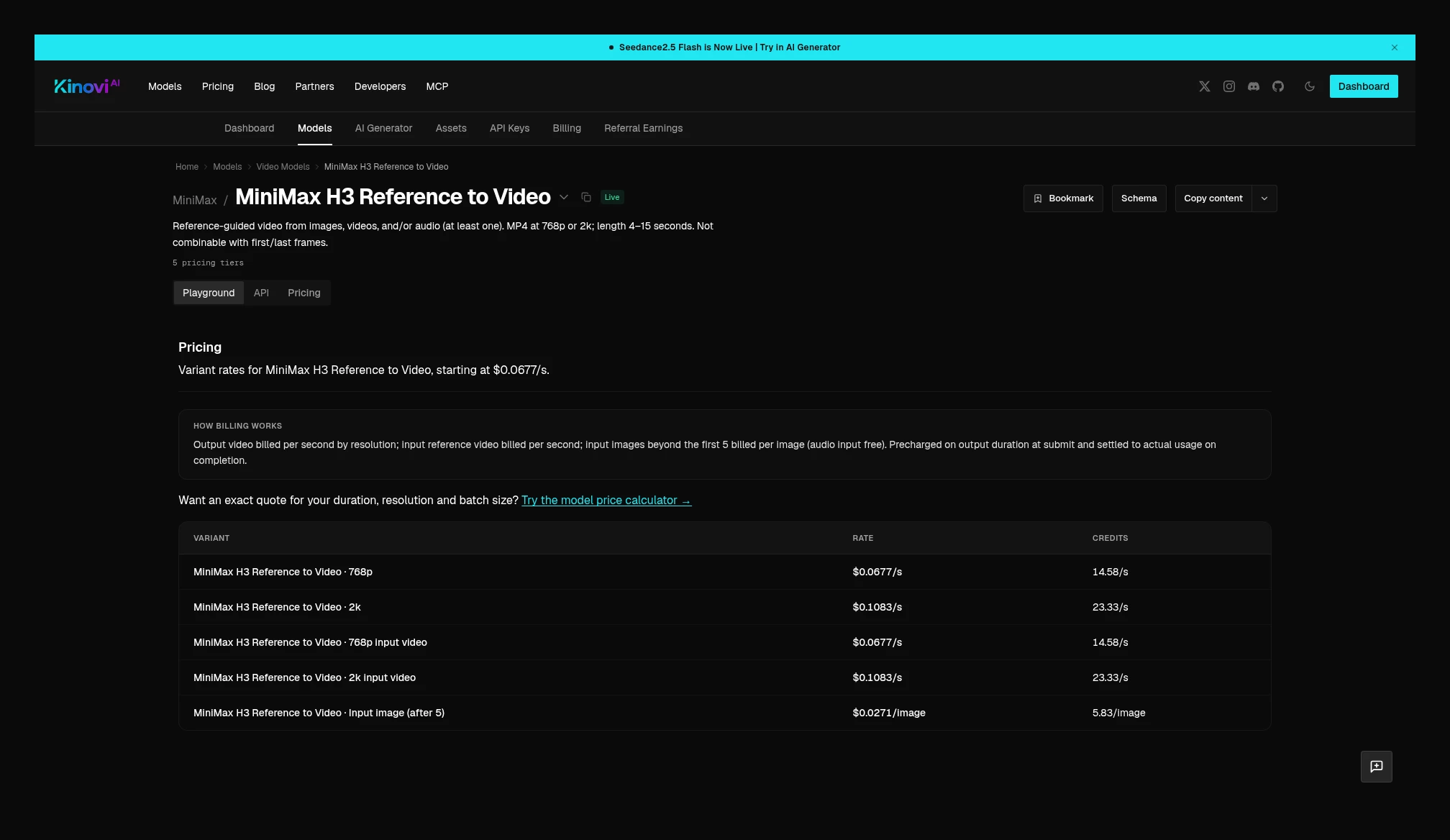 Kinovi MiniMax H3 Reference to Video: output and input video are both 768p $0.0677/s, 2K $0.1083/s; the first 5 input images are free, and each one after that is $0.0271; audio is free. Source: https://kinovi.ai/models/minimax-h3-reference-to-video#pricing
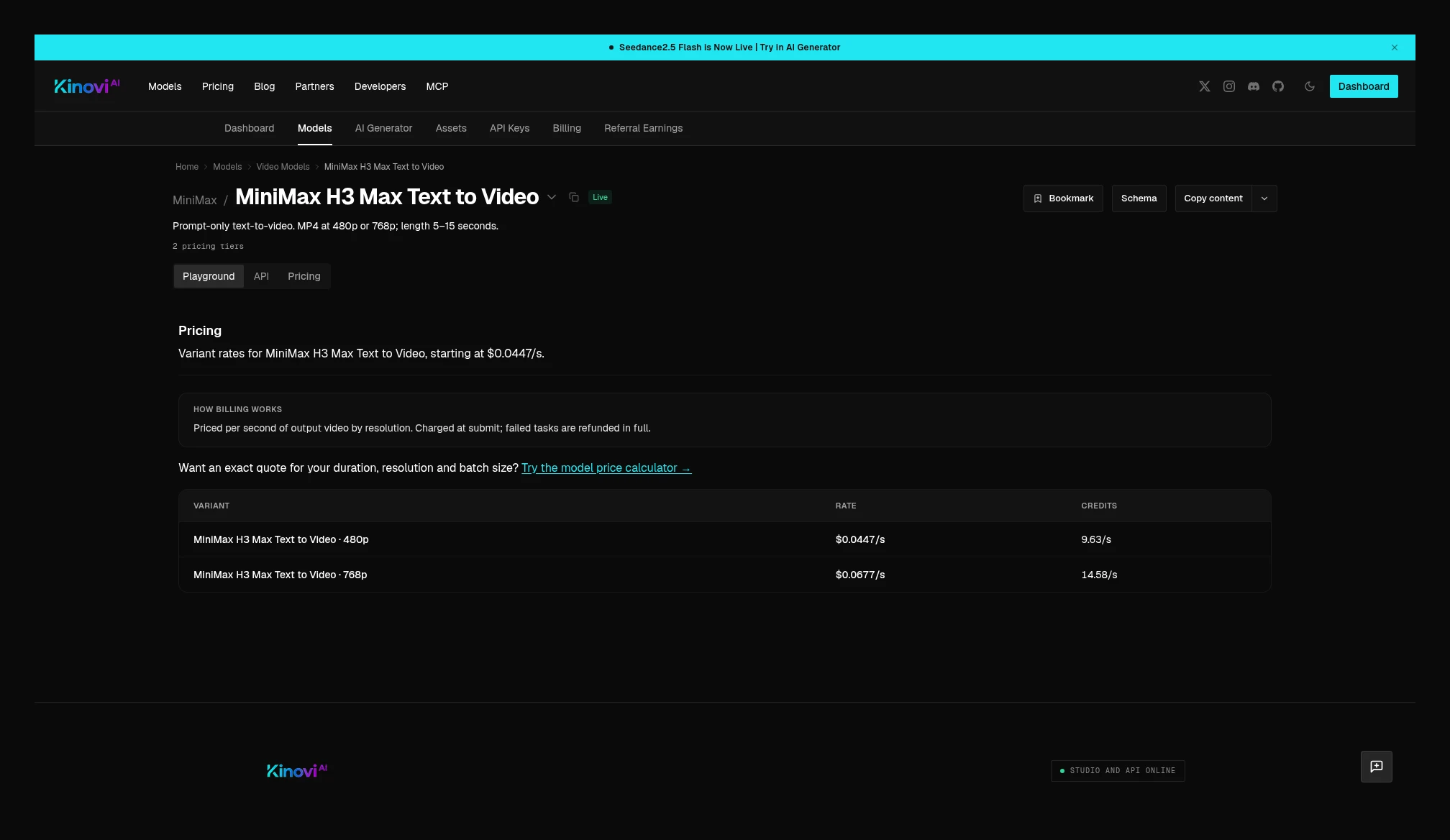 Kinovi MiniMax H3 Max text-to-video: 480p $0.0447/s, 768p $0.0677/s, billed on output seconds. The image-to-video page is the same price. Source: https://kinovi.ai/models/minimax-h3-max-text-to-video#pricing
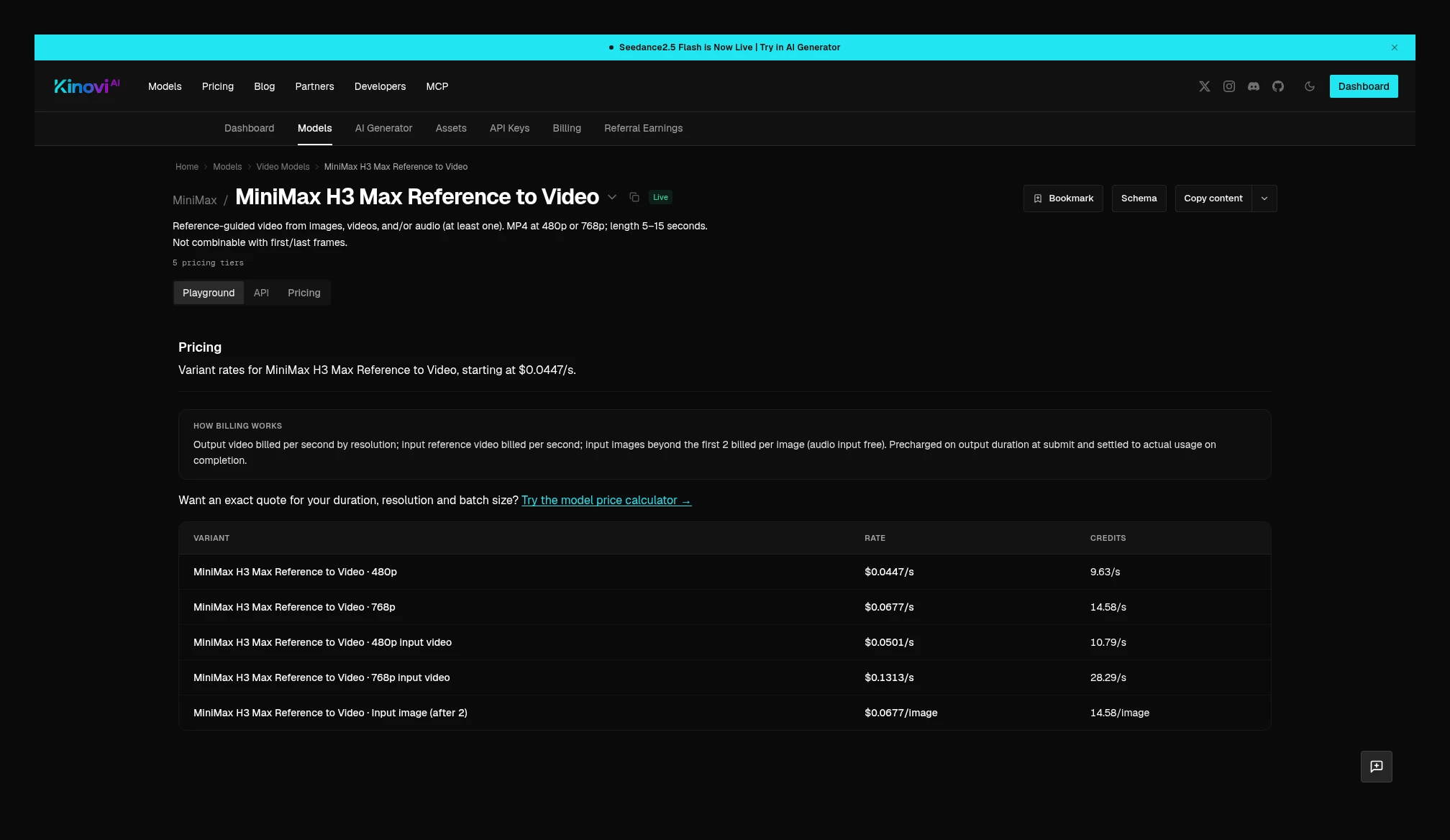 Kinovi MiniMax H3 Max reference: output 480p $0.0447/s, 768p $0.0677/s; input video 480p $0.0501/s, 768p $0.1313/s; from input image 2 onward, each image is $0.0677. Source: https://kinovi.ai/models/minimax-h3-max-reference-to-video#pricing
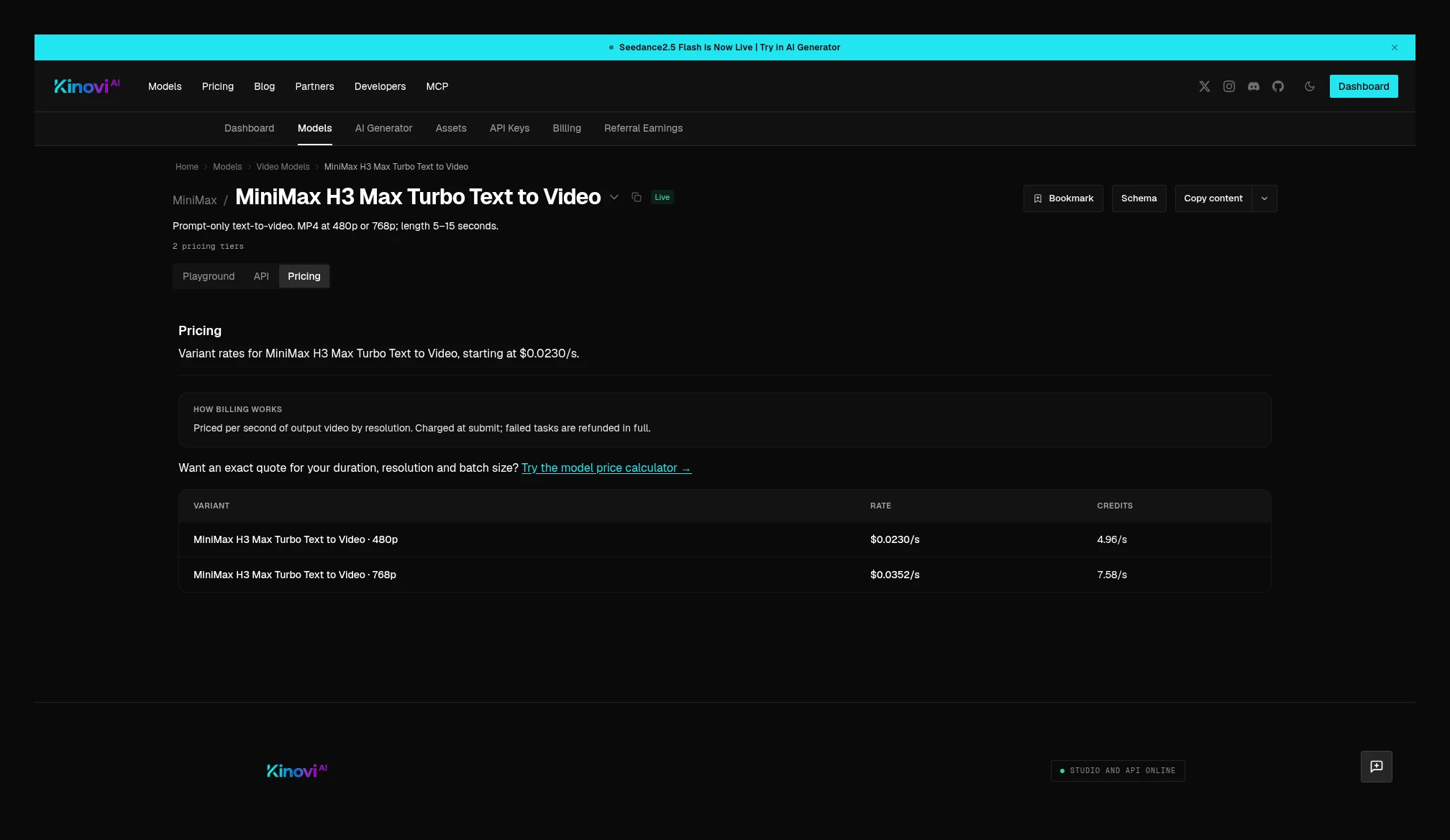 Kinovi MiniMax H3 Max Turbo text-to-video: 480p $0.0230/s, 768p $0.0352/s, billed on output seconds; the image-to-video page is the same price. Source: https://kinovi.ai/models/minimax-h3-max-turbo-text-to-video#pricing
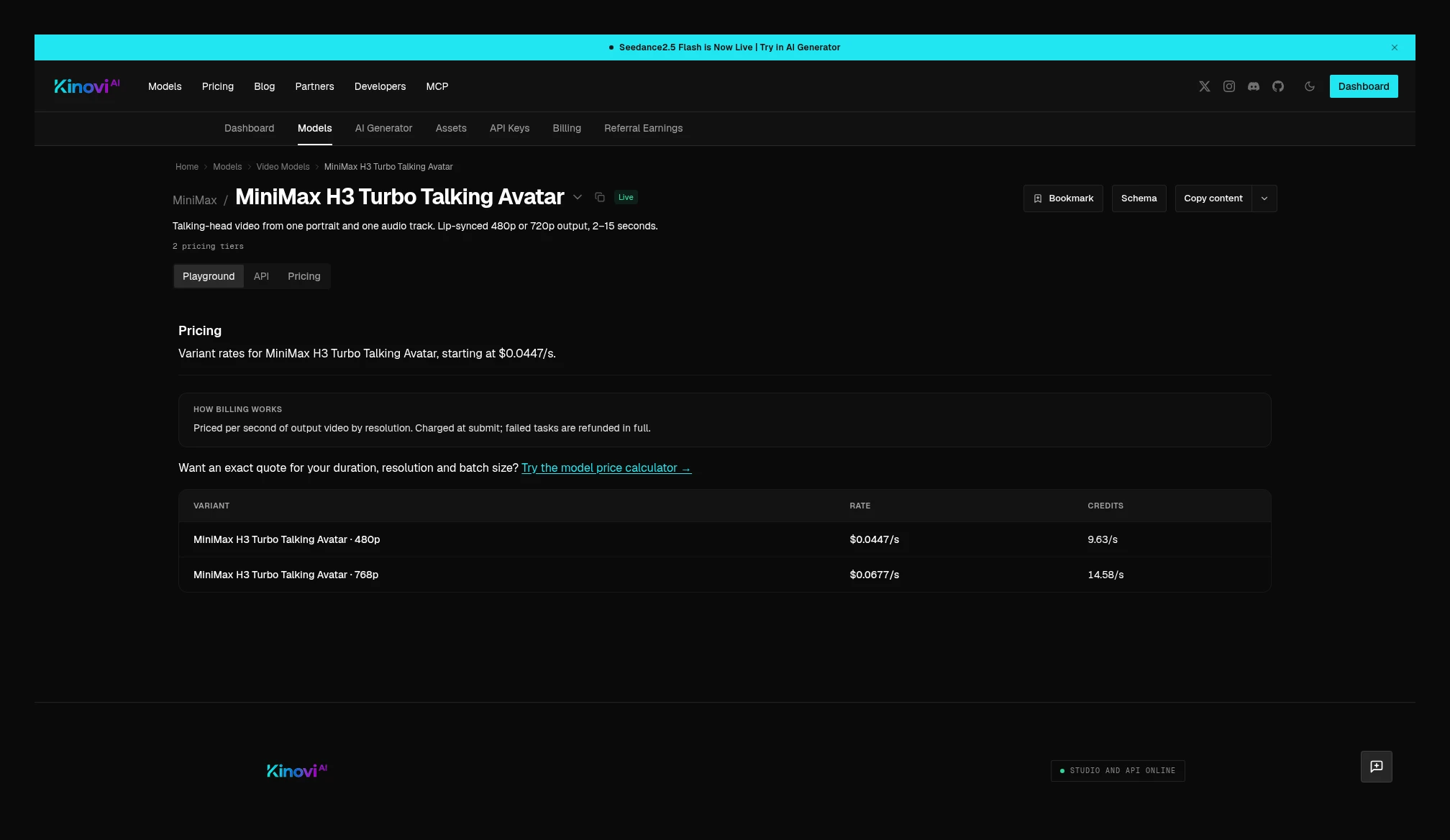 Kinovi MiniMax H3 Turbo Talking Avatar: 480p $0.0447/s, 768p $0.0677/s; one portrait plus one audio track, billed on output seconds. Source: https://kinovi.ai/models/minimax-h3-turbo-avatar-talking#pricing
Takeaway: has already been checked against the current tables on each model page: Seedance 2.5, 2.5 Flash, and 2.0 standard / Fast, plus HappyHorse 1.0 and Kling 4.0 at 720p/1080p, are lower on Kinovi at the same specs; Seedance 2.0 Mini, MiniMax H3, Nano Banana 2, and no-reference text-to-video for Wan 3.0 and Prime, are lower on Kie at the same specs. Seedream 5.5 plain text-to-image current tables match, but image-to-image, layer decompose, and edit cannot use the text-to-image per-image price as the full job; 5.0 Pro plain text-to-image is lower on Kie per image. Whether a migration is worth it depends on which model you actually run; one row in the summary table cannot stand in for the whole catalog.
Image price cards
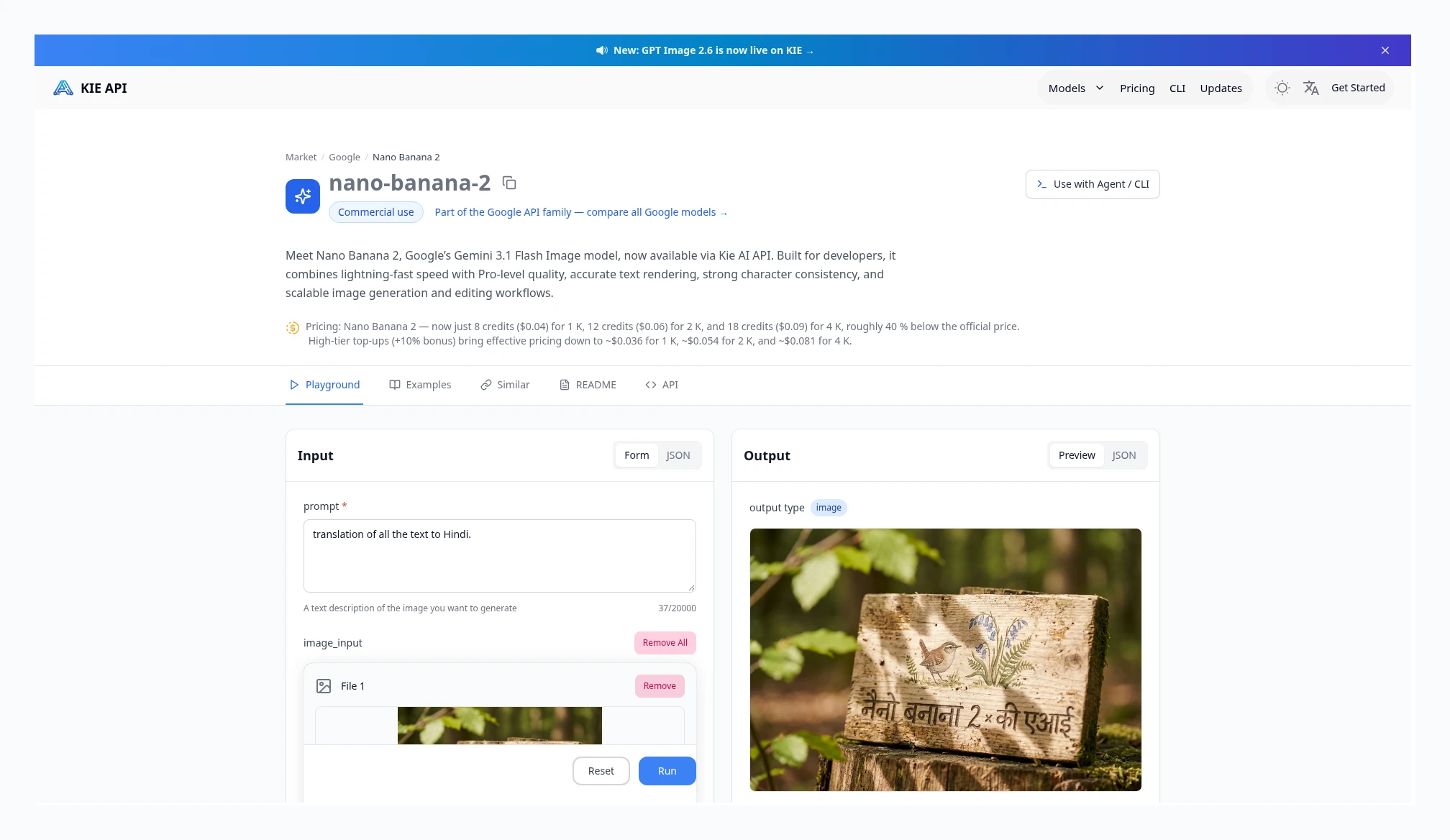 Kie Nano Banana 2: 1K $0.04, 2K $0.06, 4K $0.09. Source: https://kie.ai/nano-banana-2
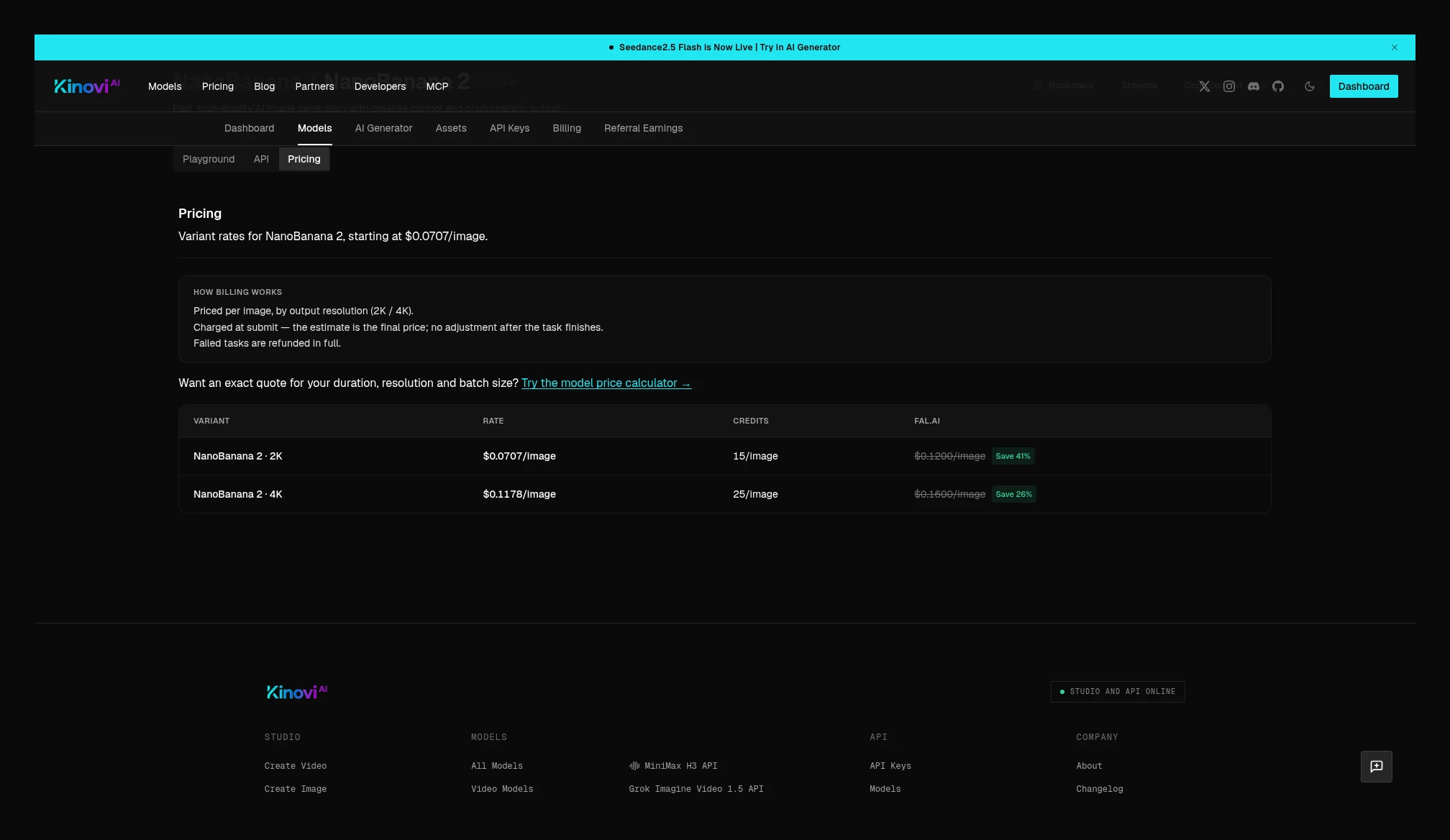 Kinovi NanoBanana 2: 2K $0.0707, 4K $0.1178; that page has no 1K row. Source: https://kinovi.ai/models/nanobanana-2#pricing
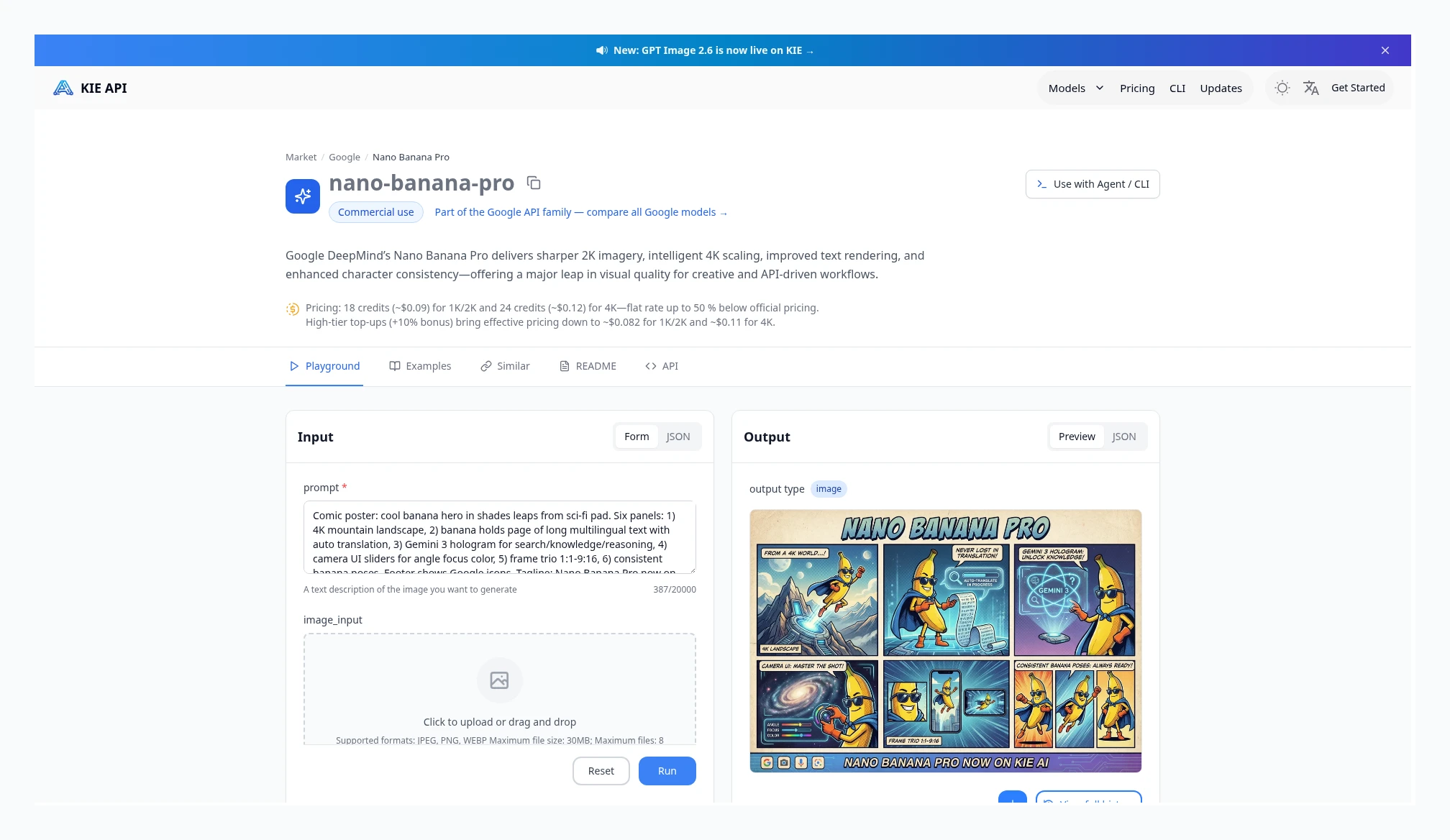 Kie Nano Banana Pro: 1K / 2K are both $0.09, and 4K is $0.12. Source: https://kie.ai/nano-banana-pro
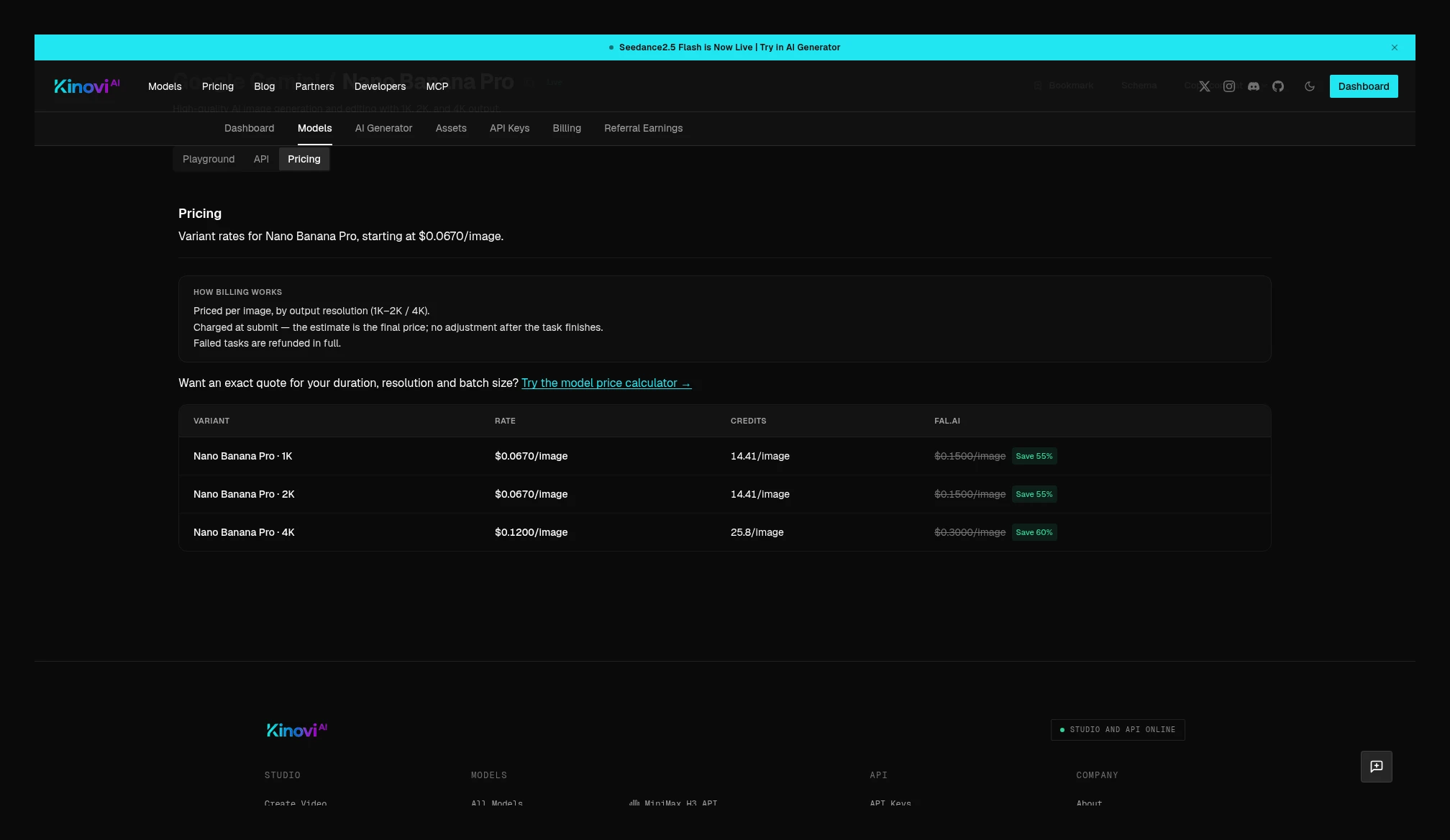 Kinovi Nano Banana Pro: 1K / 2K are both $0.0670, and 4K is $0.1200. Source: https://kinovi.ai/models/nano-banana-pro#pricing
HappyHorse 1.0
Both sides have published Kie HappyHorse 1.0 and Kinovi HappyHorse, both at 720p / 1080p, billed on output seconds. The Kie configuration page states that duration must be 3–15 seconds, defaulting to 5 seconds. At 720p $0.1400 vs $0.0801, 42.8% lower; at 1080p $0.2400 vs $0.1413, 41.1% lower. A 5-second 720p job: Kie $0.70, Kinovi $0.4005. 1.1 is a separate model; its quotes are in the next subsection and are not mixed with 1.0.
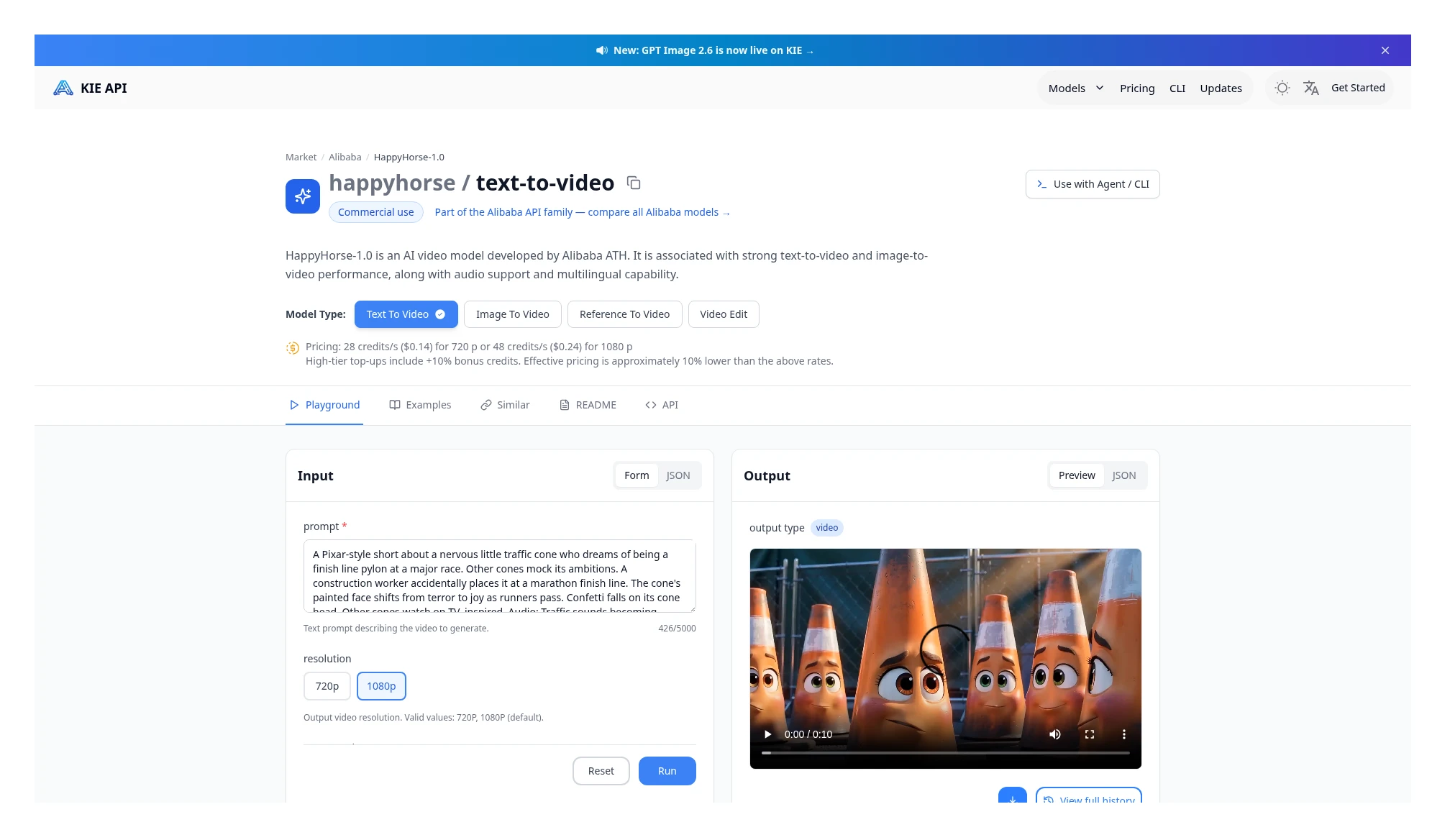 Kie HappyHorse 1.0: 720p $0.14/s, 1080p $0.24/s. Source: https://kie.ai/happyhorse-1-0
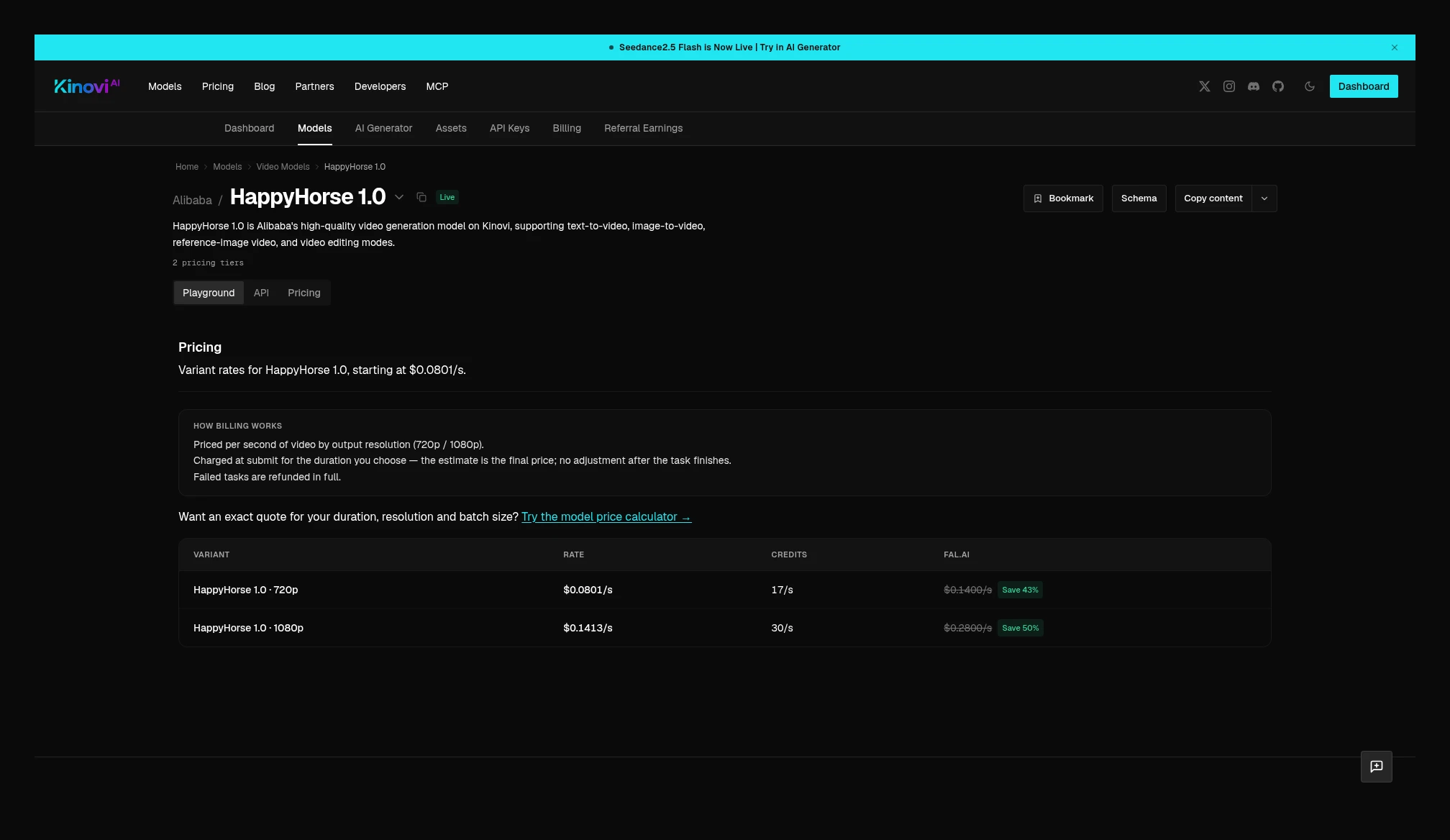 Kinovi HappyHorse current price table: 720p $0.0801/s, 1080p $0.1413/s, billed on output seconds. Source: https://kinovi.ai/models/happyhorse#pricing
Kie also has HappyHorse 1.1. This screenshot has Reference to Video selected: 720p $0.1125/s, 1080p $0.145/s. The same page can switch between text-to-video and image-to-video; the price card does not list a separate reference-video rate. The Kinovi catalog showed a 1.0 page this time, so 1.1 is recorded as a Kie-side quote only and is not mixed with 1.0.
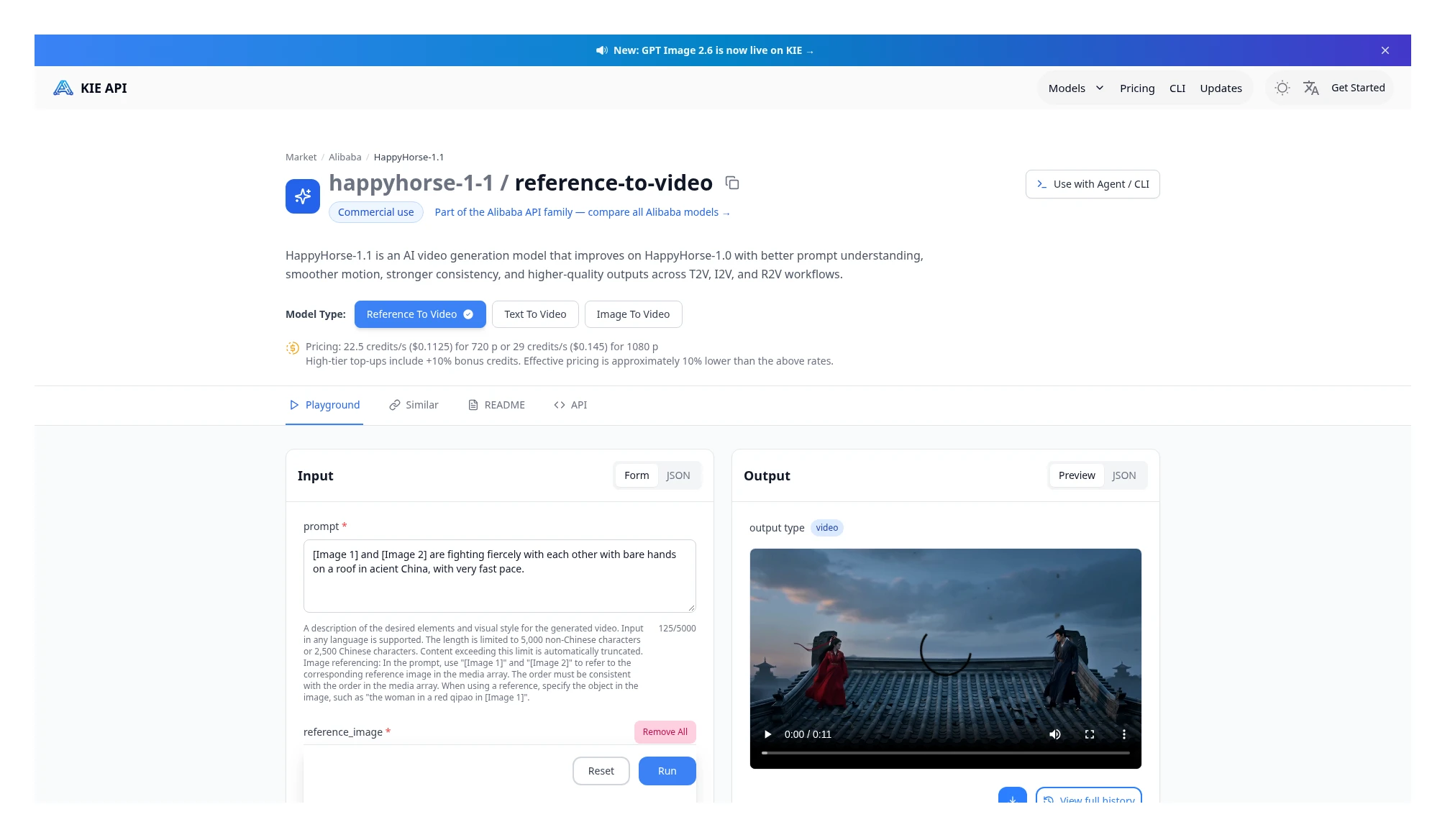 Kie HappyHorse 1.1 Reference to Video: 720p $0.1125/s, 1080p $0.145/s. Source: https://kie.ai/happyhorse-1-1
Seedream 5.5 and 5.0 Pro
Seedream 5.5 and Kinovi 5.5’s plain text-to-image current tables match: both are $0.0180 / $0.0180 at 1K / 1.5K, and both are $0.0315 / $0.0315 at 2K. The “same” result in the summary table above applies only to this text-to-image job.
Image-to-image, layer decompose, and edit have to be calculated separately; you cannot treat $0.0180 / $0.0315 as the full job. Kie’s Image-to-image entry point output per-image price is the same as text-to-image, but each input image adds another $0.0072. The page’s example is 2K output plus 2 input images: $0.0315 + 2 × $0.0072 = $0.0459. Layer decompose bills every output layer (including the base layer) as one output image, then adds the input-image fee; the page’s example is 4 1K outputs plus 1 input image: 4 × $0.0180 + $0.0072 = $0.0792.
Kinovi’s 5.5 edit page price table still lists 1K / 1.5K $0.0180, 2K $0.0315, but the billing notes state that edits are billed at the output-resolution tier, plus each reference image (including the first)billing. That page does not separately list a USD surcharge for reference images, so $0.0180 / $0.0315 cannot be treated as the entire cost of an edit job, and this article does not invent the missing surcharge. The Kinovi text-to-image page itself bills by output resolution and does not add an input-image surcharge on that page.
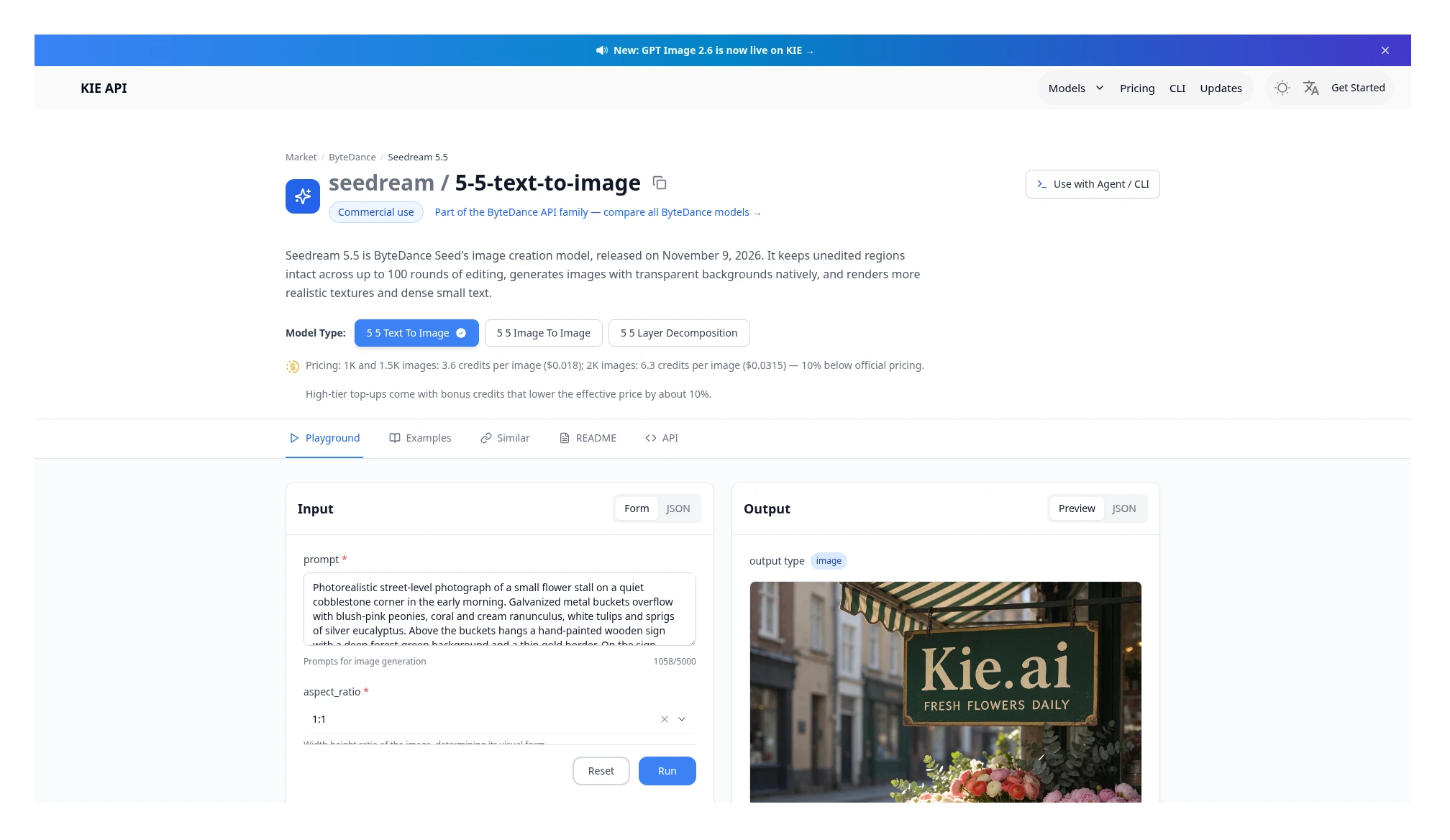 Kie Seedream 5.5 text-to-image: 1K / 1.5K $0.018/image, 2K $0.0315/image. Source: https://kie.ai/seedream-5-5
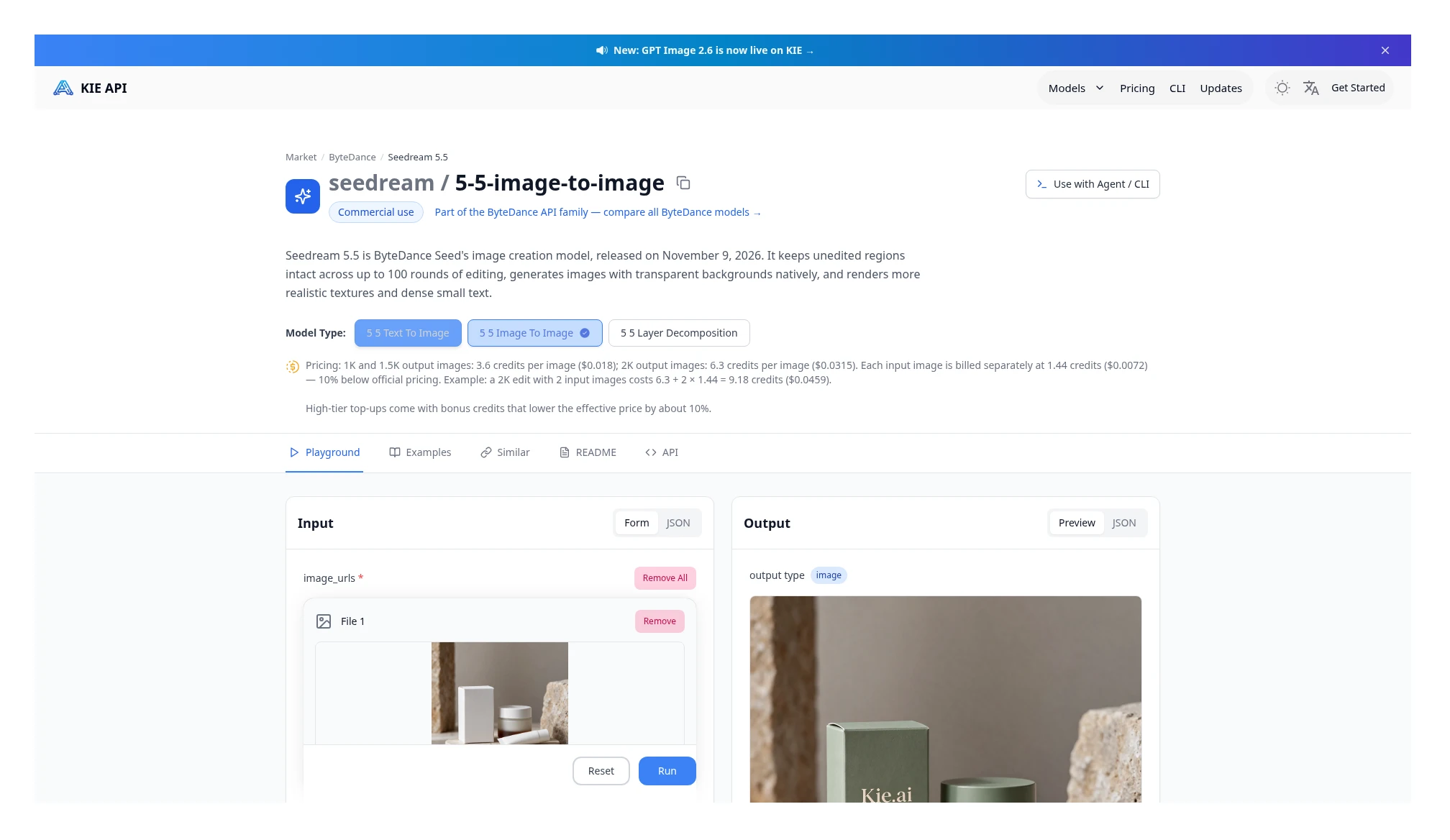 Kie Seedream 5.5 image-to-image: the output per-image price is the same as text-to-image, and each input image adds another $0.0072. The page’s example is 2K output plus 2 input images, totaling $0.0459. Source: https://kie.ai/seedream-5-5?model=seedream%2F5-5-image-to-image
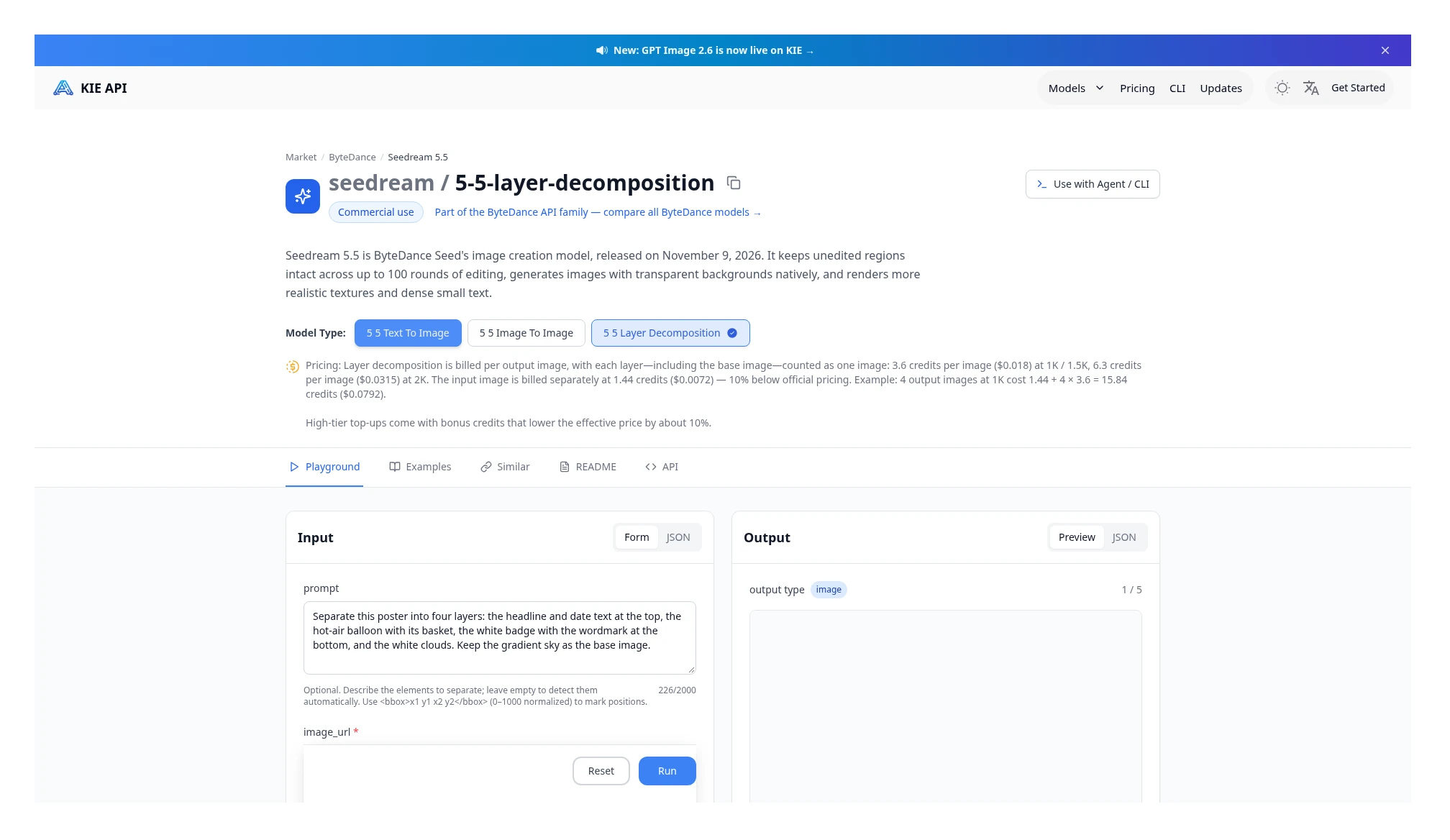 Kie Seedream 5.5 layer decompose: each output layer (including the base) is billed as one output image, and input images add another $0.0072. The page’s example is 4 1K outputs plus an input image, totaling $0.0792. Source: https://kie.ai/seedream-5-5?model=seedream%2F5-5-layer-decomposition
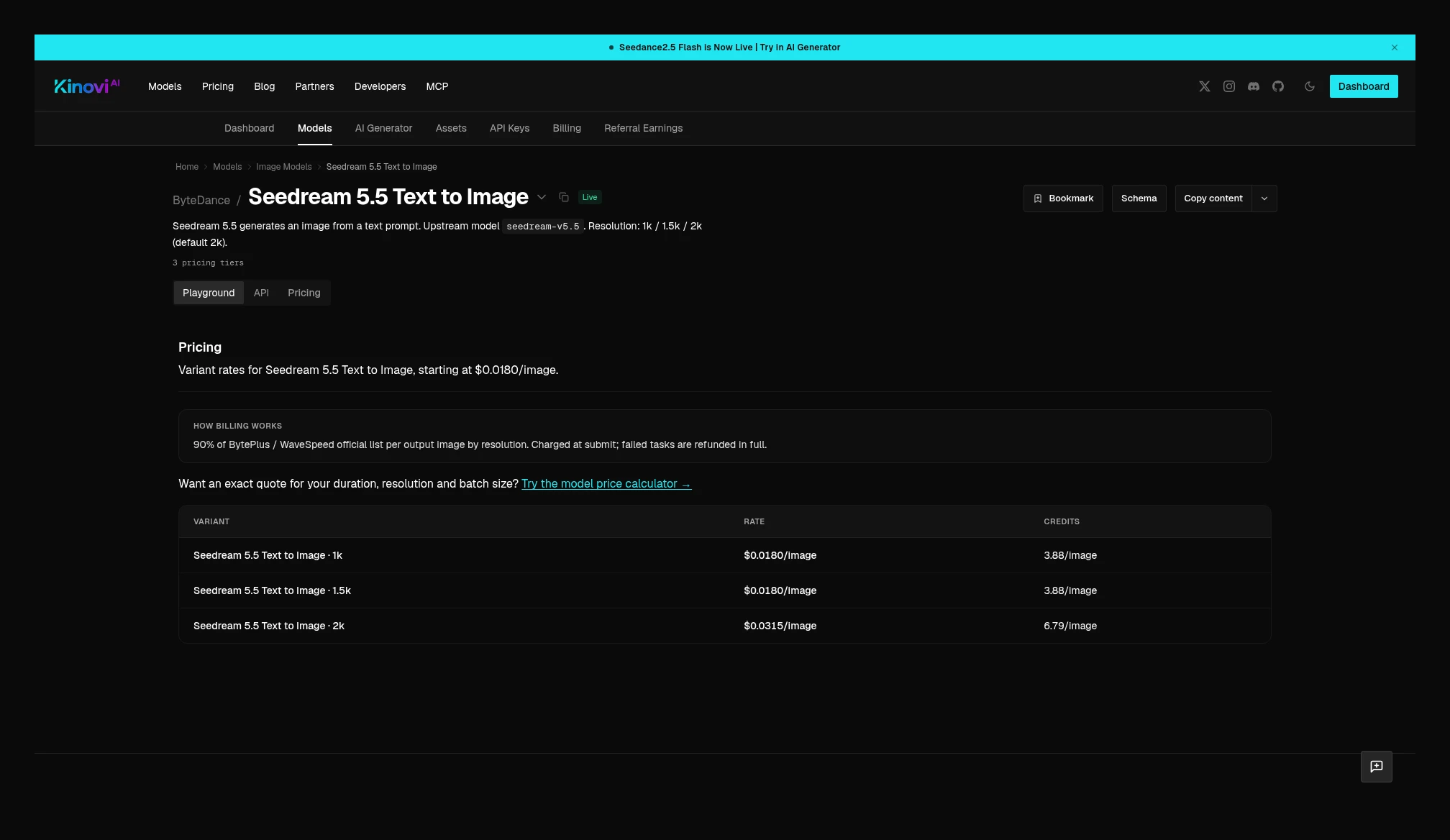 Kinovi Seedream 5.5 text-to-image current table: 1K / 1.5K $0.0180/image, 2K $0.0315/image. Source: https://kinovi.ai/models/seedream-5-5#pricing
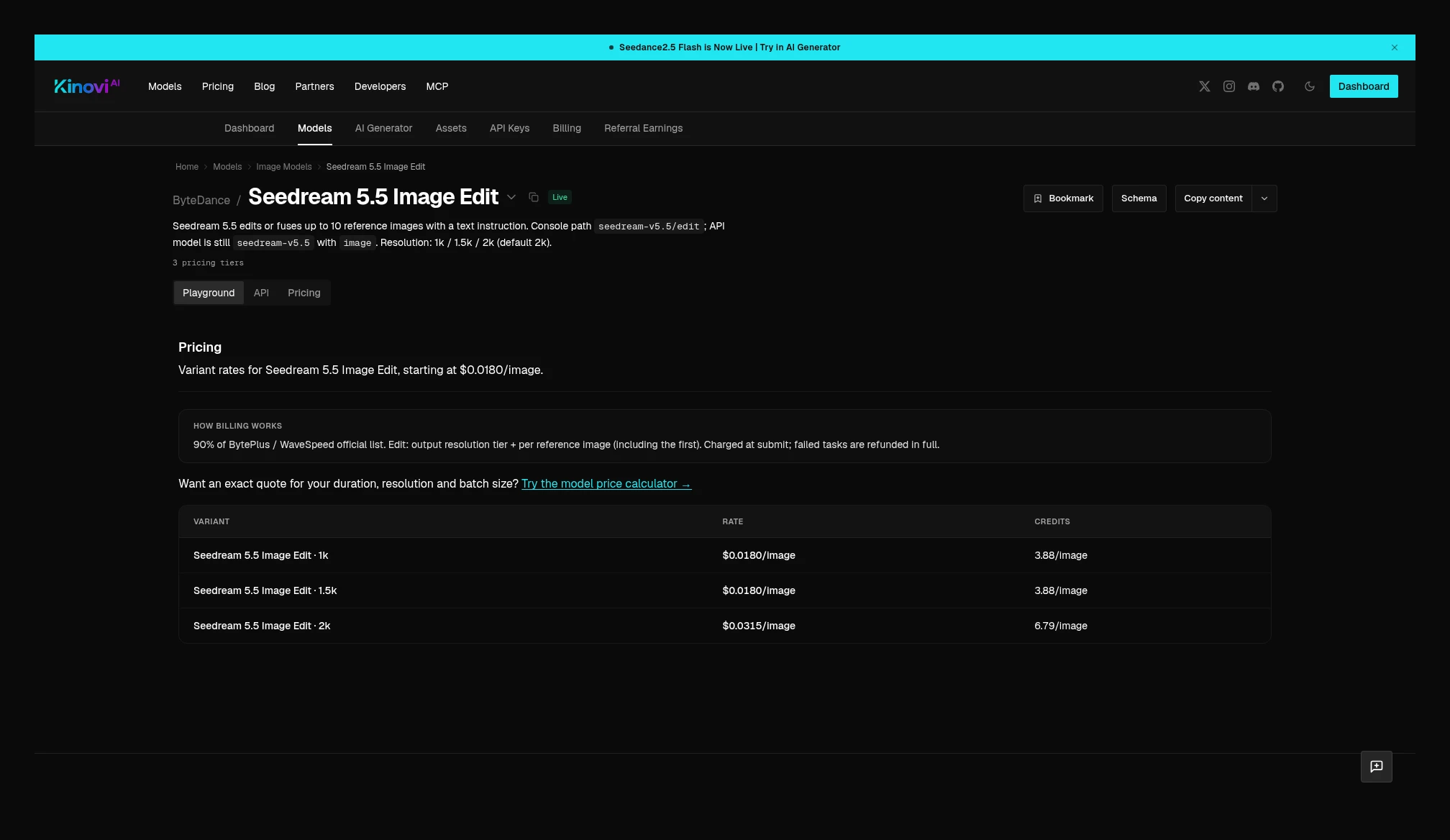 Kinovi Seedream 5.5 edit: the table still lists 1K / 1.5K $0.0180 and 2K $0.0315, but the notes say each reference image is also billed (including the first); the page does not list a separate USD surcharge for reference images. Source: https://kinovi.ai/models/seedream-5-5-edit#pricing
Takeaway: For Seedream 5.5 plain text-to-image, both sides are 1K / 1.5K $0.018 and 2K $0.0315, so you can compare per image. Once you switch to image-to-image, layer decompose, or edit, you can no longer use those two figures as the full job: Kie image-to-image adds $0.0072 per input image, and layer decompose adds the input-image fee on top of each output layer; Kinovi’s edit page states that every reference image, including the first, is billed separately, but it does not give a USD surcharge, so the full job cannot be calculated for now.
Seedream 5.0 Pro plain text-to-image per image: 1K $0.0350 vs $0.0527, 50.6% higher; 2K $0.0700 vs $0.0904, 29.1% higher. Kie’s image-to-image entry states that the first input image is free, and each one after that is $0.0025; the Kinovi page states that reference images add no surcharge. When you compare jobs that include a reference, you have to count Kie’s input-image fee; you cannot compare output per-image prices alone.
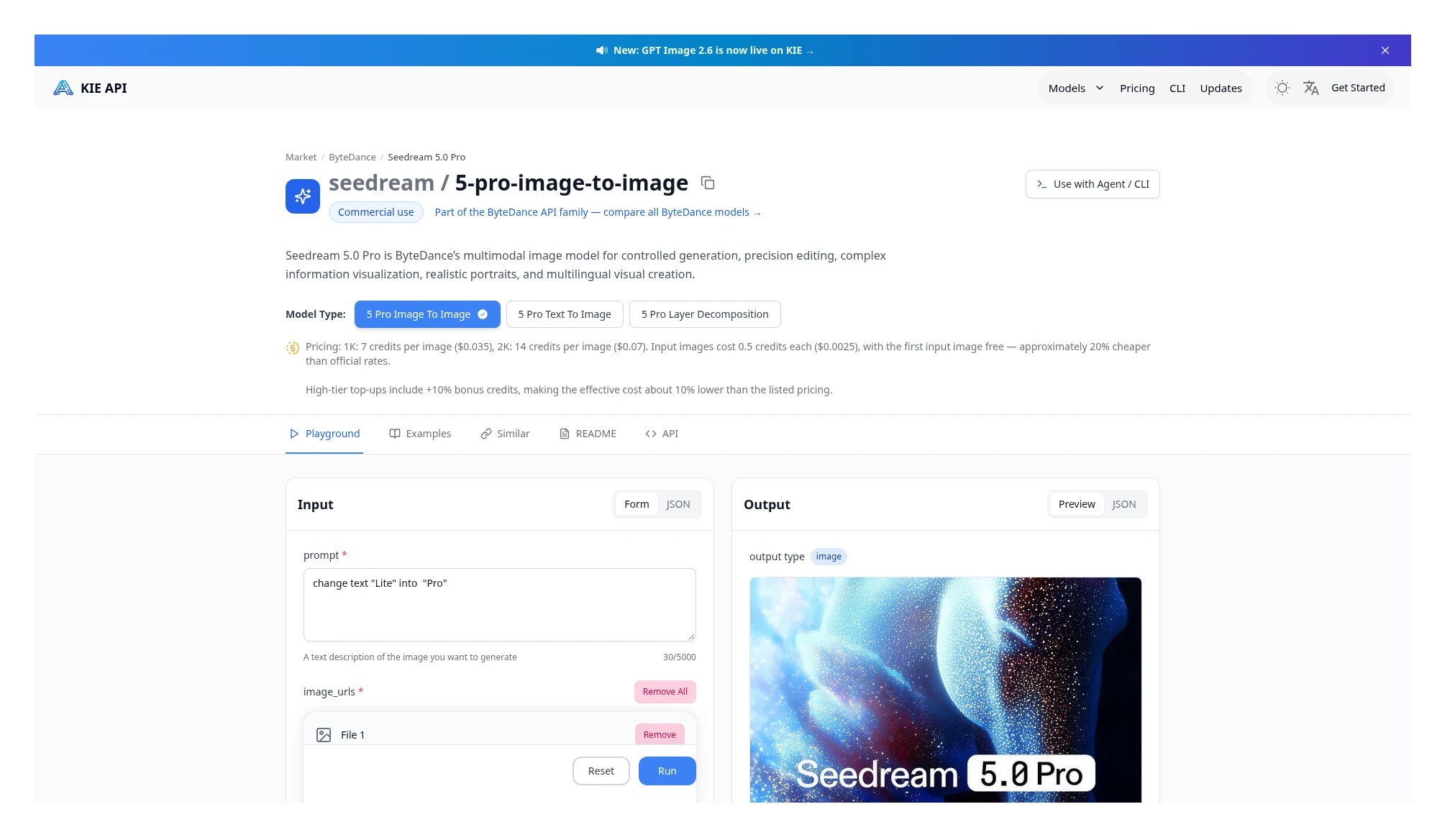 Kie Seedream 5.0 Pro: 1K $0.035/image, 2K $0.07/image; input images $0.0025/image, with the first one free. Source: https://kie.ai/seedream-5-0-pro
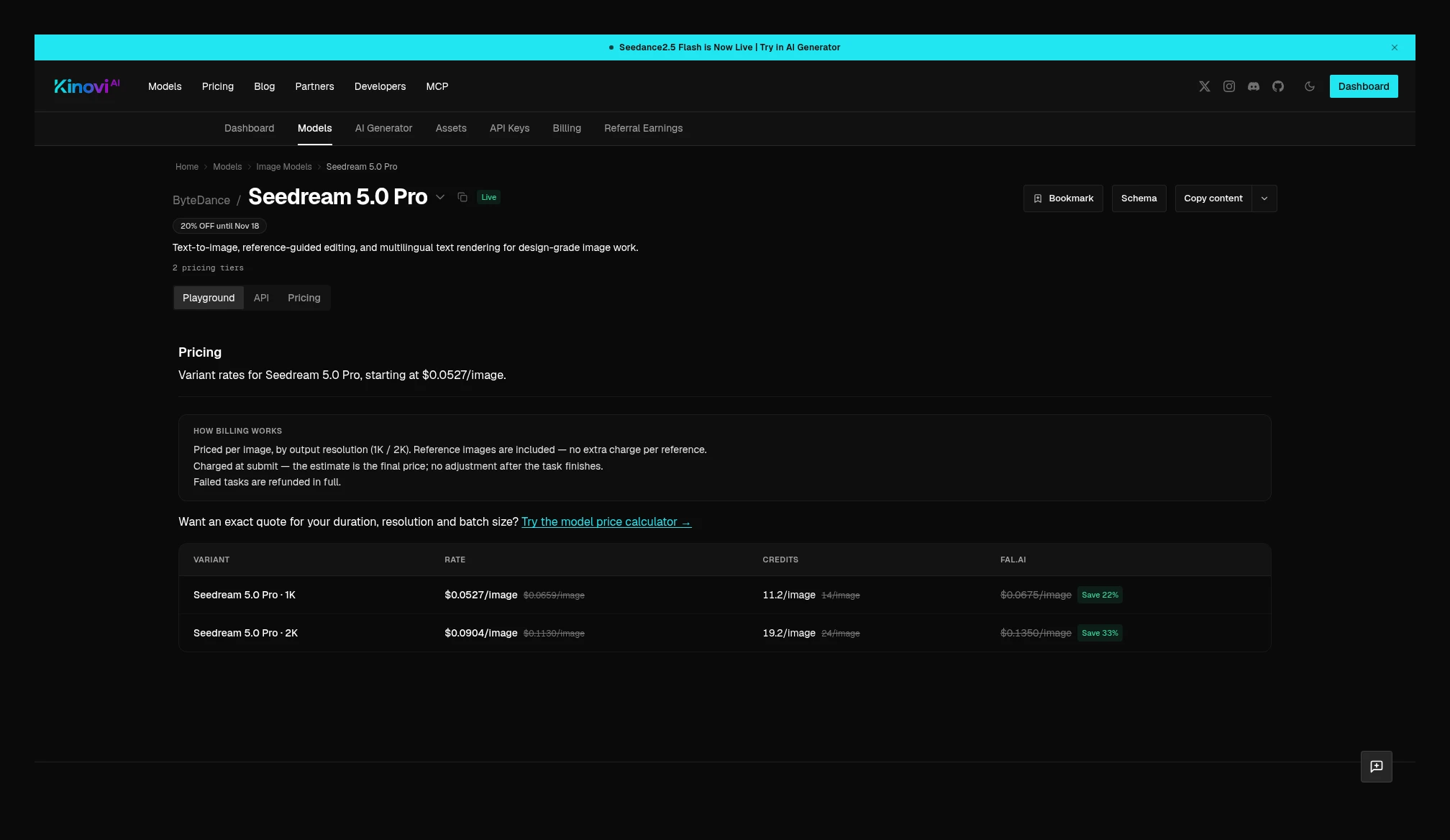 Kinovi Seedream 5.0 Pro current table: 1K $0.0527/image, 2K $0.0904/image; reference images are included, with no extra charge. Source: https://kinovi.ai/models/seedream-5-pro#pricing
GPT Image 2 and 2.5: the tiers and billing units do not line up, so no side-by-side percentages
Kie GPT Image 2 is a flat price by resolution: 1K $0.03, 2K $0.05, 4K $0.08, and the page does not further split quality tiers, nor map these three tiers to Low / Medium / High. Switching to Image-to-image entry point after that, the resolution prices are the same as text-to-image, and the price card does not list a separate input-image fee. Kinovi’s price table is split into nine tiers by quality × resolution, and states that aspect ratio and reference images do not change the price:
The docs example defaults to low / 1K. Official materials do not map Kie’s flat prices to Low, Medium, or High, so this section only lists both tables. It does not conclude that one side is “lower at the same tier,” invent a quality mapping, or write a percentage.
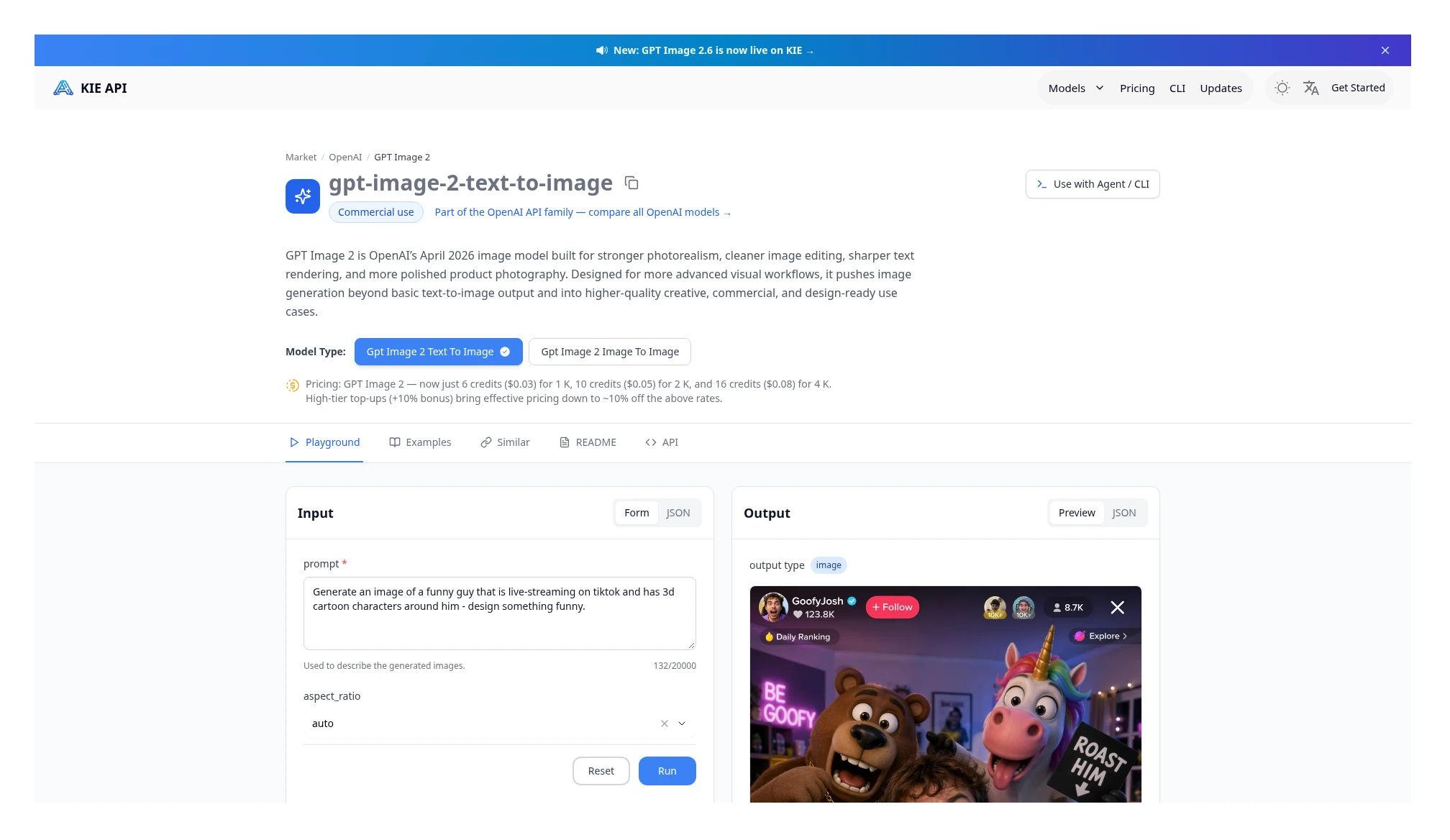 Kie GPT Image 2 text-to-image: 1K $0.03, 2K $0.05, 4K $0.08, with no further quality split. Source: https://kie.ai/gpt-image-2
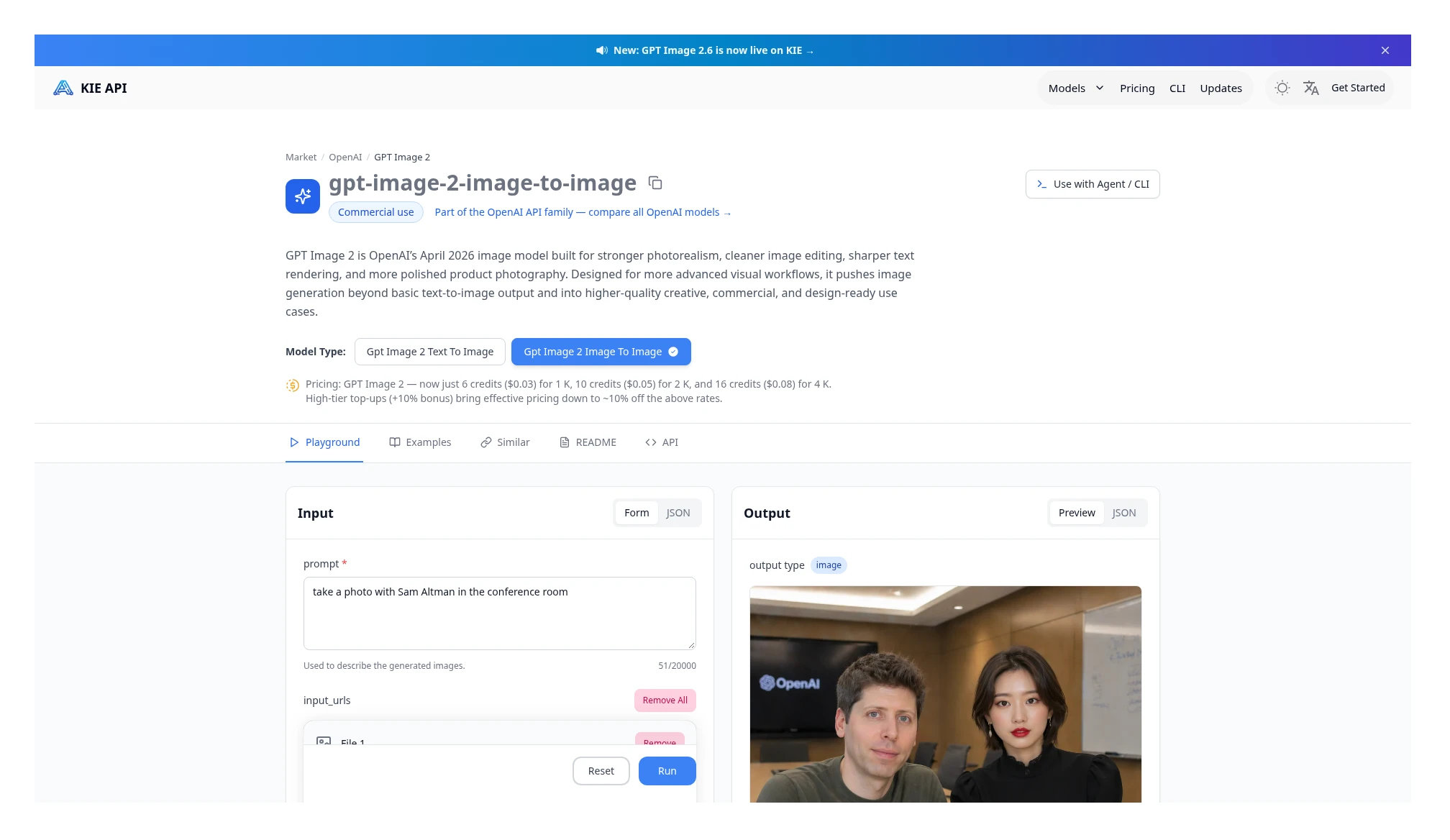 Kie GPT Image 2 image-to-image: resolution prices are the same as text-to-image, and the price card does not list a separate input-image fee. Source: https://kie.ai/gpt-image-2?model=gpt-image-2-image-to-image
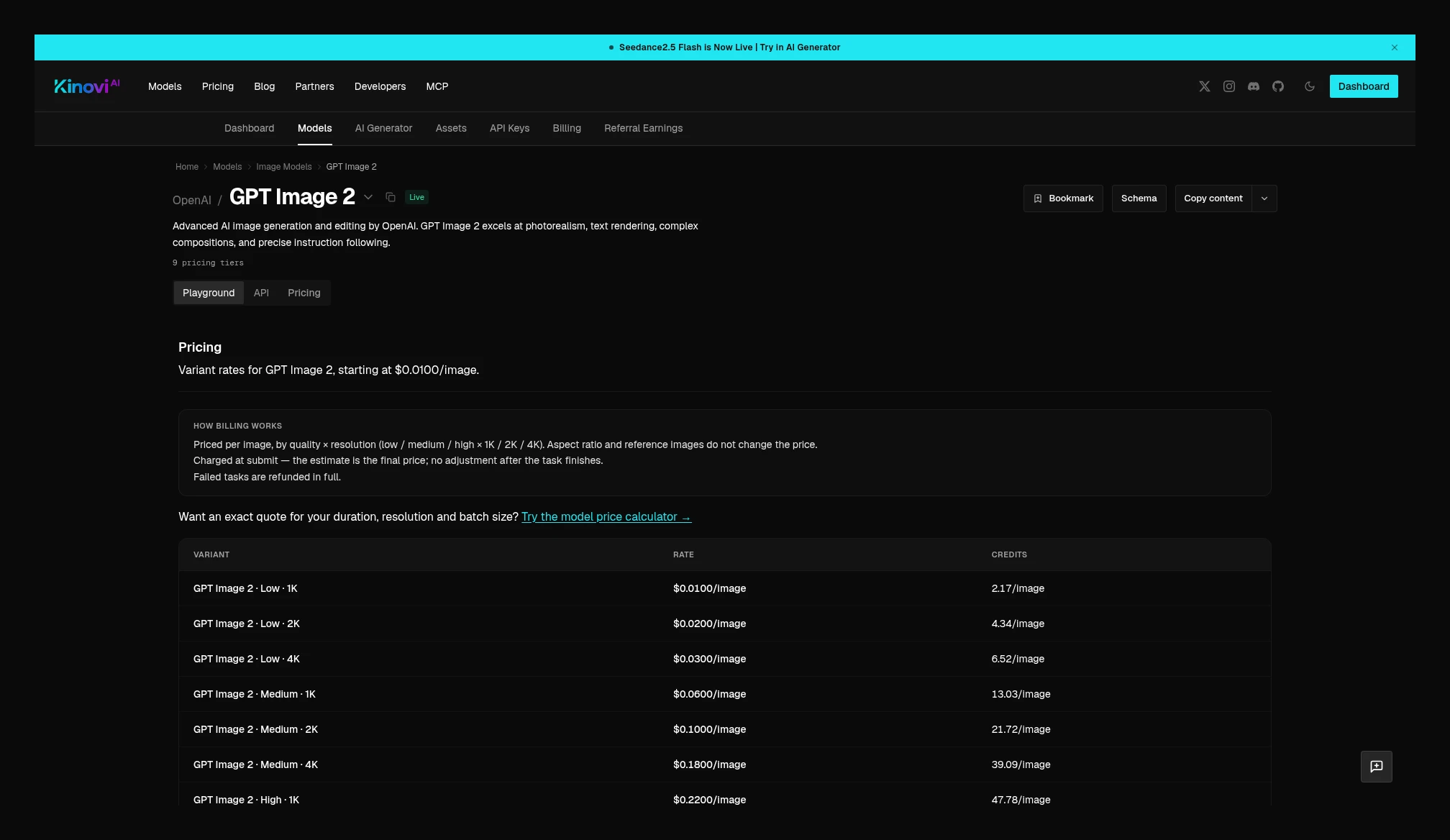 Kinovi GPT Image 2: billed by Low / Medium / High and 1K / 2K / 4K; aspect ratio and reference images do not change the price. Source: https://kinovi.ai/models/gpt-image-2#pricing
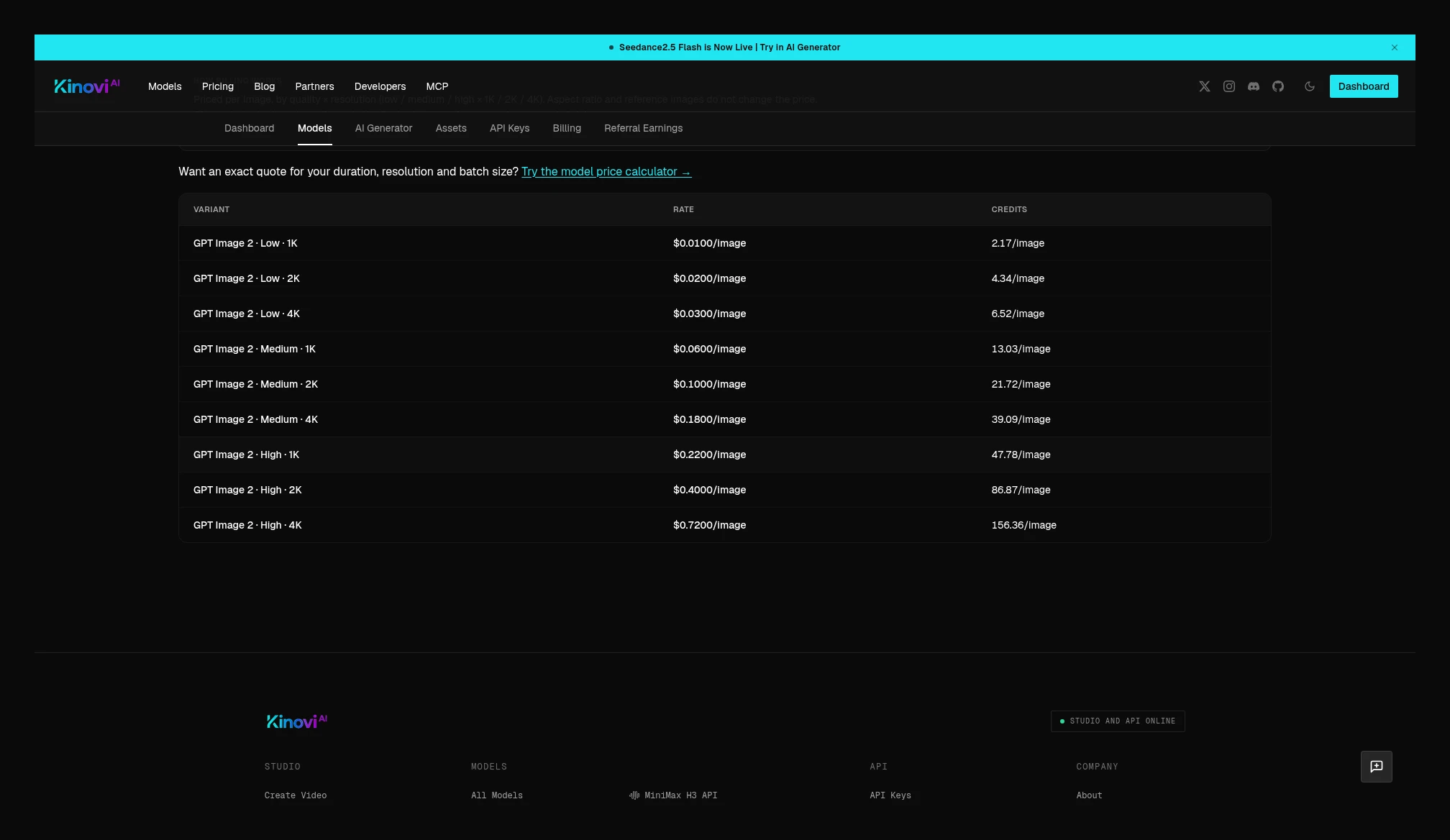 Kinovi GPT Image 2 full nine tiers: Low $0.0100 / $0.0200 / $0.0300, Medium $0.0600 / $0.1000 / $0.1800, High $0.2200 / $0.4000 / $0.7200. Source: https://kinovi.ai/models/gpt-image-2#pricing
GPT Image 2.5 This official screenshot has Flare text-to-image selected: the price card lists 1K per image as $0.03, 2K $0.05, 4K $0.08. The same page also has Flare image-to-image, plus Sunburst text-to-image / image-to-image entry points; this batch did not switch to a Sunburst price card, so this set of Flare per-image prices is not written as a checked Sunburst quote.
What has been captured for Kinovi is Sunburst, which settles in tokens, not as a flat per-image price. The current table: text input $0.0054 / 1k tokens, cached text $0.0014, image input $0.0086, cached image input $0.0022, image output $0.0324. At submit time it first holds an estimate based on quality and resolution, then after success settles in tokens for actual text, reference images, and output pixels. Kinovi also has Flare page; this batch did not capture that page’s table, so Sunburst rates are not applied to Flare. Flare billed per image and Sunburst billed per token are not the same sub-model, and no percentage is converted between them.
Kie also has a token-billed GPT Image 2.6; no 2.6 page was found in the Kinovi catalog this time.
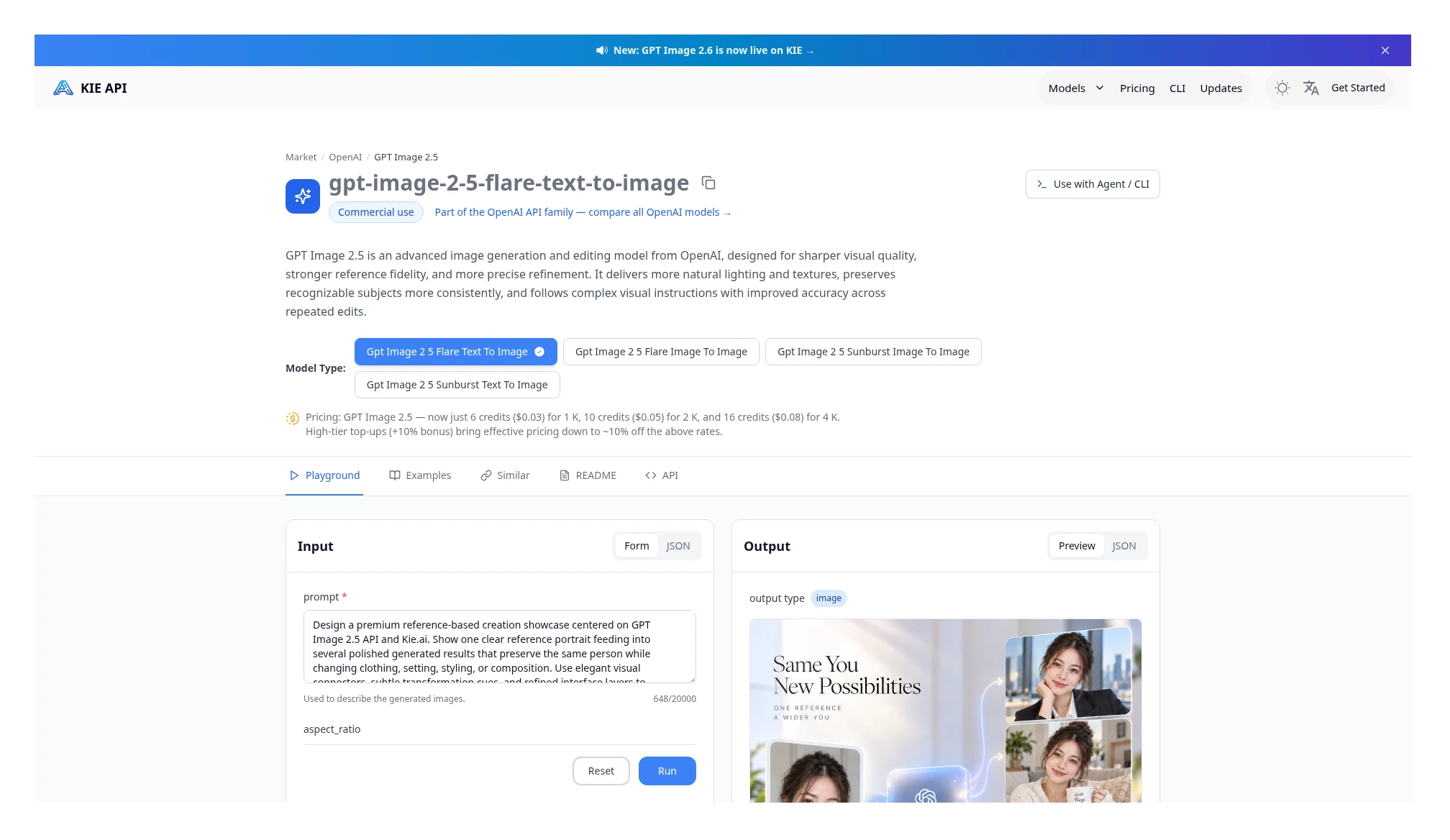 Kie GPT Image 2.5 Flare text-to-image: 1K $0.03, 2K $0.05, 4K $0.08 per image. The same page also has a Sunburst entry; this shot did not switch to it, so this set of prices is not written as a verified Sunburst price. Source: https://kie.ai/gpt-image-2-5
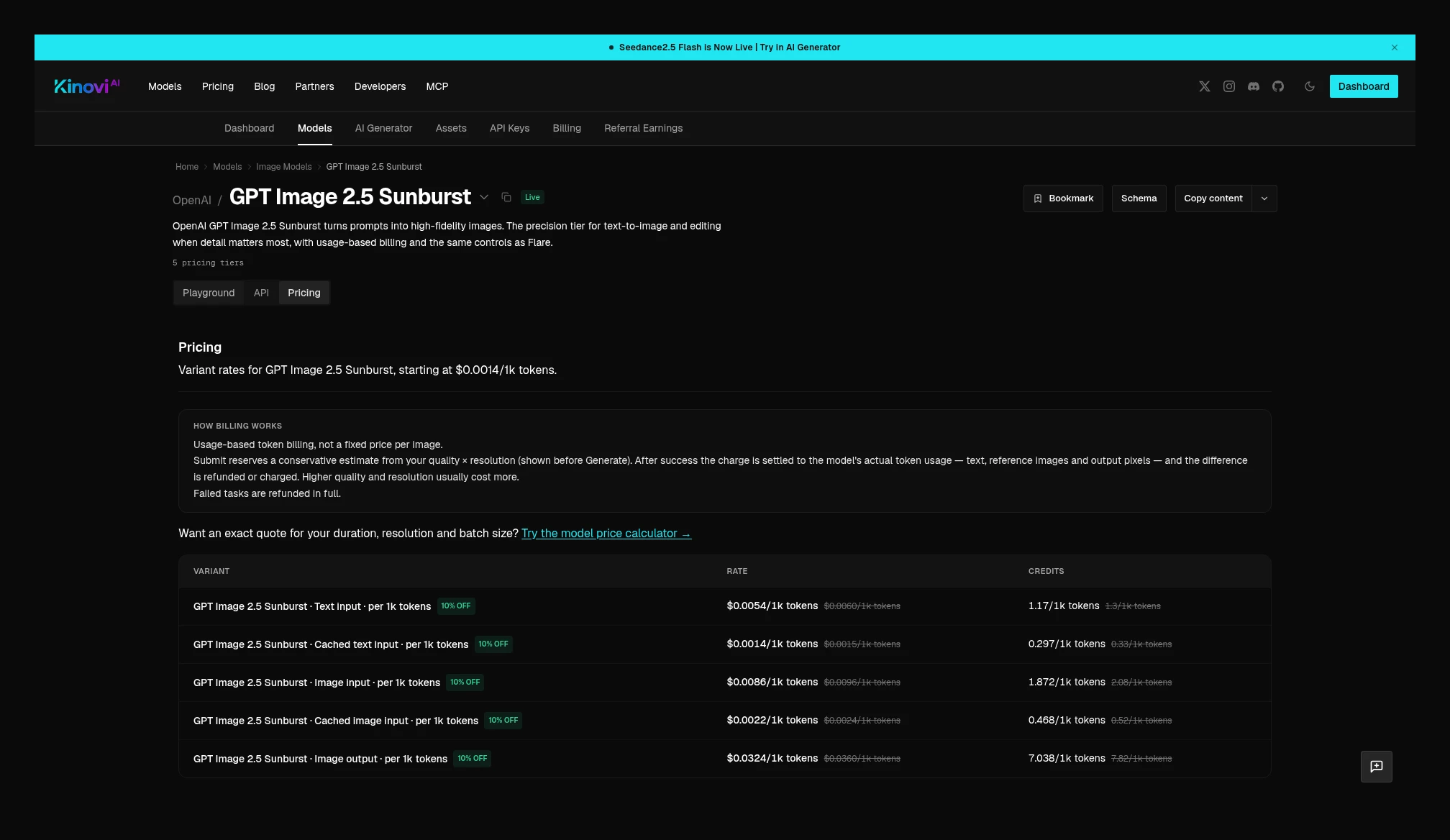 Kinovi GPT Image 2.5 Sunburst: settled in tokens; text input $0.0054 / 1k tokens, cached text $0.0014, image input $0.0086, cached image $0.0022, image output $0.0324. Source: https://kinovi.ai/models/gpt-image-2.5-sunburst#pricing
Grok Imagine Video 1.5: both sides are preview, so only page quotes are listed
Kie Grok Imagine Video 1.5 page model is grok-imagine-video-1-5-preview. The price card lists about $0.012 at 480p, about $0.0225 at 720p, and about $0.04 at 1080p, per second. The configuration page states enable_audio is on by default; resolution can be 480p / 720p / 1080p; duration ranges from 1–15 seconds, defaulting to 8 seconds.
Kinovi splits this into five entry points: text-to-video, image-to-video, reference, and Lite text-to-video / image-to-video. Text-to-video page current table is 480p $0.0501, 720p $0.0878, 1080p $0.1567. The page is marked Preview test pricing, audio is included, and billing is by output second and resolution; first-and-last-frame mode supports up to 720p. This page’s screenshot does not state duration bounds, so it cannot yet be fully aligned with Kie’s 1–15 seconds. Image-to-video page current table is the same as text-to-video, also Preview test pricing, with audio included; the body does not repeat the figure.
The comparison below is only of the same resolution, no reference, with audio page quotes, and does not claim these are settlement prices already checked against actual charges. The percentages likewise describe the page figures only.
| Specs (page quote, preview, with audio, no reference) | Kie | Kinovi | Relative difference in the page figures |
|---|---|---|---|
| 480p | About $0.012 | $0.0501 | 317.5% higher |
| 720p | About $0.0225 | $0.0878 | 290.2% higher |
| 1080p | About $0.04 | $0.1567 | 291.8% higher |
If you only multiply the page unit price by 5 seconds at 720p: Kie about $0.1125, Kinovi $0.439. This is still an exercise on preview quotes, not an actual paid bill.
Reference page lists only 480p $0.0501, 720p $0.0878, with no 1080p row; the description states up to 7 reference images. This table does not list a separate reference-image surcharge, and it is not appropriate to reuse the text-to-video 1080p row here.
Lite is a separate entry point and cannot be mixed into the same row as the 1.5 standard tier above, or with Kie’s preview page. Lite text-to-video current table is 480p $0.0125/s, 720p $0.0188/s, 1080p $0.0878/s; Lite image-to-video is the same price. This representative figure does not state a billing formula different from the standard tier, and no duration bounds were seen; only the Kinovi-side page quotes are recorded here.
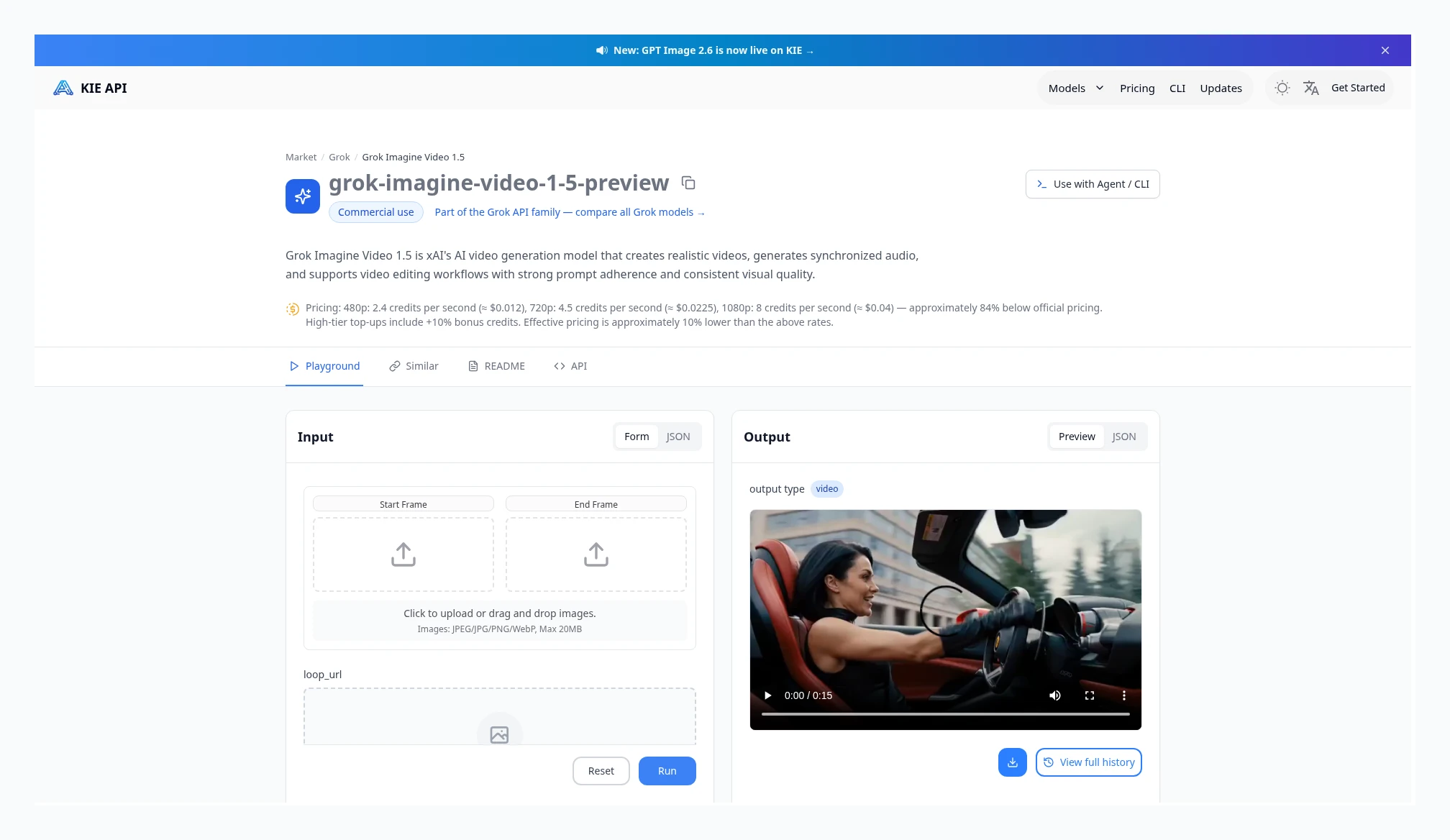 Kie Grok Imagine Video 1.5, page model grok-imagine-video-1-5-preview: about $0.012/s at 480p, about $0.0225/s at 720p, about $0.04/s at 1080p. Source: https://kie.ai/grok-imagine-video-1.5
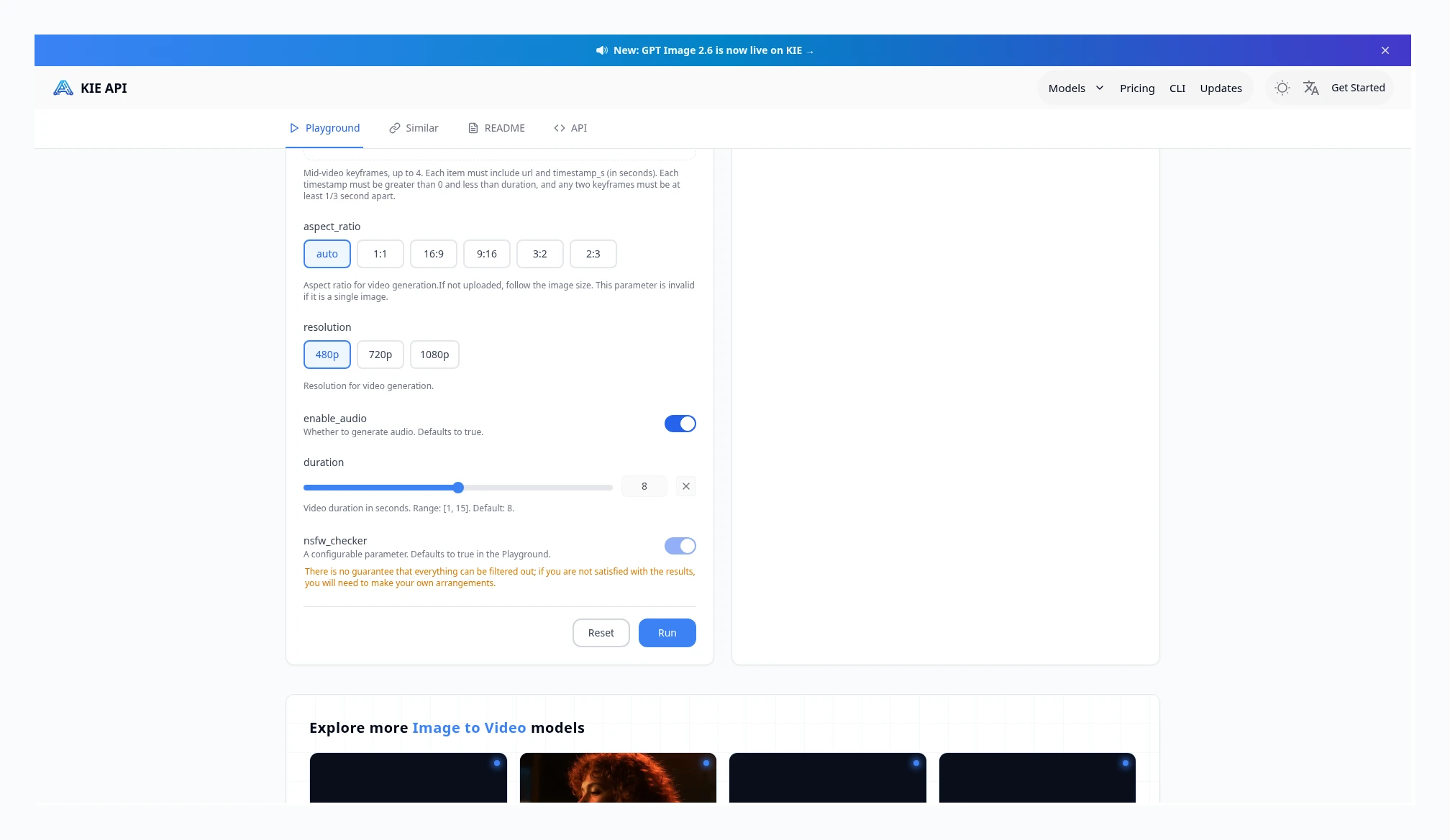 Configuration page for the same model: enable_audio is on by default; resolution 480p / 720p / 1080p; duration 1–15 seconds, default 8 seconds. Source: https://kie.ai/grok-imagine-video-1.5
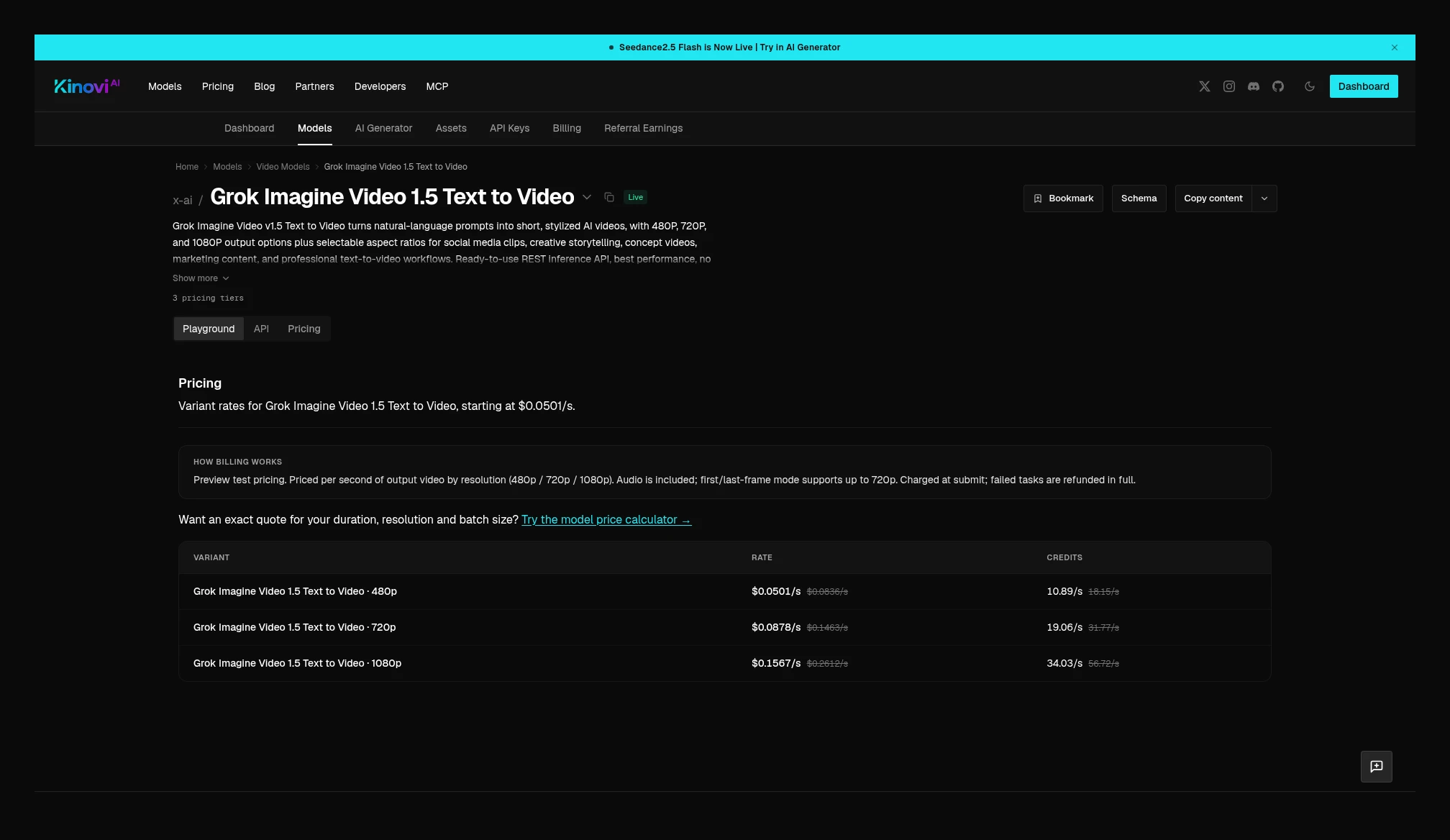 Kinovi Grok Imagine Video 1.5 text-to-video: Preview test pricing, with audio; 480p $0.0501/s, 720p $0.0878/s, 1080p $0.1567/s. Source: https://kinovi.ai/models/grok-imagine-video-1-5-text-to-video#pricing
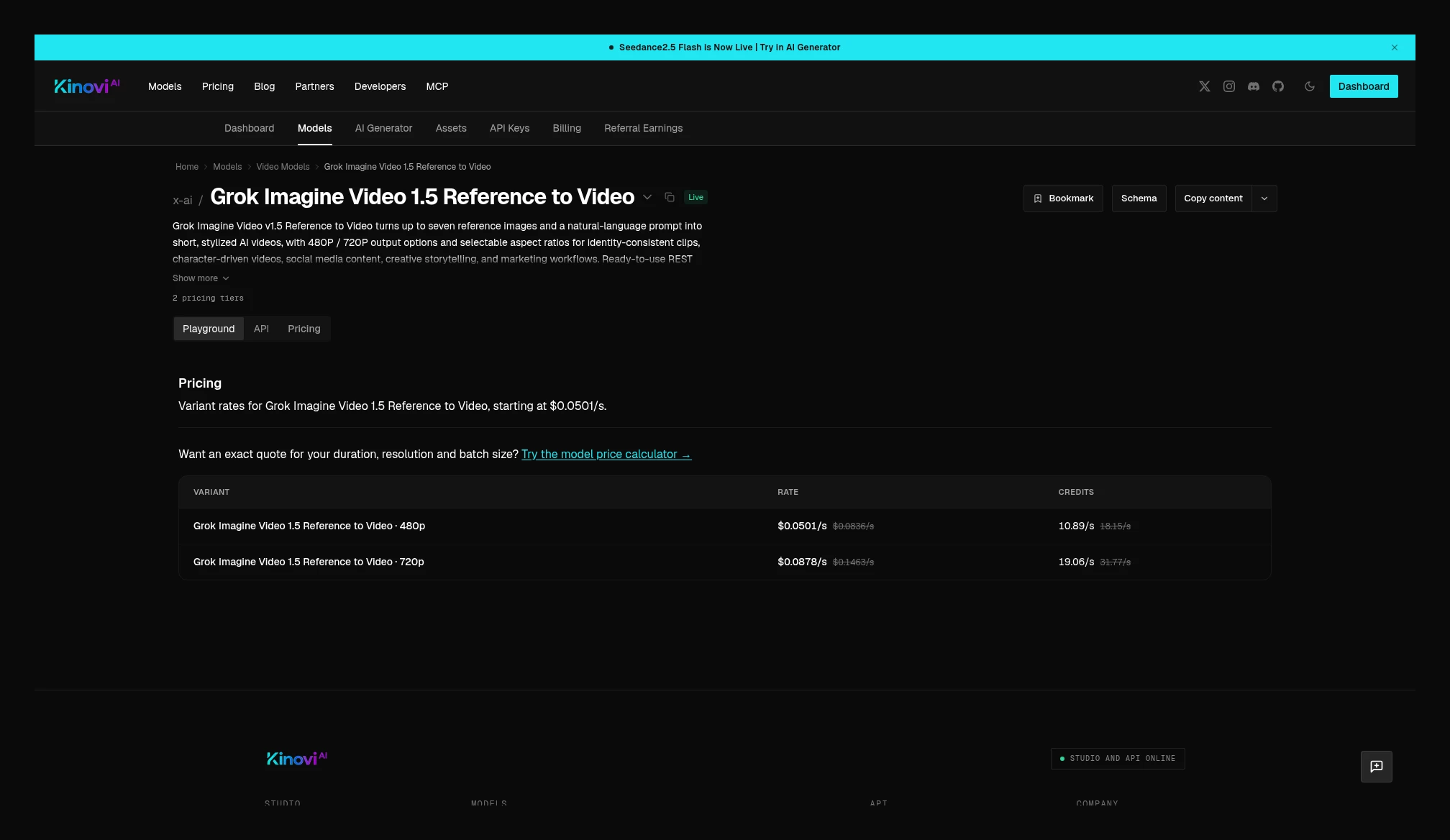 Kinovi Grok Imagine Video 1.5 Reference to Video: 480p $0.0501/s, 720p $0.0878/s; the table does not list 1080p. Source: https://kinovi.ai/models/grok-imagine-video-1-5-reference-to-video#pricing
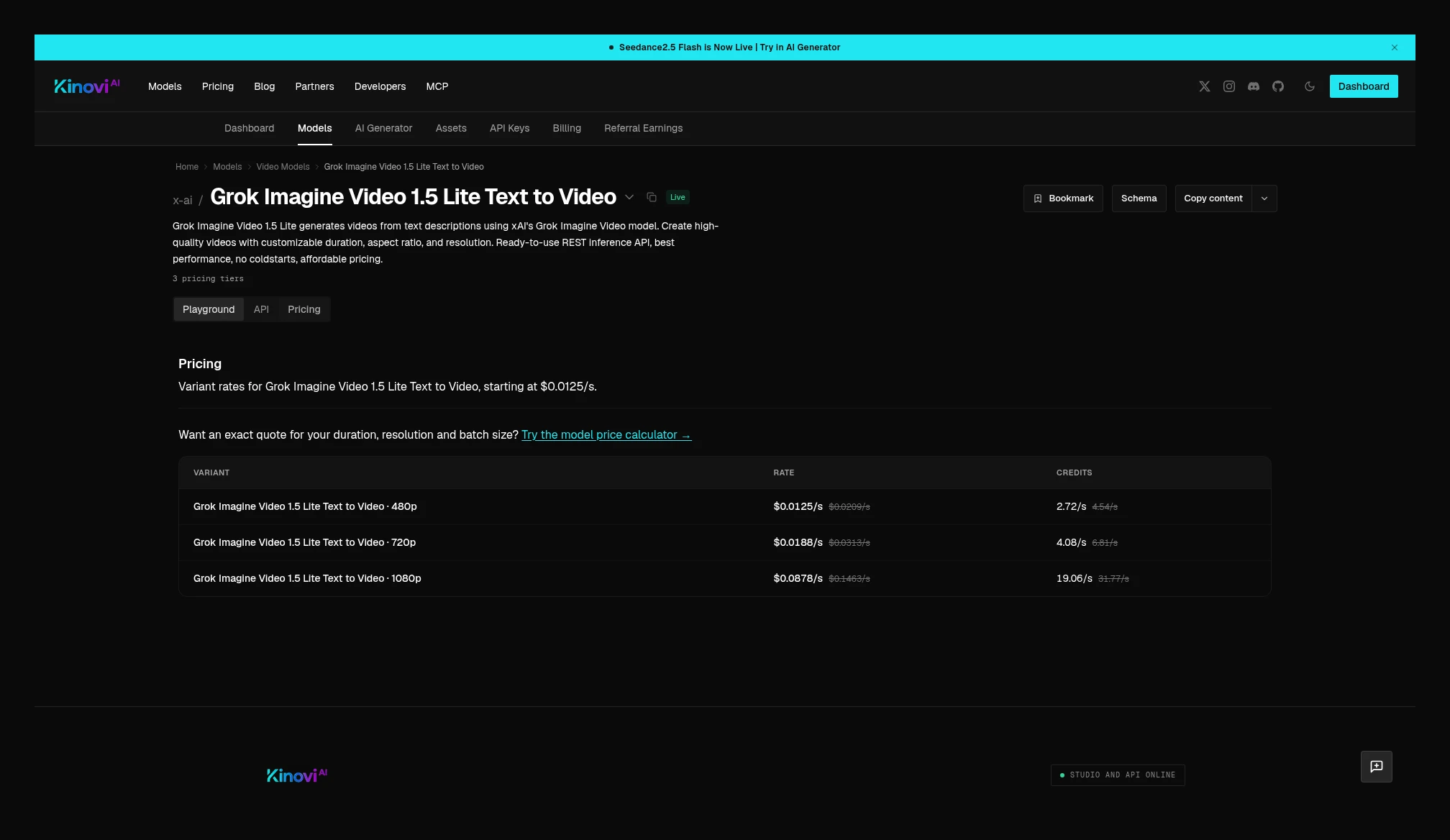 Kinovi Grok Imagine Video 1.5 Lite text-to-video: 480p $0.0125/s, 720p $0.0188/s, 1080p $0.0878/s; the image-to-video page is the same price. Lite is not mixed with the standard tier or with Kie’s preview page. Source: https://kinovi.ai/models/grok-imagine-video-1-5-lite-text-to-video#pricing
Suno: first align the request type and how many tracks you get back
This check compared Kie’s Generate Music and Kinovi’s Suno Music. This Kie tier is 12 credits per request, or about $0.06; this price card does not state how many tracks are returned each time. Kinovi is 16 credits/request, states that 2 tracks are returned each time, is unaffected by prompt length or output duration, and the table does not also give a USD column.
The two credit systems are not worth the same amount. You cannot apply Kie’s 1 credit = $0.005 to Kinovi’s 16 credits, and you cannot compare “price per track” with Kinovi’s 2 tracks when Kie does not state how many tracks you get. The same Kie page also shows entry names such as Extend, Cover, and stems, but this price card only verified Generate Music, so no prices are invented for those entries. Kinovi’s Remix, Sample, and Sounds also did not have standalone price cards checked in this package; only the already-checked Music page is kept.
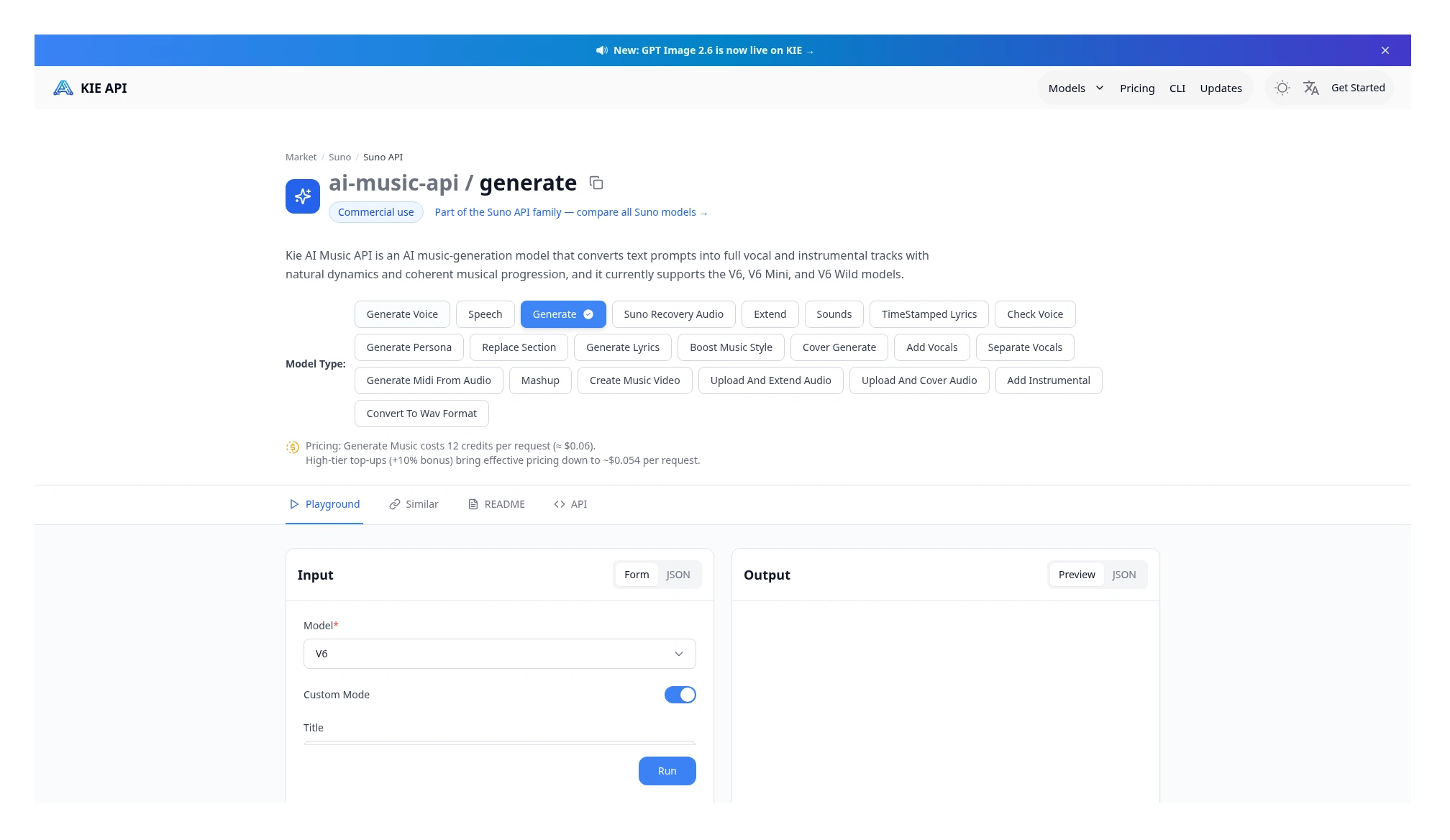 Kie Generate Music: 12 credits per request, about $0.06; this price card does not state how many tracks are returned each time. Source: https://kie.ai/suno-api?model=ai-music-api%2Fgenerate
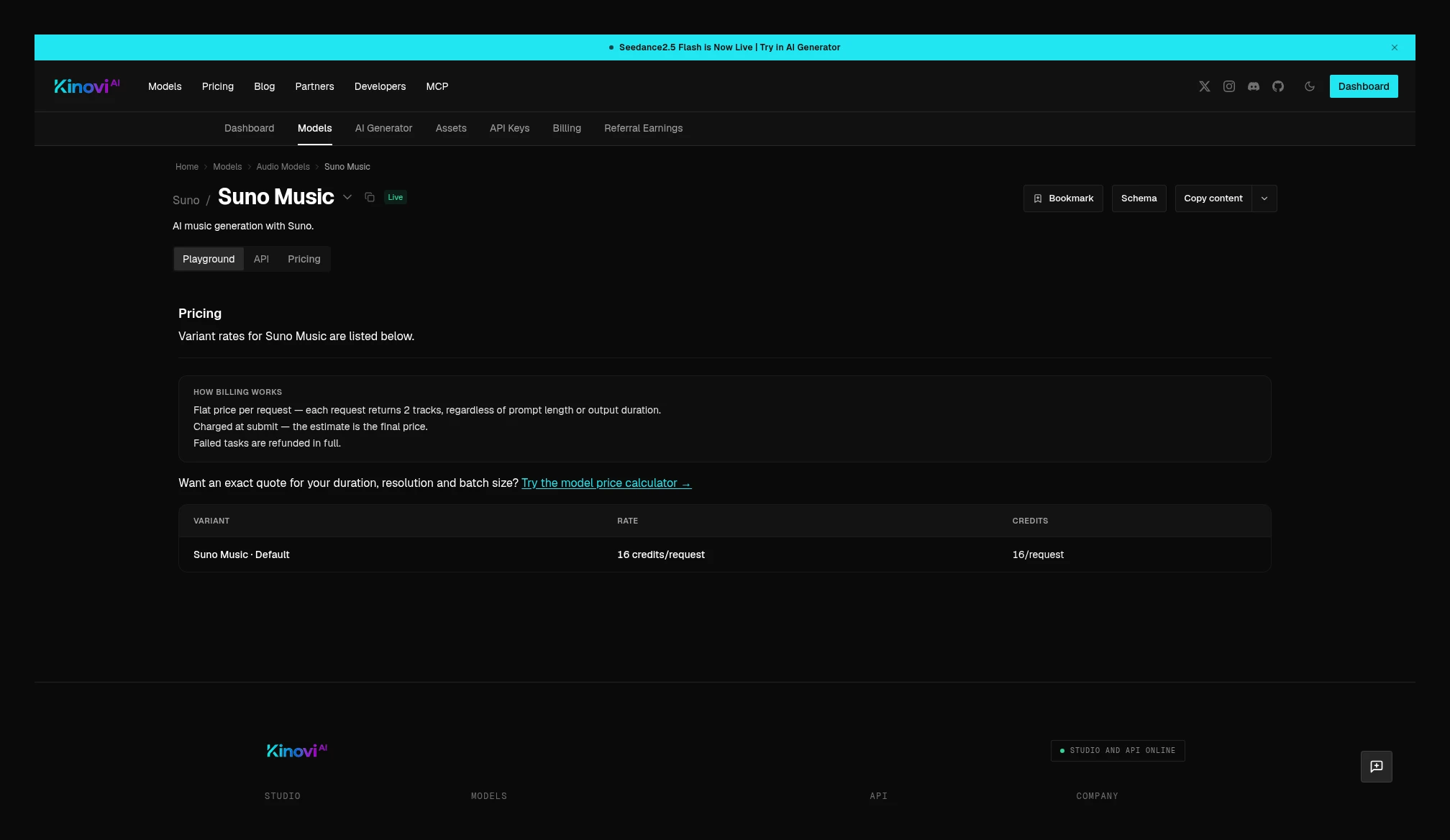 Kinovi Suno Music: 16 credits/request, 2 tracks each time; the table does not also give a USD column. Source: https://kinovi.ai/models/suno-music#pricing
Representative models that appear in only one catalog
The pages below appeared on only one side in this catalog check. Only that side’s official quotes are written here; no price or “unsupported” label is invented for the other side.
Midjourney V8 is a flat per-request price and returns a 4-image grid each time, currently $0.0565 / 4 images. Kie’s marketplace lists Midjourney as a provider, but no standalone model page was found this time. The same catalog also has Niji V7, and this package uses V8 as the representative figure.
SeedVR2 Image Upscale is currently $0.0471/image.
Seed Audio 1.0 text-to-speech, speech-to-speech, image-to-speech, and sound-effect entry points are all currently $0.0030/s. At submit time it holds 20 seconds, and after success it bills the actual upstream generation duration, up to 120 seconds. The body keeps only the text-to-speech representative figure.
Kie’s MiniMax H3 Image is billed by output pixels: up to 4.5 MP (1K / 2K) is $0.009/image, and up to 20 MP (4K) is $0.0275/image. The same page also has an Image Edit mode; this shot is the text-to-image representative price card, and the edit price is not written as verified.
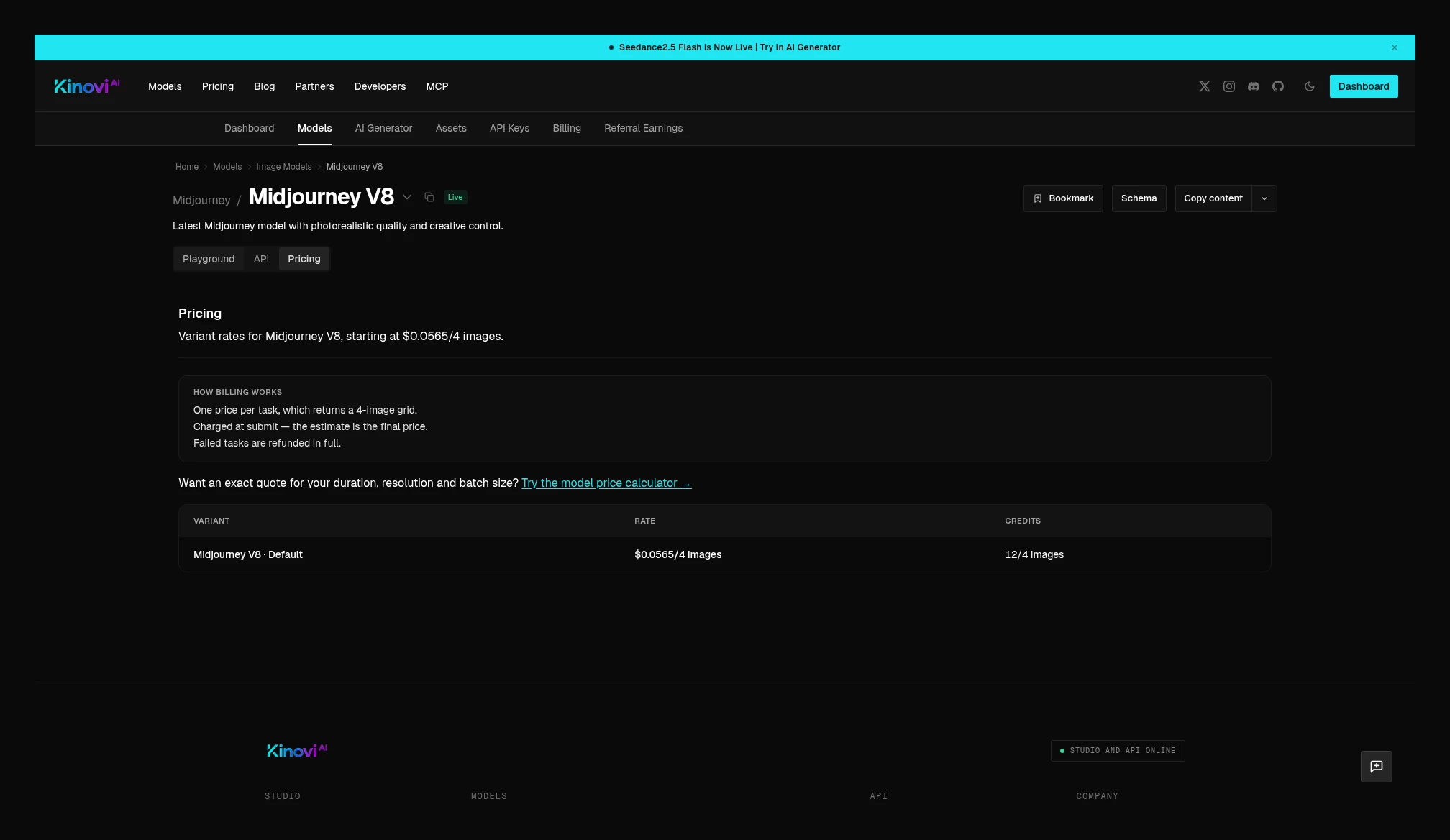 Kinovi Midjourney V8: $0.0565 per request, returning a 4-image grid. Source: https://kinovi.ai/models/midjourney-v8#pricing
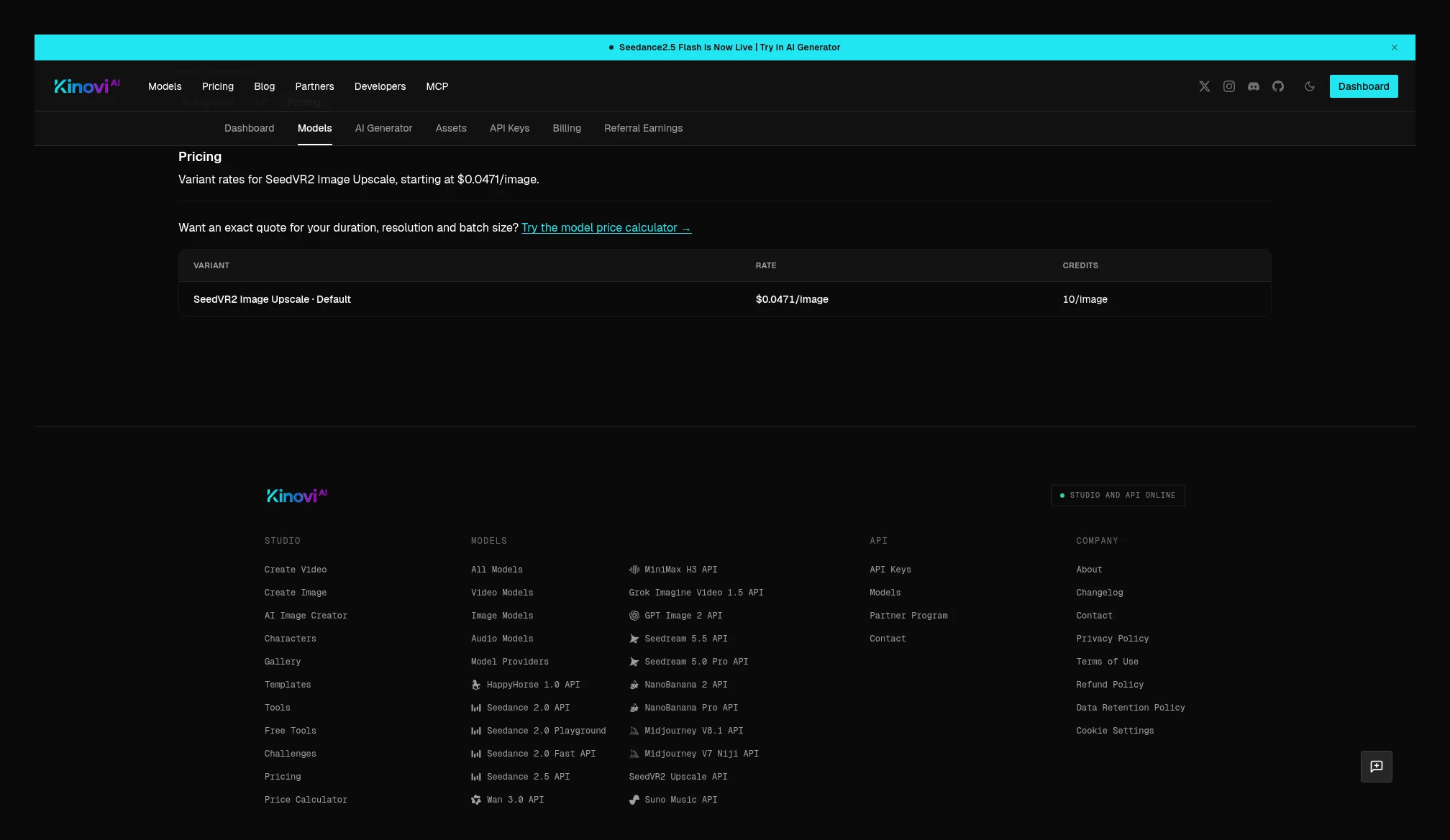 Kinovi SeedVR2 Image Upscale: $0.0471 per image. Source: https://kinovi.ai/models/seedvr2-image-upscale#pricing
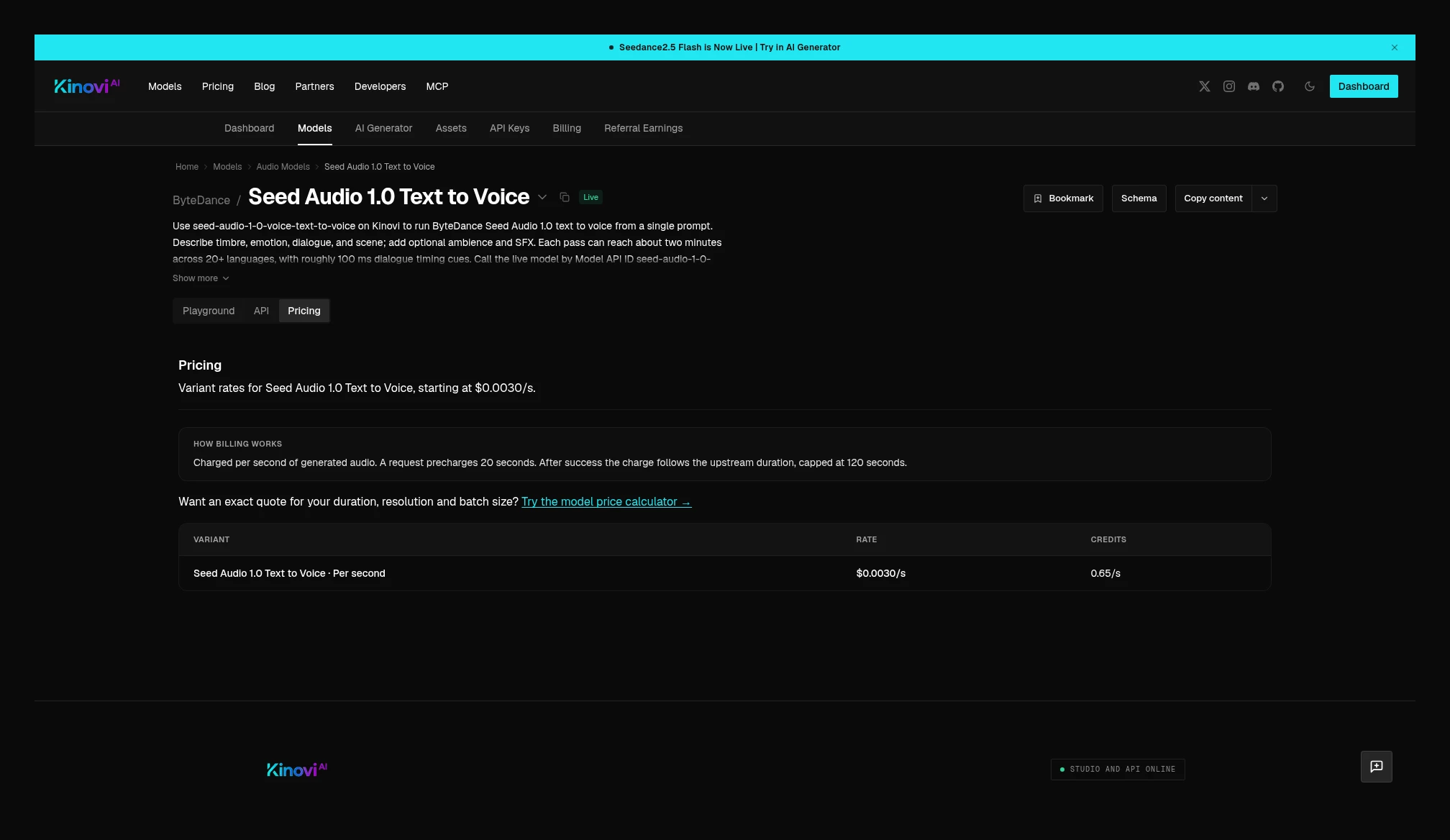 Kinovi Seed Audio 1.0 Text to Voice: $0.0030/s; it holds 20 seconds, then after success bills generation duration, up to 120 seconds. Source: https://kinovi.ai/models/seed-audio-1-0-text-to-voice#pricing
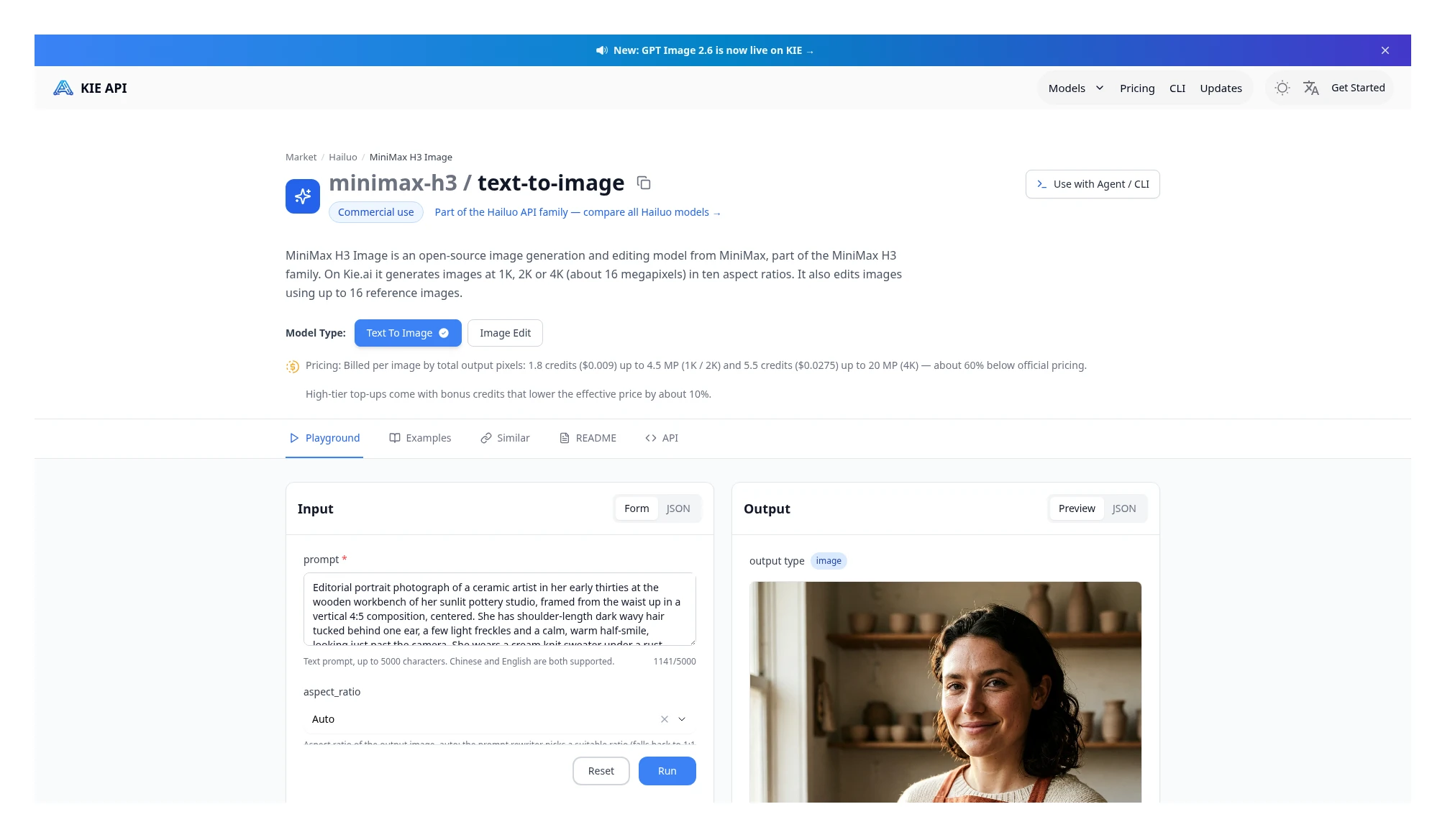 Kie MiniMax H3 Image text-to-image: $0.009 per image up to 4.5 MP, $0.0275 per image up to 20 MP. Source: https://kie.ai/minimax-h3-image
Catalog alignment: models listed publicly on both sides
The check date and catalog counts are in the same package’s “model-coverage audit.” Both the Kie marketplace and the sitemap have 133 entries; the Kinovi model catalog has 52 (33 video, 11 image, 8 audio). Official pages are listed by model below; if a model does not appear in one side’s catalog, only a one-sided quote is recorded, not “unsupported.”
#### Video, image, and audio that can be matched in both catalogs
| Model and version | Kie | Kinovi | How this article treats it |
|---|---|---|---|
| Seedance 2.5 | Page | Text-to-video etc., Edit, Extend | No-reference and 5+5 compared (with figure); Kinovi edit / extend formulas compared and illustrated; Kie has edit / extend parameters but no standalone price card (with figure) |
| Seedance 2.5 Flash | Page | Generate, Edit, Extend | No-reference and 5+5 compared (with figure); Kinovi edit illustrated, extend at the same price; Kie has parameters but no standalone price card (with figure) |
| Seedance 2.0 standard | Page | Page | Compared (with a Kie figure) |
| Seedance 2.0 Fast | Page | Page | No-reference compared (with figure); with-reference full jobs listed under each side’s rule (with figure) |
| Seedance 2.0 Mini | Page | Page | No-reference compared (with figure); with-reference full jobs listed under each side’s rule (with figure) |
| Wan 3.0 | Page | Text-to-video, Image-to-video, Reference | No-reference text-to-video compared (with figure); image-to-video at the same unit price; reference full jobs listed under each formula (with figure) |
| Wan 3.0 Prime | Page | Text-to-video, Image-to-video, Reference | No-reference text-to-video compared (with figure); image-to-video at the same unit price; reference full jobs listed under each formula (with figure) |
| Kling 4.0 | Page | Text-to-video, Image-to-video, Reference | No-reference text-to-video compared (with figure); image-to-video at the same unit price; reference full jobs listed under each formula (with figure) |
| MiniMax H3 | Video | Text-to-video, Image-to-video, Reference | Text-to-video compared (with figure); image-to-video at the same unit price; reference and extra-image fees documented with figures |
| HappyHorse 1.0 | Page | Page | Compared (with figure) |
| Grok Imagine Video 1.5 | Page | Text-to-video, Image-to-video, Reference, Lite text-to-video, Lite image-to-video | Text-to-video / image-to-video page quotes listed (with figure, preview, not an amount actually paid); reference at 480p/720p only (with figure); Lite listed separately, not mixed with the standard tier (with figure) |
| Nano Banana 2 | Page | Page | Compared (with figure) |
| Nano Banana Pro | Page | Page | Compared (with figure) |
| GPT Image 2 | Page | Page | Both price tables are listed (with figure); quality tiers cannot be aligned officially, so no percentage is given |
| GPT Image 2.5 | Page | Flare, Sunburst | Kie Flare text-to-image per image illustrated; Kinovi Sunburst per token illustrated; Flare and Sunburst are not mixed in one comparison, and no percentage is written |
| Seedream 5.0 Pro | Page | Page | Plain text-to-image compared per image (with figure); Kie image-to-image adds an input-image fee (with figure) |
| Seedream 5.5 | Page | Text-to-video, Edit | Plain text-to-image compared (with figure); Kie image-to-image / layer decompose and Kinovi edit rules are stated (with figure); the full edit job is unfinished because the reference-image surcharge is missing |
| Suno | Page | Music, Remix, Sample, Sounds | Generate / Music listed (with figure); other entry points are names or pages visible on one side only, and unchecked prices are not invented |
#### Model pages found only in the Kinovi catalog this time
- MiniMax: H3 Max text-to-video(480p $0.0447/s, 768p $0.0677/s), Max image-to-video (same price), Max reference, Max Turbo text-to-video(480p $0.0230/s, 768p $0.0352/s), Max Turbo image-to-video (same price), Turbo Avatar(480p $0.0447/s, 768p $0.0677/s)
- Images: Midjourney V8($0.0565 / 4 images), Niji V7, SeedVR2 Image Upscale($0.0471/image). Kie’s marketplace lists Midjourney as a provider, but no standalone model page was found.
- Audio: Seed Audio 1.0 text-to-speech($0.0030/s), Speech-to-speech, Image-to-speech, Sound effects (all four entry points currently at the same price)
#### Video and image found only in the Kie catalog this time (grouped by vendor)
- ByteDance: Seedance 1.0 Pro Fast, Seedance v1; there are also image models Seedream, 4.5, 5.0 Flash, 5.0 Lite, seedream-api
- Kling: 4.0 Flash(720p $0.085/s, with video $0.0565/s), O3, 3.0, 3.0 Turbo, 3 Motion Control, 2.6, 2.6 Motion Control, 2.5, v2.1, AI Avatar, Kling Image 4.0
- Wan: 2.7 video, 2.7 image, 2.6, 2.6 Flash, 2.5, v2.2, Wan Animate, Animate 2, Speech to Video Turbo
- Google: Veo 3.1, Gemini Omni, Omni 1.1 Flash, Omni 1.2 Flash, Imagen 4
- MiniMax: H3 Image (up to 4.5 MP $0.009, up to 20 MP $0.0275, with figure)
- Other video: HappyHorse 1.1(720p $0.1125/s, 1080p $0.145/s, with figure), Hailuo 2.3, Hailuo, PixVerse V6, V6 Max, Runway, Vidu Q4, LTX 2.5, OmniHuman 1.5, 2.0, Infinitalk, Volcengine lip sync, Video Upscaler, Topaz Video
- Other image: GPT Image 1.5, GPT Image 2.6, Nano Banana, 2.1, 2 Lite, Grok Imagine, Imagine Image 2, Flux 2, Flux 3, Flux Kontext, Qwen Image, 2, 2.1, 3, Qwen Image Edit, Ideogram Character, v3, Z-Image, 4o Image, Image Upscaler, Topaz Image, Recraft Upscale, Recraft background removal
- Audio: ElevenLabs TTS, Text to Dialogue v3, Gemini 2.5 Pro TTS, Gemini 3.1 Flash TTS, 3.8 Flash TTS, 3.8 Flash Lite TTS, Nemotron 3.5 Transcribe
#### Chat models found only in the Kie catalog this time
Kinovi’s public catalog is video, image, and audio; no chat-model pages were seen. Kie is grouped by vendor below, each with a standalone page; this article does not compare chat prices.
- Anthropic: Fable 5, 5.1, 5.2, Haiku 4.5, Haiku 5.5, Sonnet 4.5, 4.6, 5, 5.5, Opus 4.5, 4.6, 4.7, 4.8, 5, 5.5
- OpenAI: GPT-5.2, GPT-5.6, GPT-6 Astra, GPT-6 Sol and Luna, GPT-6.1 Sol, GPT-6.1 Terra, GPT-6.2 Astra, GPT-6.2 Sol, Codex
- Google: Gemini 3 Pro, 3.1 Pro, 3.6 Flash, 3.8 Flash, 4 Argon, 4 Carbon, 4 Hydrogen, 4 Neon
- Other: Grok 4.5, 4.6, 4.7, Kimi K3, Kimi K3.1 Pro, DeepSeek V4.1 Flash, features/v3-api
The specs that can be aligned above have already been written into the tables at the same version and the same input type. The official conditions below still do not line up, so quotes are shown side by side, without a same-row “who is cheaper”: GPT Image 2 does not map its flat prices to a quality tier; GPT Image 2.5 Flare and Sunburst are different sub-models, and one side bills per image while the other bills per token; Grok Imagine Video 1.5 is preview on both sides, Lite has to be listed separately, and the duration ranges are not fully aligned; Suno does not state on one side how many tracks are returned each time, and credits cannot be converted across platforms; Seedream 5.5 edit states that each reference image (including the first) is billed, but does not publish a separate USD surcharge for reference images, so the full job cannot be completed. Kie’s Seedance edit / extend has parameters only, with no standalone price card, and is not compared as a percentage with Kinovi’s edit page.
A month of cost
The three groups below are all estimates, all at the current published prices on each model page, with no top-up bonuses included. Video defaults to 5 seconds, 720p, and no reference, unless the scenario itself is an edit with a reference. The actual bill also depends on failed retries, stepping up the resolution, and whether you counted a reference video. The comparison bars are drawn to one scale only within the same set of conditions; lengths from different scenarios cannot be compared with each other. Legend: light blue is Kie, cyan is Kinovi.
Indie developers: 50 Seedance 2.5 jobs a month
50 jobs × 5 seconds at 720p, no reference: Kie 50 × $1.575 = $78.75, Kinovi 50 × $1.3585 = $67.93. Kinovi is about $10.82 lower, or 13.7% lower.
Conditions: 50 Seedance 2.5 jobs, 5 seconds each, 720p, no reference. Unit: USD / month (estimate). The scale of this chart uses the higher figure in this group, $78.75, as a full bar.
At this volume, the gap is probably limited. If your existing Kie integration is already stable, rewriting the client usually is not worth it for this amount. What is more worth calculating first is whether you will soon scale up to the two tiers below, and whether 14-day retention of outputs is enough.
Higher-volume products: 200 jobs a month
Seedance 2.5 at the same specs: Kie $315.00, Kinovi $271.70, about $43.30 lower on Kinovi (13.7% lower). The gap is already visible, and this line is worth a separate comparison test.
Conditions: 200 Seedance 2.5 jobs, 5 seconds each, 720p, no reference. Unit: USD / month (estimate). The scale of this chart uses the higher figure in this group, $315.00, as a full bar.
If these 200 jobs are actually MiniMax H3, 768p, also 5 seconds with no reference: Kie $40.00, Kinovi $67.70, about $27.70 higher on Kinovi (69.3% higher). The direction is completely reversed.
Conditions: 200 MiniMax H3 jobs, 5 seconds each, 768p, no reference. Unit: USD / month (estimate). The scale of this chart uses the higher figure in this group, $67.70, as a full bar, and does not share a length with the previous group.
If it is 150 Seedance 2.5 jobs plus 50 H3 jobs at 768p: Kie about $246.25, Kinovi about $220.70. Kinovi is still about $25.55 lower, but the advantage is already thinner than for Seedance alone. Change the mix, and the conclusion changes.
Conditions: 150 Seedance 2.5 jobs (5 seconds, 720p, no reference) plus 50 MiniMax H3 jobs (5 seconds, 768p, no reference). Unit: USD / month (estimate). The scale of this chart uses the higher figure in this group, $246.25, as a full bar.
Images can be estimated on the same basis. 2,000 Nano Banana 2 images a month at 2K: Kie $120.00, Kinovi $141.40, about $21.40 higher on Kinovi (17.8% higher). If you switch to Nano Banana Pro at 2K: Kie $180.00, Kinovi $134.00, about $46.00 lower on Kinovi (25.6% lower).
Conditions: 2,000 Nano Banana 2 · 2K images. Unit: USD / month (estimate). The scale of this chart uses the higher figure in this group, $141.40, as a full bar.
Conditions: 2,000 Nano Banana Pro · 2K images. Unit: USD / month (estimate). The scale of this chart uses the higher figure in this group, $180.00, as a full bar, and does not share a length with the previous group.
| Scenario | Kie | Kinovi |
|---|---|---|
| 200 Seedance 2.5 jobs, 5 seconds at 720p, no reference | $315.00 | $271.70 |
| 200 MiniMax H3 jobs, 5 seconds at 768p, no reference | $40.00 | $67.70 |
| 150 Seedance 2.5 jobs + 50 H3 jobs | $246.25 | $220.70 |
| 2,000 Nano Banana 2 · 2K images | $120.00 | $141.40 |
| 2,000 Nano Banana Pro · 2K images | $180.00 | $134.00 |
Iterating on cuts: 200 jobs a month with a 5-second reference
Seedance 2.5, 720p, 5 seconds of output plus a 5-second reference video, both sides 10 seconds times the reference-tier unit price: Kie 200 × $1.900 = $380.00, Kinovi 200 × $1.612 = $322.40. Kinovi is about $57.60 lower (15.2% lower).
Conditions: 200 Seedance 2.5 jobs, 720p, 5 seconds of output plus a 5-second reference, both sides 10 seconds × the reference-tier unit price. Unit: USD / month (estimate). The scale of this chart uses the higher figure in this group, $380.00, as a full bar.
This table cannot be used to estimate a Kinovi Seedance 2.0 edit job, because billed seconds differ there. It also cannot be used to estimate H3 or Wan reference workflows unless you have already calculated the seconds under the corresponding page’s rule.
Takeaway: These monthly costs are all estimated at published prices, and include only specs already checked whose rules are clear. If the main volume is Seedance 2.5, the gap grows with job count; if it is H3 or Nano Banana 2, the direction reverses. Edit jobs with a reference video have to be calculated separately as “input plus output,” and you cannot apply the from-scratch monthly totals directly. The comparison bars only compare length within the same set of conditions.
How to hook up a migration
Both Kie and Kinovi start with createTask to get a taskId, then poll recordInfo, and production can add a callback on either side. That makes a migration more direct than moving from an entirely different protocol. It is not, however, a “more modern” interface unique to one side: you still have to change the model ID, and input and inputs at this layer of field names. Kie’s auth is Authorization: Bearer $KIE_API_KEY, and Kinovi’s is Authorization: Bearer $KINOVI_API_KEY. When uploading files, Kie uses the kieai.redpandaai.co in the docs; do not assume it is the same host as api.kie.ai.
The acceptance job below is the same prompt, a 5-second 720p plain text-to-video, with no reference image or reference video. The fields come from the official schemas; the samples were not actually executed.
Submitting on Kie
curl -X POST "https://api.kie.ai/api/v1/jobs/createTask" \
  -H "Authorization: Bearer $KIE_API_KEY" \
  -H "Content-Type: application/json" \
  -d '{
    "model": "bytedance/seedance-2-5",
    "input": {
      "prompt": "A product turntable on a white background, soft studio lighting, one slow rotation.",
      "resolution": "720p",
      "aspect_ratio": "16:9",
      "duration": 5
    }
  }'
Query:
curl "https://api.kie.ai/api/v1/jobs/recordInfo?taskId=TASK_ID" \
  -H "Authorization: Bearer $KIE_API_KEY"
Official samples often include reference_image_urls, reference_video_urls and similar fields. That changes how Seedance 2.5 is billed, so do not copy them into the default request when you are acceptance-testing a price comparison.generate_audio The official default is true, and it is left unchanged here to avoid introducing extra billing questions. After a successful create, read the code and data.taskId in the response body; do not rely on the HTTP status code alone.
The same job on Kinovi
curl -X POST "https://kinovi.ai/api/v1/jobs/createTask" \
  -H "Authorization: Bearer $KINOVI_API_KEY" \
  -H "Content-Type: application/json" \
  -d '{
    "model": "seedance2-5",
    "inputs": {
      "prompt": "A product turntable on a white background, soft studio lighting, one slow rotation.",
      "duration": 5,
      "outputResolution": "720p"
    }
  }'
Query:
curl "https://kinovi.ai/api/v1/jobs/recordInfo?taskId=TASK_ID" \
  -H "Authorization: Bearer $KINOVI_API_KEY"
Note the differences in the table below. Kinovi holds credits at submit time for the settings you chose, and refunds them on failure; Kie does not charge for failed jobs. When reconciling, use the actual charge in the query result, then compare it with that day’s public unit price.
| Item | Kie | Kinovi |
|---|---|---|
| Create a job | POST https://api.kie.ai/api/v1/jobs/createTask | POST https://kinovi.ai/api/v1/jobs/createTask |
| Query a job | GET https://api.kie.ai/api/v1/jobs/recordInfo?taskId= | GET https://kinovi.ai/api/v1/jobs/recordInfo?taskId= |
| Auth | Authorization: Bearer $KIE_API_KEY | Authorization: Bearer $KINOVI_API_KEY |
| Seedance 2.5 model ID | bytedance/seedance-2-5 | seedance2-5 |
| Where parameters go | input | inputs |
| Resolution field | resolution (for example 720p) | outputResolution (for example 720p) |
| Duration field | duration, official default 5, range 4–30 seconds; -1 billed on the duration actually generated | duration, official default 5, range 4–30 seconds |
| Aspect-ratio field | aspect_ratio, official default adaptive | Follow the schema on that model page |
| Callback | callBackUrl, signature verification is recommended per the docs | Follow Kinovi’s callback docs |
| Upload host | Documented as https://kieai.redpandaai.co, different from the API domain | Follow Kinovi’s upload docs |
Takeaway: When accepting the integration, first run the same plain text-to-video job: the same prompt, the same duration and resolution, and no reference file yet. After submit, use recordInfo poll, then reconcile the returned charge against the public unit price. The route names are close, but the model IDs and input / inputs cannot be copied as-is; once a reference video is added, Seedance 2.5 switches to a different billing rule, and what you reconcile will not be the price of this job.
Billing, refunds, and retention
Kie’s credits do not expire, and neither do Kinovi’s. Neither is the kind of platform where the balance is wiped at month-end, so this cannot be written as a selling point for migrating.
How failures are handled is close in outcome and slightly different in mechanism. Kie publicly states that failed jobs are not charged. Kinovi reserves credits at submit time for the settings you chose, and rejects the submit if the balance is insufficient; after a failure, timeout, or cancellation, the reserved credits return to the same balance. Studio and the API share one balance.
The concurrency and rate-limit models differ. Kie limits the rate of new submits: 20 every 10 seconds by default; over that you get a 429, and the request is not queued. The docs say running jobs can usually exceed 100, and you can request a higher submit cap. Kinovi limits how many jobs can be in waiting or generating at once; new accounts default to 3 slots, then 10, 20, 50, and enterprise tiers. Tiers are assigned by the platform, not sold as a standalone add-on. Which side you pick depends on whether you care more about “how many new jobs you can submit in a short window,” or “how many slots can run at once.”
On files, Kie is explicit: outputs 14 days, logs 2 months, uploads 24 hours. If your workflow needs to keep finished films longer, you have to store them yourself before they expire. Kinovi’s retention days follow the docs as of that day; this article does not compare which is longer using older figures that were not rechecked.
When you should stay on Kie
If your volume is concentrated on MiniMax H3, Seedance 2.0 Mini, or large runs of Nano Banana 2 images at 2K and 4K, at today’s tables it is cheaper to stay on Kie. Moving those jobs to Kinovi would push the monthly cost up, not down. No-reference text-to-video for Wan 3.0 and Wan 3.0 Prime, and Seedream 5.0 Pro plain text-to-image per image, are also lower on Kie at the current tables.
If you are already running production jobs stably on Kie, and you only have a few dozen Seedance jobs a month, the gap is limited, and the cost of rewriting the integration may be higher than the amount saved. The credits themselves also do not expire, so you need not move just because you “worry the balance will lapse.”
If you depend on models already in use in the Kie catalog that could not be checked at the same specs on a Kinovi page this time, do not switch the whole account yet. The more cautious approach is: models whose prices line up, and that are genuinely cheaper, can be tried at low volume; ones that do not line up stay on Kie. If you need 4K or the HDR add-on on Kie’s Kling 4.0, confirm that the other side offers the same tier before you talk about price.
Who Kinovi is for
Kinovi is a fit for teams whose volume is concentrated on Seedance 2.5, 2.5 Flash, or Seedance 2.0 standard / Fast, and who want another line that uses the same submit-and-query pattern. HappyHorse 1.0, and Nano Banana Pro at 1K and 2K, are also lower at the current tables. Kling 4.0 text-to-video at 720p and 1080p is likewise lower on Kinovi. Studio and the API share a balance, which is more convenient for people who both tune in the web UI and call the API from a product.
It is not automatically a fit for “everyone leaving Kie.” Bills for H3, Seedance 2.0 Mini, Nano Banana 2, and no-reference text-to-video on Wan 3.0 and Wan 3.0 Prime would be higher at today’s tables. Concurrency is managed by account tier; new accounts default to 3 slots. If your current Kie workflow depends on a higher number of jobs running at once, confirm the tier first, rather than assuming a move will preserve the original throughput.
The more common approach is to split by model: Seedance 2.5, 2.5 Flash, and 2.0 Fast can be comparison-tested on Kinovi, while H3, 2.0 Mini, Nano Banana 2, and no-reference Wan text-to-video stay on Kie until the prices change. Record on one internal job table which platform handled each job.
FAQ
Can the output be used commercially?
Follow Kie’s and Kinovi’s terms of service as of that day, and the licenses of each model’s rights holder. Do not assume, from a price-comparison article alone, that output can be used in ads or for resale.
Is there a free allowance?
Kie publicly states that new accounts can receive 80 free credits. Kinovi’s docs say new accounts may receive a small starter allowance by region; the amount after you sign up is authoritative.
Do prices change?
Yes. The figures in this article were checked against current official model-page tables and screenshots, and model pages can also change at any time. Before you place an order or build a budget, open the corresponding price card again. Kie’s Seedance 2.5 and 2.0 prices are marked beta, and the pages also note that they may change.
Do you have to switch to an official SDK?
Not necessarily. Both sides are HTTPS plus JSON, so an HTTP client in any language will do. Whether there is an official SDK, and whether samples cover your model, follow each side’s docs.
What happens if a generation fails?
Kie: failed jobs are not charged. Kinovi: the reserved credits are refunded. If you cancel the job yourself, follow the cancellation rules in that platform’s docs.
Do credits expire?
Both Kie’s and Kinovi’s public statements are that credits do not expire. The comparison should focus on unit prices, billed seconds, and retention, not on whether the balance has an expiration date.
Can Kie code be migrated as-is?
Not as a paste-in replacement. The route shape is close, but the model IDs, input / inputs, and resolution field names all differ, and so does the upload host. Start by adapting one plain text-to-video job for acceptance testing.
How do I jump from a table price to the official page?
The USD figures in the video and image tables all link to the corresponding model pages. Treat the current table you land on as authoritative; if the page has been updated, recalculate with the new figures.
Get started
If your main volume is a Seedance spec already checked, and lower on Kinovi, you can start from Kinovi , create an account, create an API key in the docs, and use the same 5-second 720p text-to-video job above to compare the actual charge with the public unit price. The suggestion is to migrate a small number of jobs first, and widen the scope only after the results and the bill check out.
If your main volume is H3, Nano Banana 2, or Wan, first split your existing Kie bill by resolution, then decide whether to move. When you compare prices, open both Kie pricing and the corresponding Kinovi model pages; do not look at only one side’s starting price.
Prices were checked against current official model-page tables and screenshots. They are page list prices, not bills from paid test runs. The body embeds only price cards and the necessary rule screenshots; pages whose tables are the same at a given entry point use a representative figure, and all original shots are kept separately in the evidence directory. Kie is compared at the USD prices published on the page, at a conversion of 1 credit = $0.005, and large top-up bonuses are not included.
Related articles

More to try
Related models

ByteDance · video model
Seedance 2.5
Seedance 2.5 is ByteDance’s next-generation AI video model for up to 30-second generation, multimodal references, and precise local editing.
$0.1197/s

Alibaba · video model
HappyHorse 1.0
HappyHorse 1.0 is Alibaba's high-quality video generation model on Kinovi, supporting text-to-video, image-to-video, reference-image video, and video editing modes.
$0.0801/s

ByteDance · video model
Seedance 2.0
Next-generation AI video model by ByteDance. Combines Fast and Pro modes for high-quality video generation.
$0.0707/s