Choose your editor.
Start with GPT Image 2.5 Sunburst, Nano Banana Pro or Seedream 5.5 Edit. Use reference images and instructions, then judge the result yourself.
The ChatGPT Virtual Try-On alternative
Use reference-image editors to explore a different look. Review the still, then take a separate step into image-to-video. In the browser or through the Kinovi API.
Creative editing, not dedicated virtual try-on. Garment details, identity and fit are not guaranteed.
Workflow illustration · published examples, not a live chat
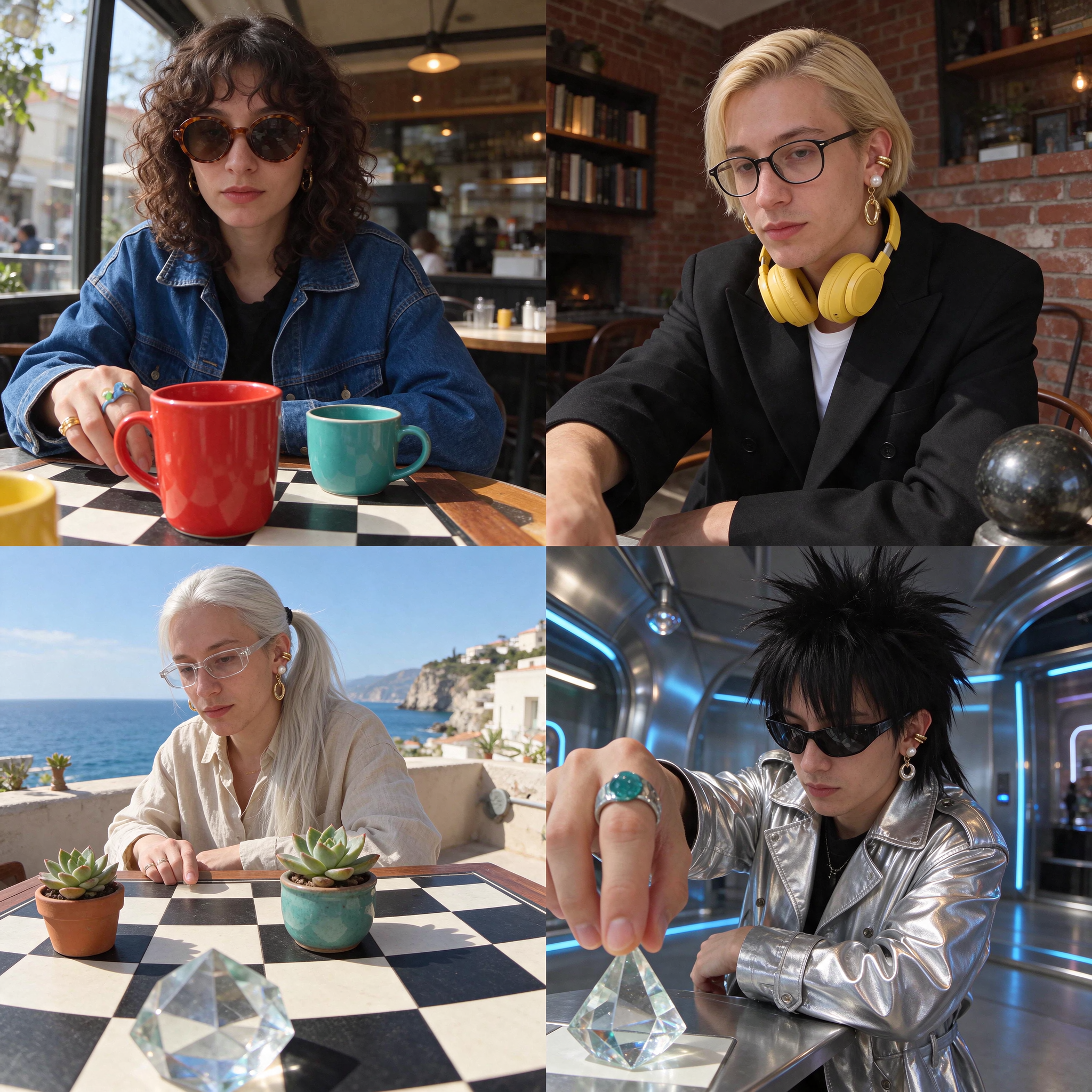
This published Seedream 5.5 Edit example changes styling across several scenes. It is a general edit, not a garment transfer.
Wan 3.0 supports image-to-video. This separate published portrait clip illustrates the model; it is not a continuation of the edit above.
Start with GPT Image 2.5 Sunburst, Nano Banana Pro or Seedream 5.5 Edit. Use reference images and instructions, then judge the result yourself.
Kinovi uses one-time credit packages, not subscriptions. Studio and API share a balance; each model page lists its own pricing and inputs.
A reviewed image can be passed to a compatible image-to-video model. Motion may introduce changes to faces, clothing and other details.
ChatGPT’s shopping help describes a generated try-on image, not this separate video workflow.
Supported editors accept uploaded images or public image URLs. You decide what to change; success and fidelity depend on the model and inputs.
ChatGPT supports a Try on button on clothing and accessory listings, and image uploads in a conversation.
Some editors accept multiple images. That does not establish garment segmentation, exact logo preservation or reliable full-outfit transfer.
ChatGPT also warns that its images may not represent products or appearance exactly.
Try different documented editors on the same brief. Kinovi does not claim that an API model reproduces ChatGPT’s shopping feature.
ChatGPT’s documented experience uses ChatGPT Images inside its shopping flow.
Submit an editing request, poll task status and retrieve output URLs with the jobs API. Add your own review and consent steps. This is not a turnkey catalog try-on service.
The comparison is with the ChatGPT shopping experience, not with all OpenAI API products.
The source and result below belong to the same Seedream 5.5 Edit showcase on Kinovi. No garment product photo was supplied. This is not evidence of dedicated virtual try-on.

The actual reference image listed in the showcase request.
A multi-scene styling edit. The output changes more than clothing.
“Adjust the person’s hairstyle, glasses, clothing, background and tabletop props over multiple rounds of editing, gradually creating different looks.”
No exact garment reference, unchanged identity, preserved product details, sizing accuracy or physical fit is demonstrated here.
SEPARATE VIDEO EXAMPLE
A published Wan 3.0 portrait example. Its original request uses first/last-frame references; it is not an outfit try-on and is unrelated to the images above.
Wan 3.0 Image to Video ↗Use a photo you own or have consent to use. Choose an editor that accepts your reference inputs.
Ask for a different look. Inspect faces, seams, prints and accessories; do not assume an exact garment match.
Keep a result only after review. Optionally use it in a compatible video model, and check the video again.
Explore photo edits from reference images and text instructions.
OpenCompare another editor’s response to your creative brief.
OpenSee the published Seedream 5.5 Edit inputs and examples.
OpenAdd motion to a reviewed still with a separate model call.
OpenUse createTask and recordInfo, not an invented try-on endpoint.
OpenRead the billing rules and the selected model’s current rates.
OpenA prompt launcher for the real editor, not a generator on this page. Open the model and add your images there.
This button only opens the model page. It does not submit your prompt, upload a photo or spend credits.
General-purpose models, not a verified dedicated virtual try-on catalog. Check each model’s inputs before you begin.
Text-to-image and reference-image editing, with model-specific options.
Reference-image editorInstruction-based image creation and editing with references.
General image editingA dedicated image-editing endpoint; the portrait showcase appears above.
Image-to-videoGenerate a clip from frame references; not a garment-transfer endpoint.
Reference videoA reference-capable video model for a separate creative generation step.
Reference-image editorAnother documented option for text generation and reference-image edits.
Different workflows, not an equivalent fit simulator. The ChatGPT column describes its shopping feature only.
| What matters | Kinovi | ChatGPT Virtual Try-On |
|---|---|---|
| What it is | General image editors and video models in Studio and by API. | A Try on button on clothing and accessory product listings. |
| Inputs | Text and reference images, subject to the selected model’s schema. | A selfie plus a product listing, or an item image uploaded in a conversation. |
| Output | A creative edit; a separate video model call can add motion. | A generated try-on image, per its shopping help. |
| Garment and identity fidelity | No dedicated try-on or exact garment/identity fidelity is established by the reviewed public catalog. | OpenAI warns that product and appearance may differ; fit and size are not guaranteed. |
| Model choice | Choose a published image or video endpoint. | ChatGPT Images powers the documented shopping feature. |
| Integration | POST createTask; GET recordInfo. No special try-on endpoint claimed. | The help page documents a ChatGPT mobile/web flow, not a shopping try-on API. |
| Billing | One-time credit packages; rates depend on model and settings. | Use is governed by your ChatGPT account and its current limits. |
Sources checked 25 Nov 2026 (UTC+8). Availability and pricing can change. ChatGPT shopping help ↗ · Kinovi billing ↗ · Kinovi catalog ↗
Know what this alternative workflow can — and cannot — do.
Explore a photo edit, review the details, then decide whether to add motion. Creative generation — not a fitting room.